
If you have ever shared a link that opened an app on one phone but a browser on another, you have run into the world of deep linking.
Deep links, Universal Links, App Links, and URI schemes all sound similar.
People use the terms interchangeably.
They are not the same thing.
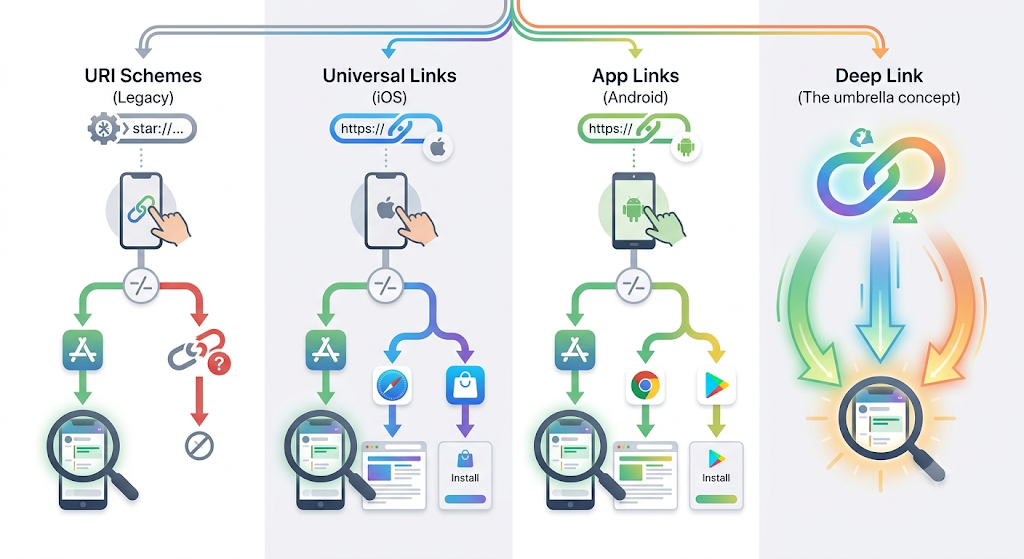
A deep link is the goal: open a specific screen inside an app.
URI schemes, Universal Links, and App Links are the different technologies that reach that goal, each with its own rules, strengths, and failure points.
Get the difference wrong and your links break, show an awkward “open in app?” prompt, or send people to the wrong place.
This guide explains each term in plain language, shows how they compare on iOS and Android, and clears up which one does what.
By the end you will know exactly what each one means and when each matters.
Then we will look at how you can open apps with deep links without touching a single configuration file.
Key Takeaways
- A deep link is any link that opens a specific page inside a mobile app. URI schemes, Universal Links, and App Links are the technologies that power deep links.
- A URI scheme (like
myapp://) is the oldest method. It is simple, but another app can claim it and it has no web fallback. - Universal Links are Apple’s iOS method. They use a normal HTTPS URL and a verification file, so they open the app if installed or the website if not.
- App Links are Android’s equivalent of Universal Links, verified with a Digital Asset Links file.
- Universal Links and App Links are not rivals. They are the same idea built for two platforms, and modern apps use both.
What is a deep link?
A deep link is any link that sends a user to a specific location inside a mobile app instead of a homepage or a website.
Tapping a deep link to a YouTube video opens that exact video in the YouTube app. The term describes the goal, not the method.
URI schemes, Universal Links, and App Links are the three methods that deliver that goal.
So “deep link” is the umbrella term, and the other three are the technologies underneath it.
For a fuller primer on the concept, see our guide on what deep linking is and how it works.
What is a URI scheme?
A URI scheme, also called a custom URL scheme, is the original deep linking method.
It uses a custom prefix like myapp:// instead of https://.
When you tap fb://profile, the device opens that path inside the app.
URI schemes work on both iOS and Android, but they were never built for the modern web.
Their main weaknesses:
- Any app can register the same scheme, so another app can intercept the link. Apple itself discourages custom schemes for this reason.
- There is no graceful fallback. If the app is not installed, the link fails instead of opening a website.
- They are unreliable as clickable links inside browsers and social apps.
URI schemes still have a place for simple, internal app-to-app actions.
For public marketing links, the newer standards are safer.
What is a Universal Link?
A Universal Link is Apple’s deep linking standard for iOS, introduced in iOS 9.
It is a normal HTTPS URL. If the matching app is installed, iOS opens it directly to the right screen.
If the app is missing, the same URL opens in Safari.
Apple requires an apple-app-site-association (AASA) file on your domain to verify the link.
That verification creates a secure, two-way association between your website and your app, so no other app can claim your links.
Apple covers the full setup in its Universal Links developer documentation.
The big advantages over URI schemes are security, a built-in web fallback, and a single URL that works for both web and app.
What is an App Link?
An App Link is Android’s version of a Universal Link, available since Android 6.0.
It is a verified HTTPS URL that opens your app directly when installed and falls back to the browser when not.
Android verifies ownership with a Digital Asset Links file named assetlinks.json hosted on your domain.
Google documents the process in its Android App Links guide.
On Android 12 and later, links that are not verified open in the browser by default, which is exactly why the assetlinks.json file matters.
In short, App Links are to Android what Universal Links are to iOS: secure, verified, HTTPS-based deep links with a web fallback.
Deep links vs Universal Links vs App Links vs URI schemes
Here is how the three technologies compare side by side.
| Property | URI scheme | Universal Link | App Link |
|---|---|---|---|
| Link format | Custom (myapp://) | HTTPS | HTTPS |
| Platform | iOS and Android | iOS | Android |
| Verification file | None | apple-app-site-association | assetlinks.json |
| Web fallback if app missing | No | Yes | Yes |
| Can another app hijack it | Yes | No | No |
| Best for | Simple internal actions | Modern iOS apps | Modern Android apps |
Why do Universal Links and App Links beat URI schemes?
Universal Links and App Links are more secure and more reliable than URI schemes.
Because they use real HTTPS URLs tied to a verified domain file, no other app can claim them, and they fall back to your website when the app is missing.
URI schemes offer neither protection nor a fallback.
This is why Google describes App Links and Universal Links as the industry standard for app deep linking.
They give users one predictable experience whether or not the app is installed.
Universal Links vs App Links: what is the difference?
There is no real rivalry between them.
Universal Links are the iOS implementation and App Links are the Android implementation of the same concept.
They differ only in platform, verification file, and minimum operating system version.
A cross-platform app needs both.
You host an apple-app-site-association file for iOS and an assetlinks.json file for Android, and the same HTTPS links then open your app on either device.
What about deferred deep linking?
Deferred deep linking solves a different problem: what happens when the app is not installed yet.
It remembers the intended destination, sends the user to install the app, then opens the right screen after the first launch.
It is a separate layer that can sit on top of the link types above.
We break this down in our guide to traditional vs universal vs deferred deep linking.
Do you need to set up Universal Links and App Links yourself?
Only if you own the app.
Hosting AASA and assetlinks.json files, adding entitlements, and verifying domains is developer work for the app you control.
If you are a marketer or creator who wants links that open apps you do not own, like YouTube, Amazon, Instagram, or OnlyFans, you do not need any of that setup.
This is the gap Linko fills.
Linko generates the right deep link for around 28 popular platforms automatically, with no configuration files and no code.
Here is what that looks like in practice:
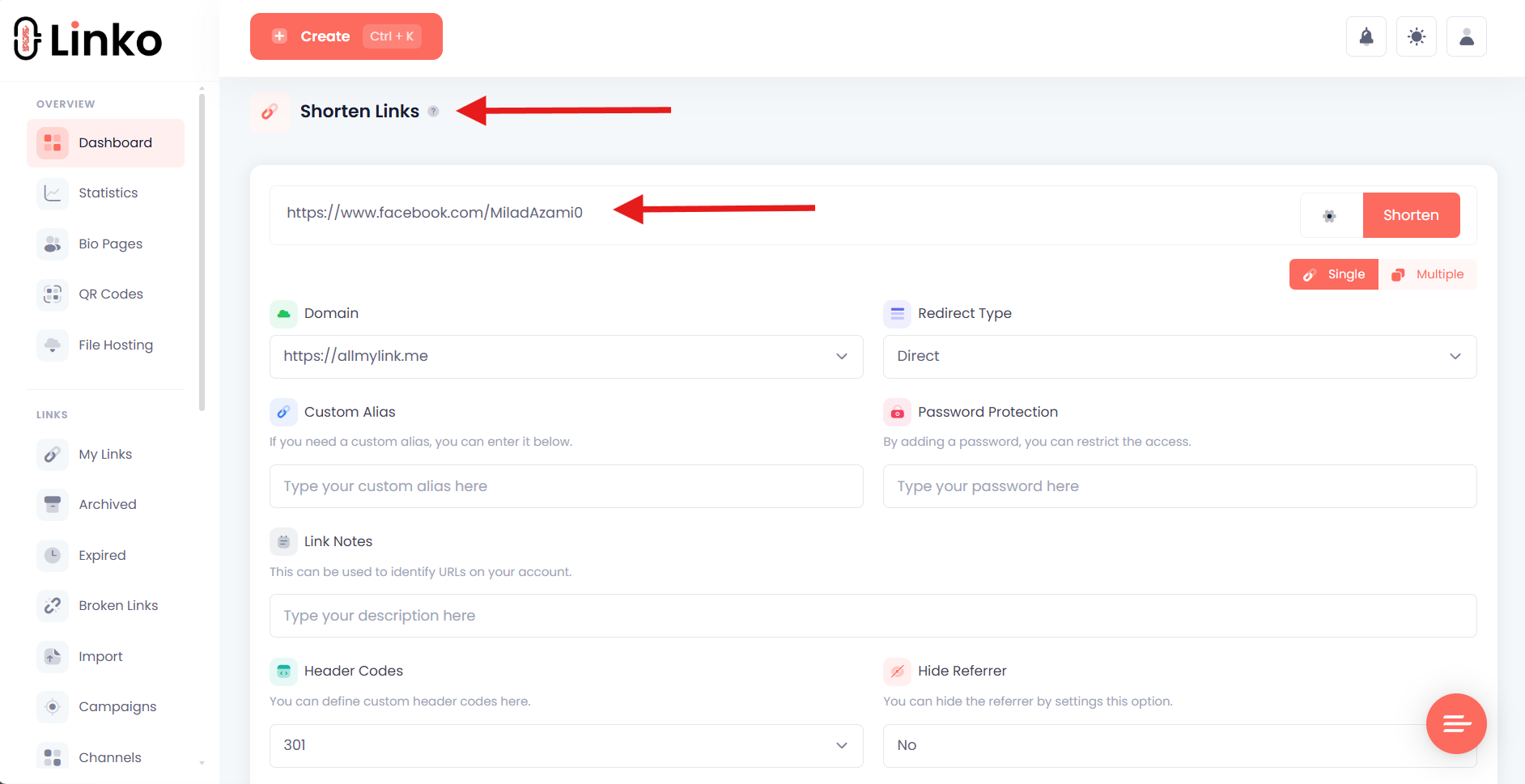
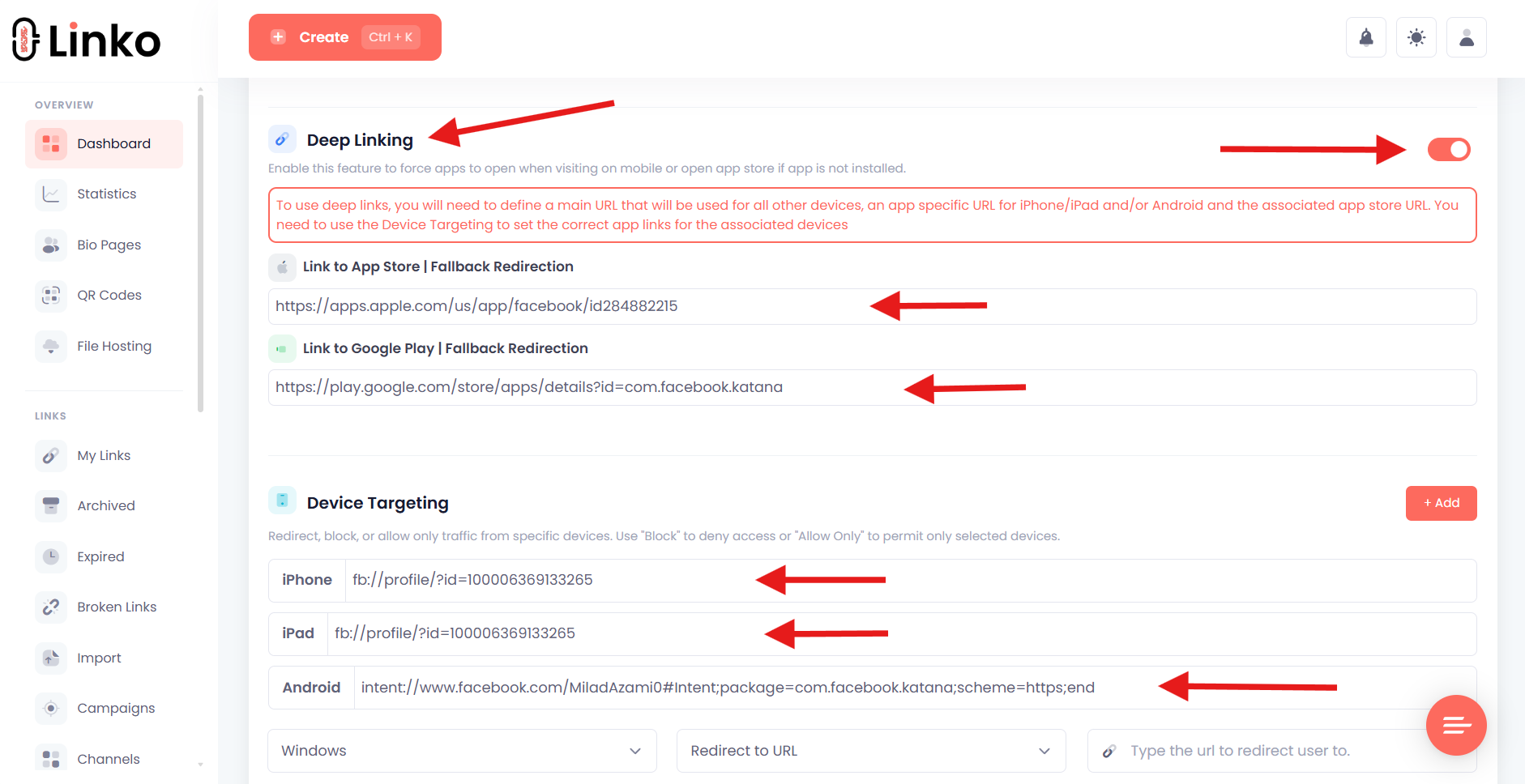
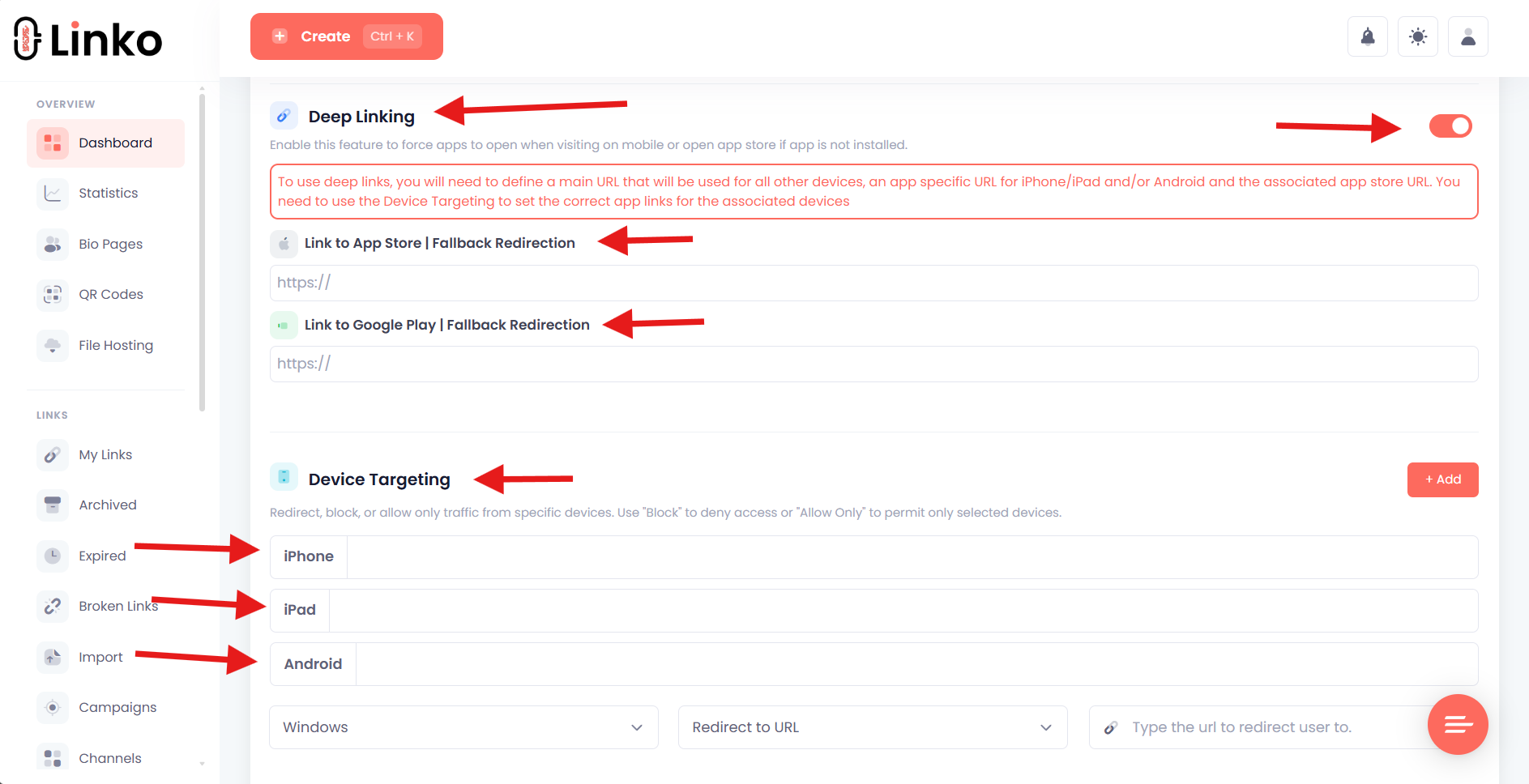
- For supported platforms, you enable the deep linking toggle and Linko handles iPhone, iPad, and Android automatically, including the app store fallback.
- For other apps, you add the app store links and the app’s URI, and Linko builds the custom deep link for you.
- Linko automatically bypasses Instagram’s in-app browser restrictions, so your links open in Safari instead of Instagram’s limited browser.
If in-app browsers are breaking your links, see our guide on how to get out of in-app browsers.
For a platform example, our walkthrough on Amazon mobile deep linking shows the same idea applied to product links.
You can also follow the steps to set up a deep link for iOS and Android in Linko.
Frequently Asked Questions
Is a deep link the same as a Universal Link?
No. A deep link is the general goal of opening a specific screen in an app. A Universal Link is one technology that achieves it on iOS. URI schemes and Android App Links are the other technologies that create deep links.
What is the difference between a URI scheme and a Universal Link?
A URI scheme uses a custom prefix like myapp:// and has no web fallback, so it fails if the app is missing. A Universal Link uses a normal HTTPS URL, opens the app if installed, and falls back to the website if not.
Are Universal Links and App Links the same thing?
They are the same concept on different platforms. Universal Links are Apple’s iOS standard and App Links are Android’s standard. Both use HTTPS URLs and a domain verification file, and a cross-platform app uses both.
Do I need to code to create a deep link?
Not if you are linking into apps you do not own. Linko generates deep links for around 28 popular platforms automatically, with no apple-app-site-association or assetlinks.json files and no SDK to install.
Why does my deep link open the browser instead of the app?
This usually means the link is an unverified web URL, the app is not installed, or the click happened inside an in-app browser. Verified Universal Links and App Links avoid most of these issues, and Linko handles the in-app browser case automatically.
Open any app with a deep link, no setup required
Universal Links and App Links are the secure, modern way to deep link into an app you own.
URI schemes are the older, simpler method.
The right choice depends on the platform and on whether you control the app.
If you just want links that reliably open the apps your audience already uses, you do not need to build any of it yourself.
Linko does the routing for you, including the Instagram in-app browser escape, on a free plan.
Create your free Linko account and turn any link into a deep link that opens the right app.
No credit card required, and you can test it with the free link short maker first.
Comments