
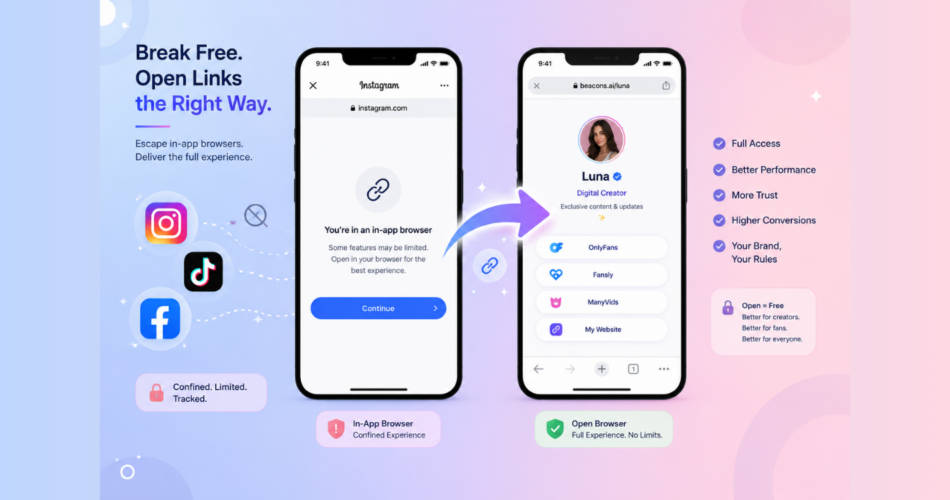
Every time someone clicks a link inside Instagram, TikTok, Facebook, or any social app, they get trapped in a stripped-down browser controlled by the app itself.
This in-app browser breaks logins, kills payment flows, and tanks conversion rates by up to 50%.
The good news: deep linking technology lets you get out of in-app browsers automatically and forces links to open in the user’s actual browser (Safari or Chrome) instead.
The catch: the behavior is wildly different across platforms and devices.
This guide is the complete reference.
You’ll see exactly how deep links behave on Instagram, TikTok, X, Reddit, Facebook, Threads, Snapchat, and Telegram, on both iOS and Android.
Key Takeaways
- In-app browsers are sandboxed views inside social apps that strip features and harm conversions.
- Deep linking forces links to open in the user’s native browser (Safari or Chrome) instead.
- Behavior varies significantly across platforms: some (like Telegram) escape automatically, others (like Reddit on iOS) block escapes entirely.
- Android platforms have stronger deep linking support than iOS in most cases.
- For platforms that block automatic escapes, fallback methods like long-press menus or middle pages still work.
What Is an In-App Browser?
An in-app browser is a lightweight web view embedded inside a mobile app.
When you tap a link inside Instagram, Facebook, TikTok, or similar apps, the link doesn’t open in Safari or Chrome.
It opens inside the app itself, in a stripped-down browser the app controls.
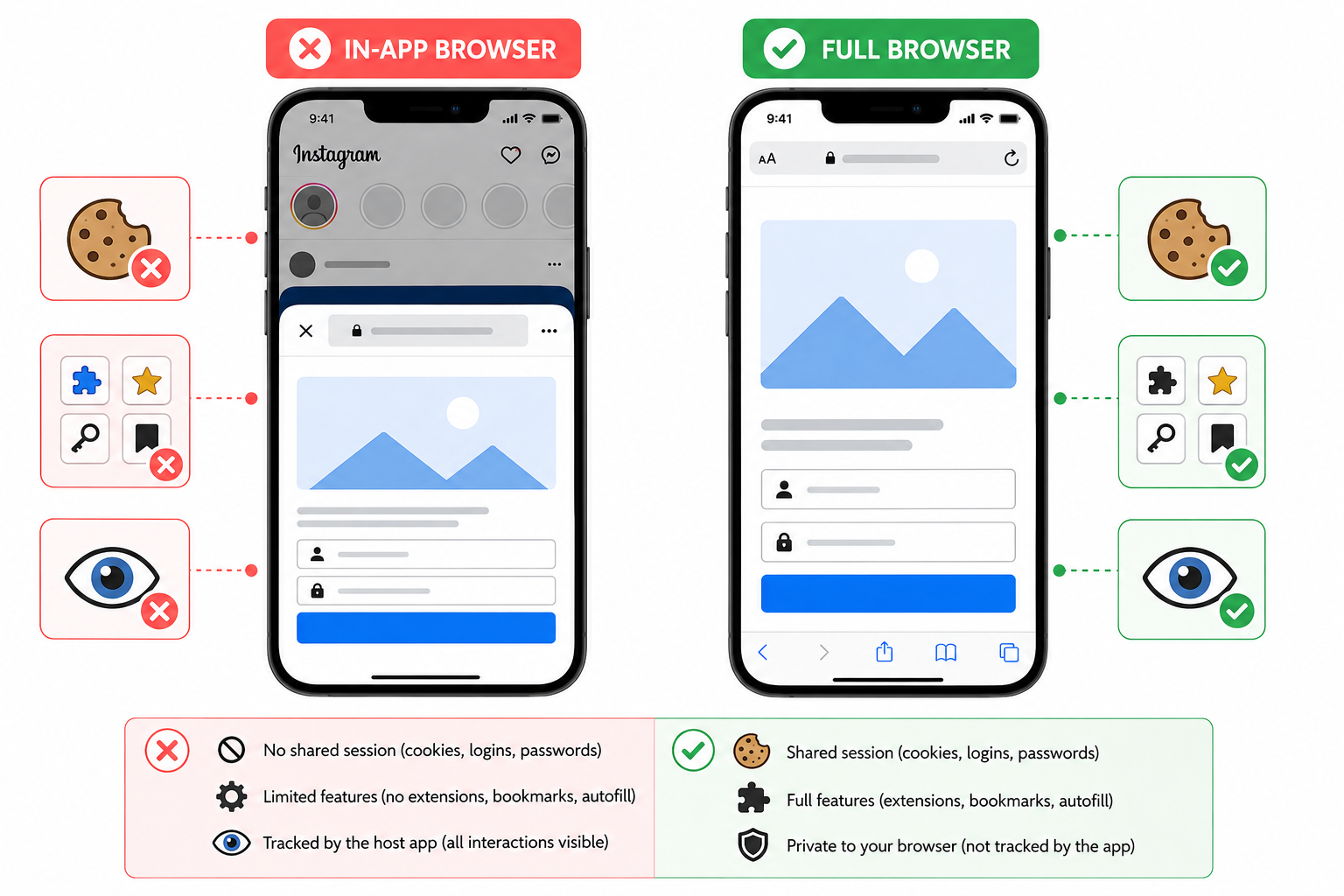
This is different from your default browser in three critical ways:
- No shared session: Cookies, logins, and saved passwords from your real browser don’t apply
- Limited features: No extensions, bookmarks, autofill, or password manager integration
- Tracked by the host app: Apps can monitor every interaction, including form inputs
According to The Register’s 2024 reporting on Open Web Advocacy, in-app browsers “subvert user choice, stifle innovation, trap users into apps, break websites, and enable applications to severely undermine user privacy.”
Why Do In-App Browsers Hurt Conversions?
The conversion problem comes from session fragmentation.
When your audience clicks a link in an in-app browser, they’re not logged into the destination site.
- Their saved passwords don’t autofill.
- Their saved payment methods are missing.
Every checkout, login, or signup becomes manual entry.
Most users abandon at this point.
According to Inc. Magazine’s analysis of in-app browser performance, these sessions “sever the continuity that website-centric analytics depend on” and feel like “another login, another friction point, another broken journey” to users.
The privacy issues are equally serious.
Security researcher Felix Krause’s 2022 research, covered extensively in The Washington Post, revealed that Meta and TikTok inject JavaScript code into their in-app browsers that can monitor everything users tap, including passwords and form inputs.
For marketers, this combination of broken UX and tracking issues directly impacts:
- Login completion rates
- Purchase conversion rates
- Subscription signups
- Form submissions
- Attribution accuracy
How Deep Links Solve the In-App Browser Problem
Deep linking is the technology that forces a link to open in the user’s native browser instead of the in-app one.
When configured correctly, the user clicks a link inside Instagram, and instead of being trapped in Instagram’s browser, they land in Safari or Chrome with all their saved data intact.
To understand the foundational concepts, see our complete guide on what deep linking is and how it works.
The key benefit:
- Users land authenticated.
- Saved passwords work.
- Payment methods autofill.
- Conversion rates often double or triple.
The three deep link types
According to Branch’s industry-standard documentation, deep links come in three flavors:
- Custom URI schemes (e.g.,
myapp://page) – The original method, now mostly legacy - Universal Links (iOS) – Apple’s modern, secure HTTPS-based approach
- App Links (Android) – Google’s equivalent for Android
For most use cases, you don’t need to choose between these. Modern link management tools handle the routing automatically.
How Do Deep Links Behave on Each Platform?
This is where things get interesting.
Each social platform implements its own rules for whether deep links can escape the in-app browser.
The behavior depends on the platform AND the operating system.
| Device | Behavior | User Action Required? |
|---|---|---|
| Android | Automatic redirect to default browser | None |
| iOS | Automatic redirect to default browser (with proper deep link setup) | None |
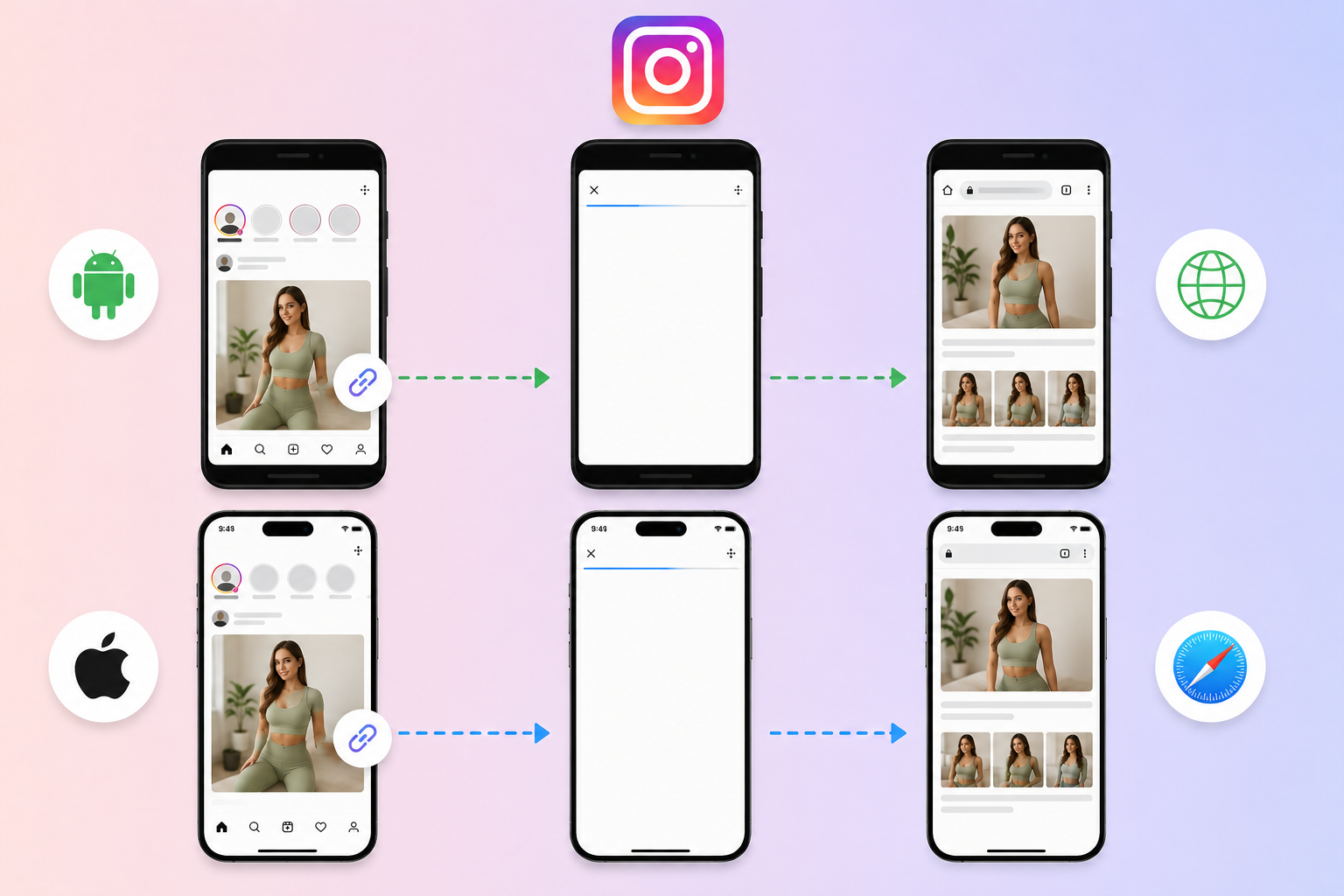
Instagram supports automatic escape on both platforms when deep linking is implemented correctly. This is the smoothest experience available.
For a step-by-step Instagram-specific setup, see how to open OnlyFans links in Safari from Instagram.
TikTok
| Device | Behavior | User Action Required? |
|---|---|---|
| Android | Automatic redirect to default browser | None |
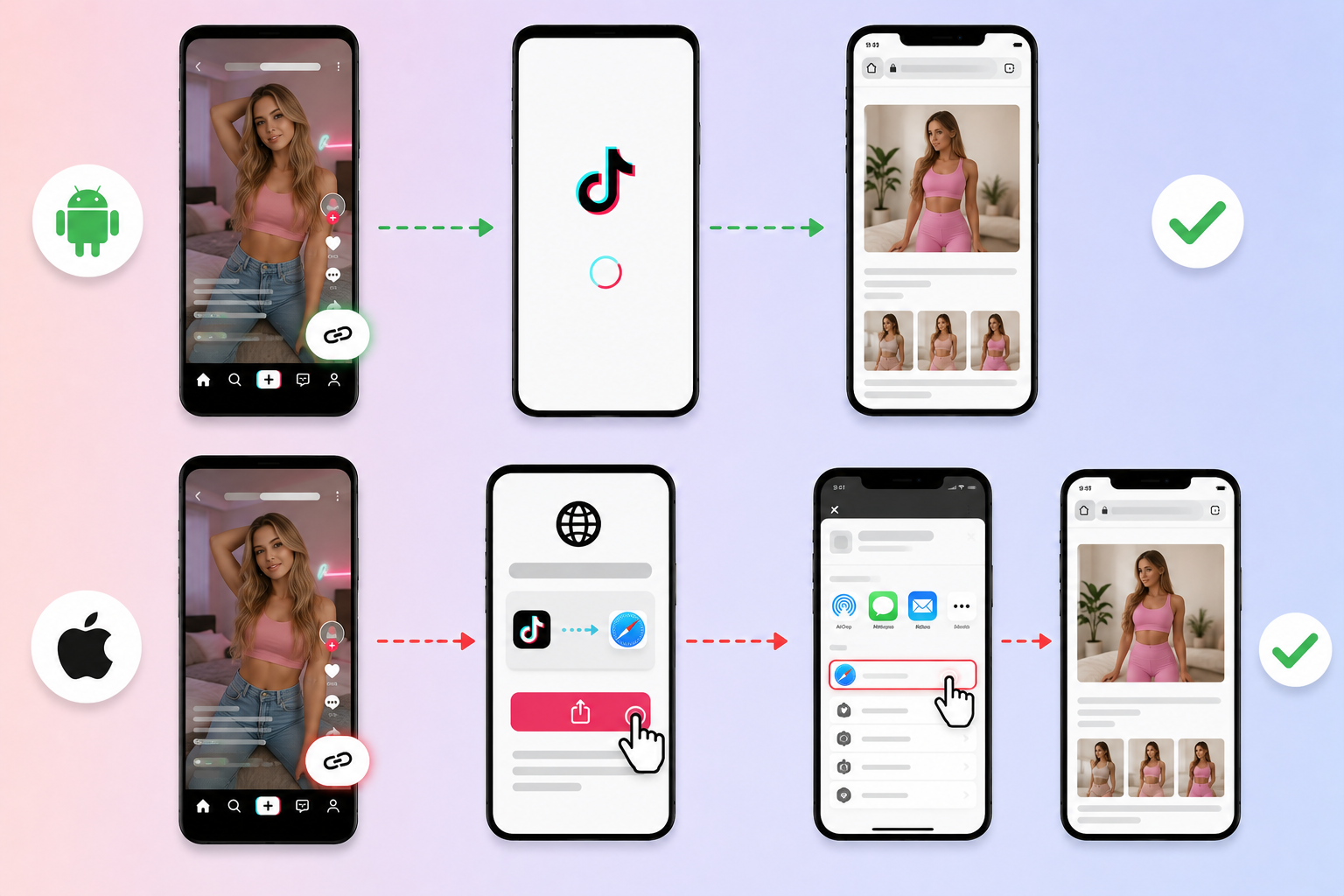
| iOS | Direct escape blocked. The middle page guides user to escape manually | One tap on guidance page |
TikTok aggressively blocks direct escapes on iOS. The workaround is a middle page that shows the user how to open the link in Safari, but it requires one extra tap.
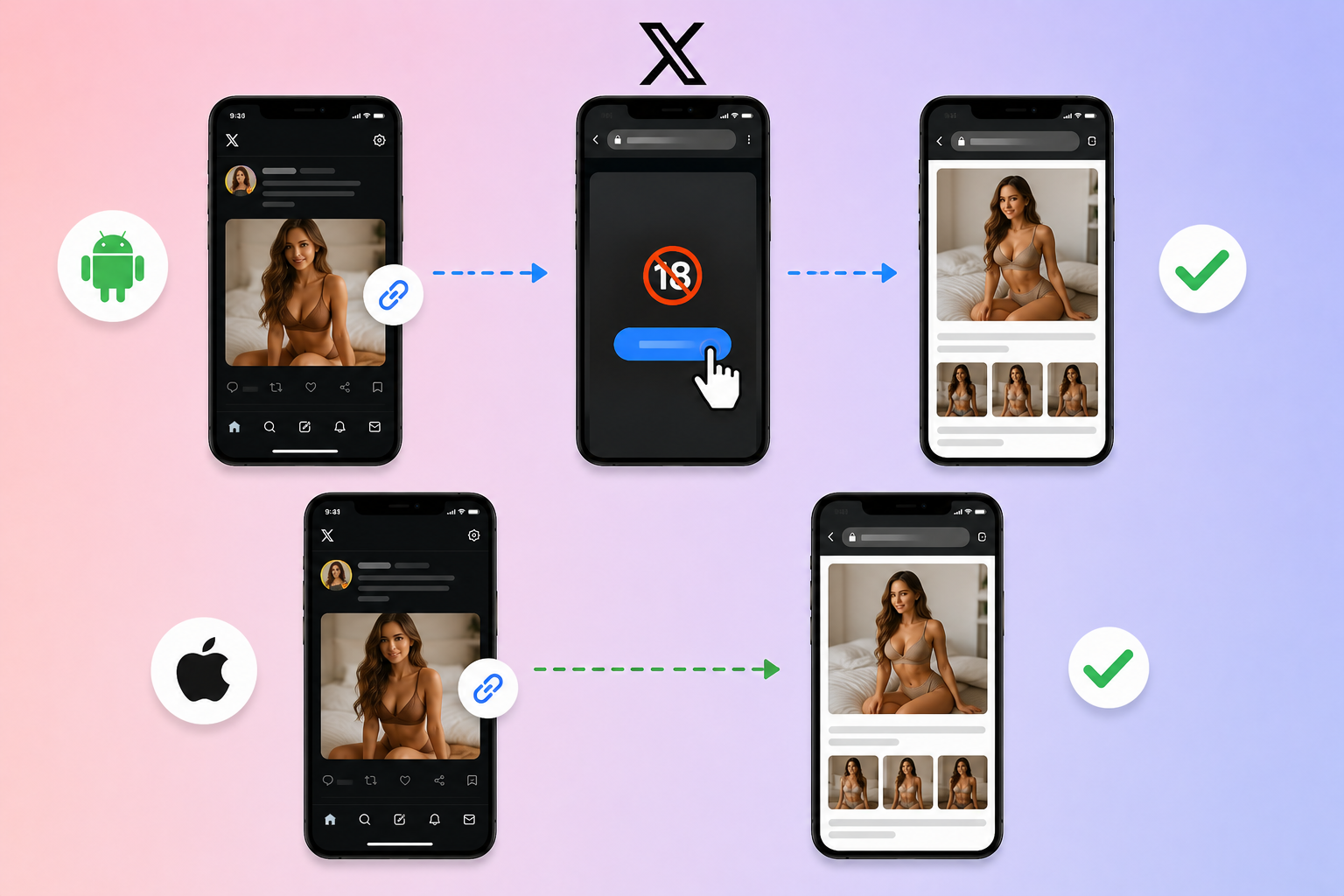
X (Twitter)
| Device | Behavior | User Action Required? |
|---|---|---|
| Android | Opens first page in browser. The user clicks an 18+ button to escape | One tap |
| iOS | Automatic redirect to default browser | None |
X is one of the few platforms where iOS works better than Android for deep linking.
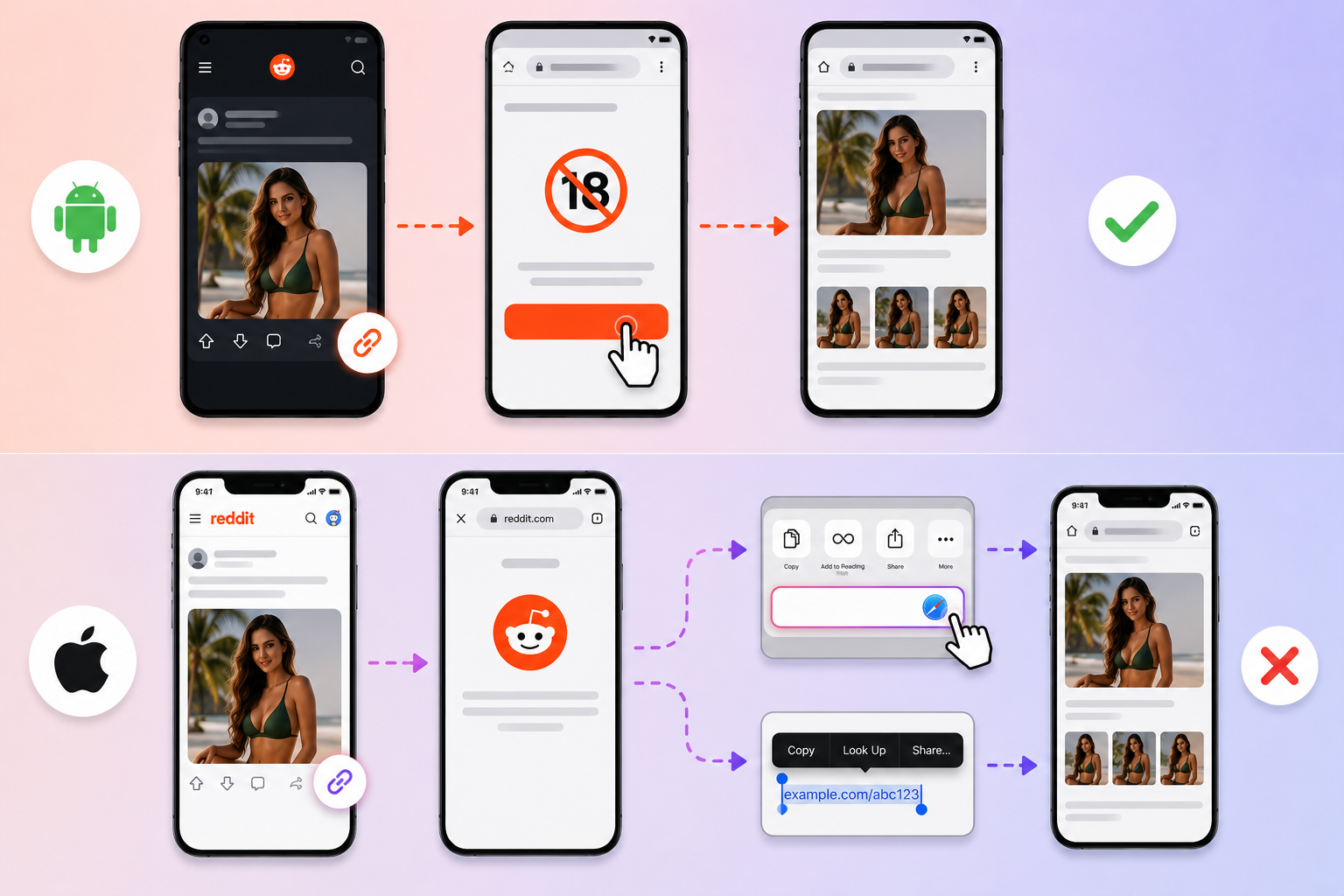
| Device | Behavior | User Action Required? |
|---|---|---|
| Android | Opens first page in browser. The user clicks an 18+ button to escape | One tap |
| iOS | Direct escape blocked. Users stay in the in-app browser | Manual workaround needed |
Reddit on iOS is the most restrictive. Users typically need to manually long-press the link or use the share menu to open in Safari.
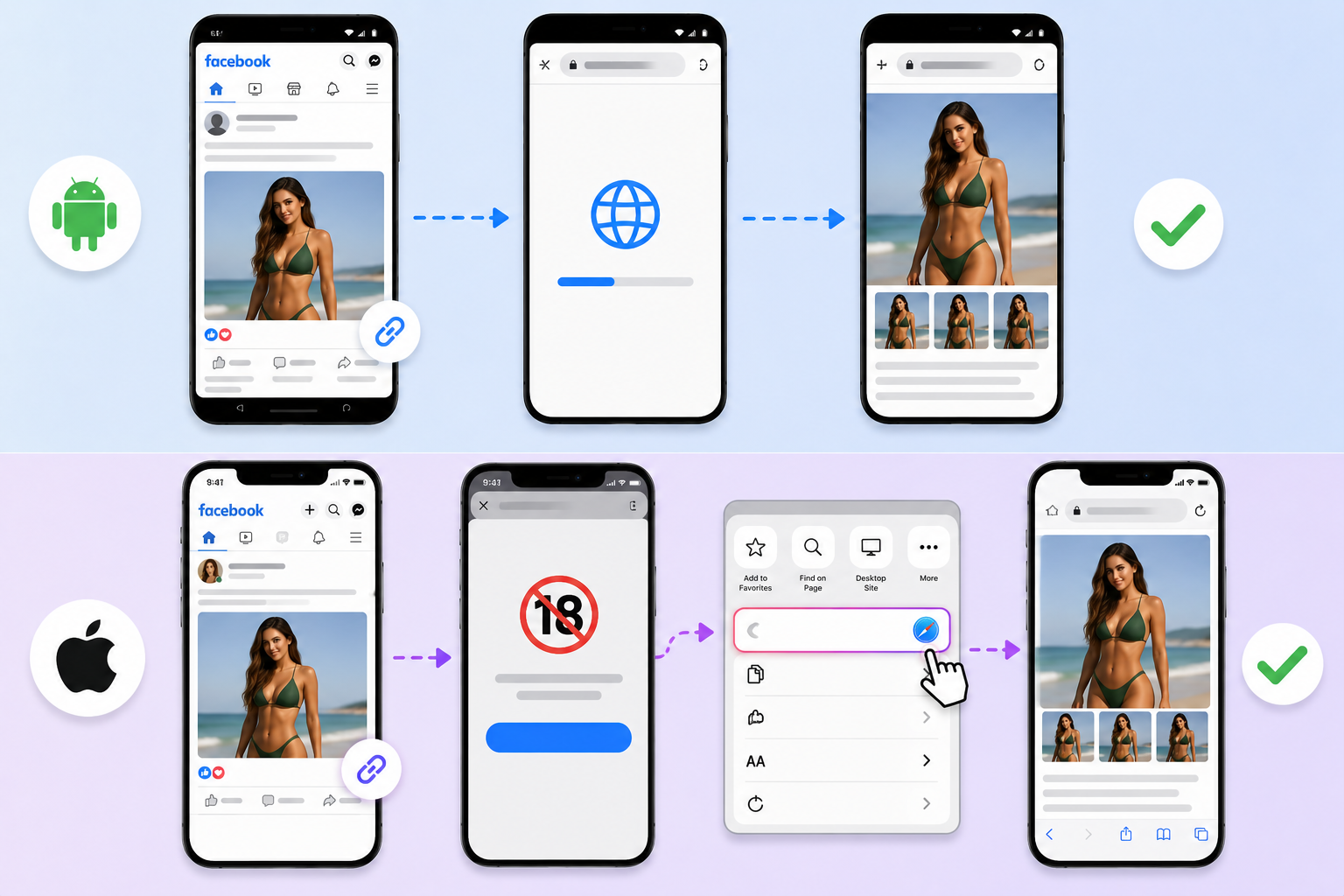
| Device | Behavior | User Action Required? |
|---|---|---|
| Android | Automatic redirect to default browser | None |
| iOS | Direct escape blocked. Long-press or 3-dots menu hint shown | Long-press menu interaction |
Facebook on iOS blocks direct escapes but provides built-in menu options users can use to open in Safari.
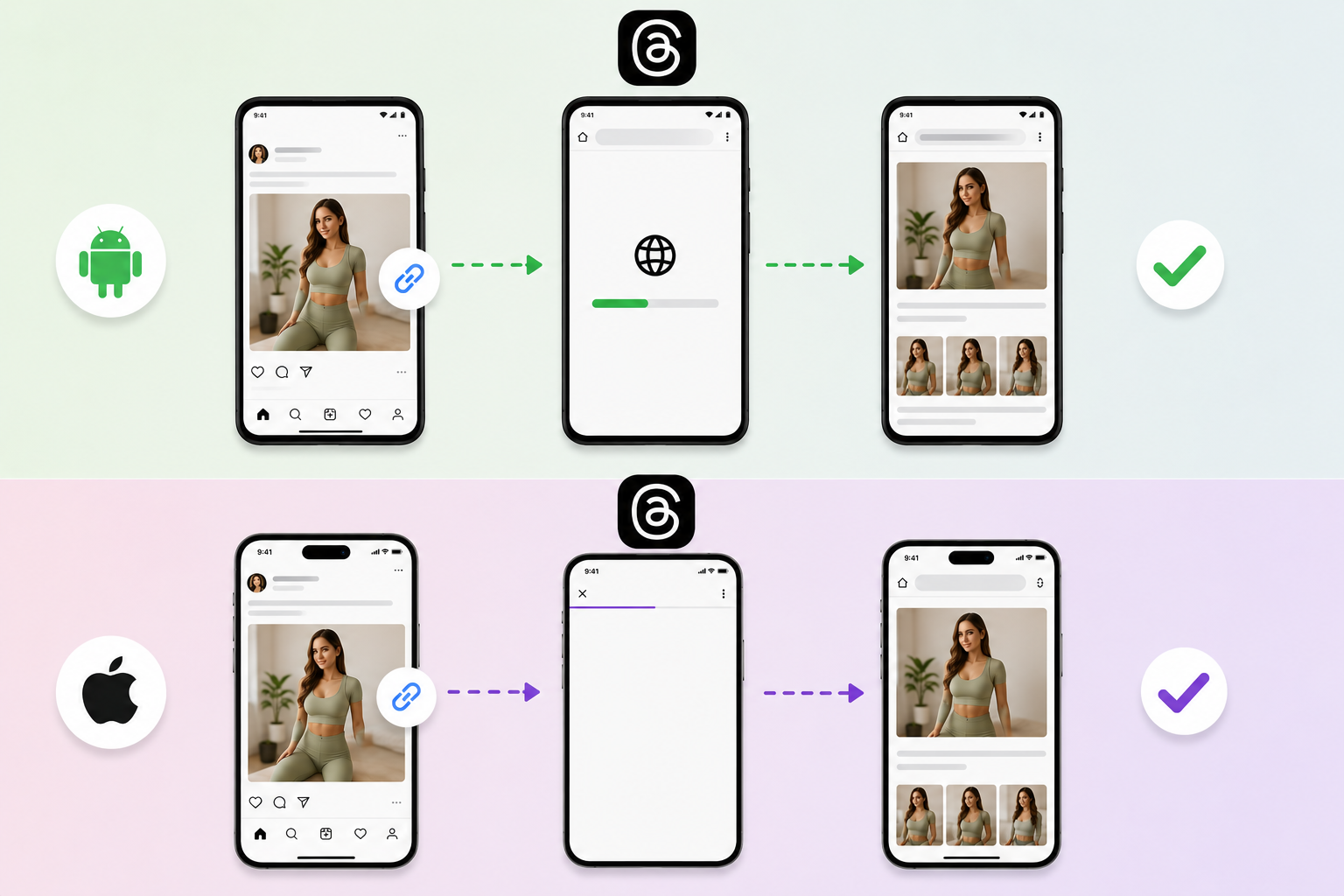
Threads
| Device | Behavior | User Action Required? |
|---|---|---|
| Android | Automatic redirect to default browser | None |
| iOS | Behavior similar to Instagram (Meta-owned) | None to minimal |
As a Meta product, Threads inherits much of Instagram’s behavior. Android works automatically.
Snapchat
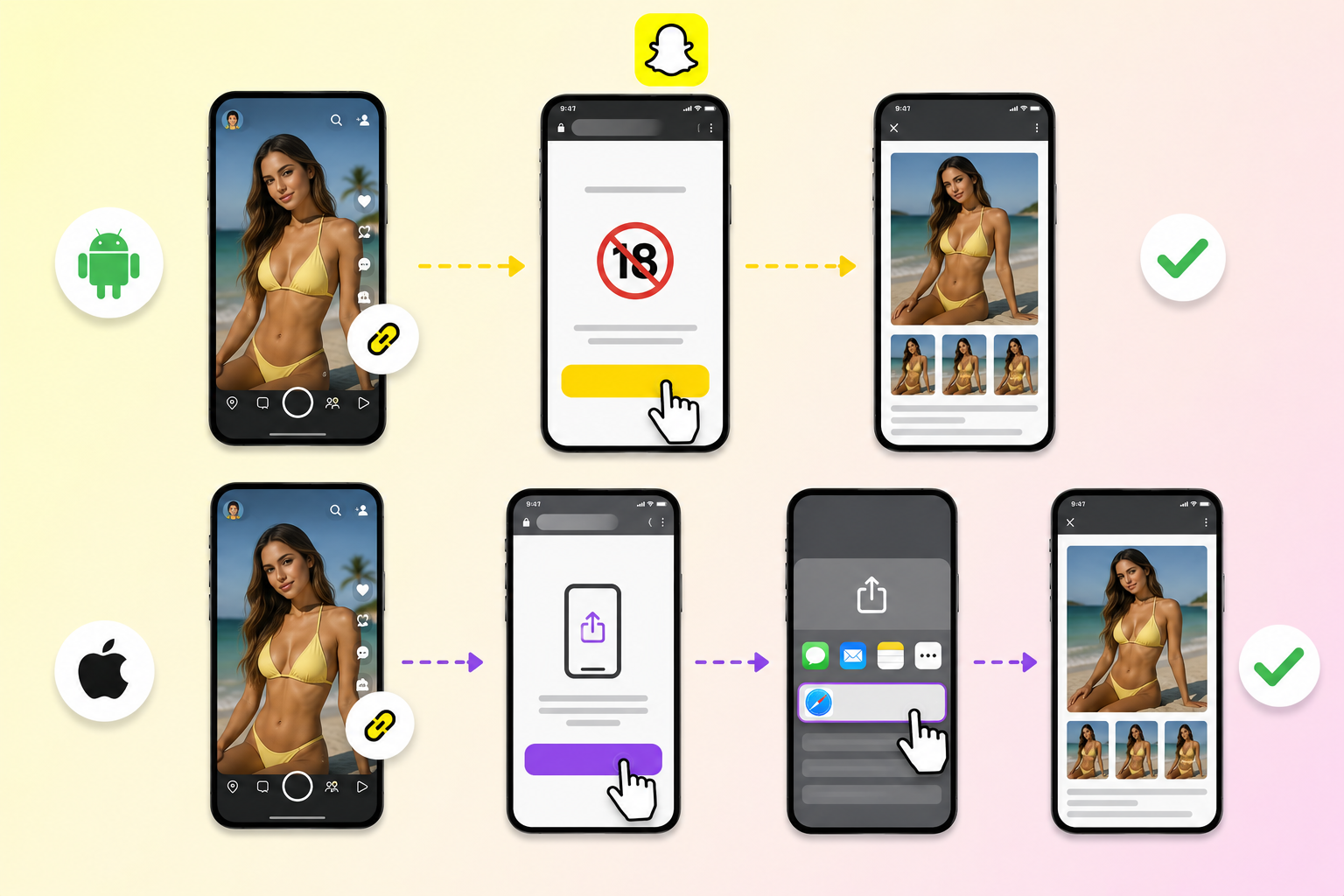
| Device | Behavior | User Action Required? |
|---|---|---|
| Android | Opens first page in browser. The user clicks 18+ button to escape | One tap |
| iOS | Direct escape blocked. The middle page guides user out | One tap on guidance page |
Snapchat behaves similarly to TikTok on iOS, requiring a middle page workaround.
Telegram
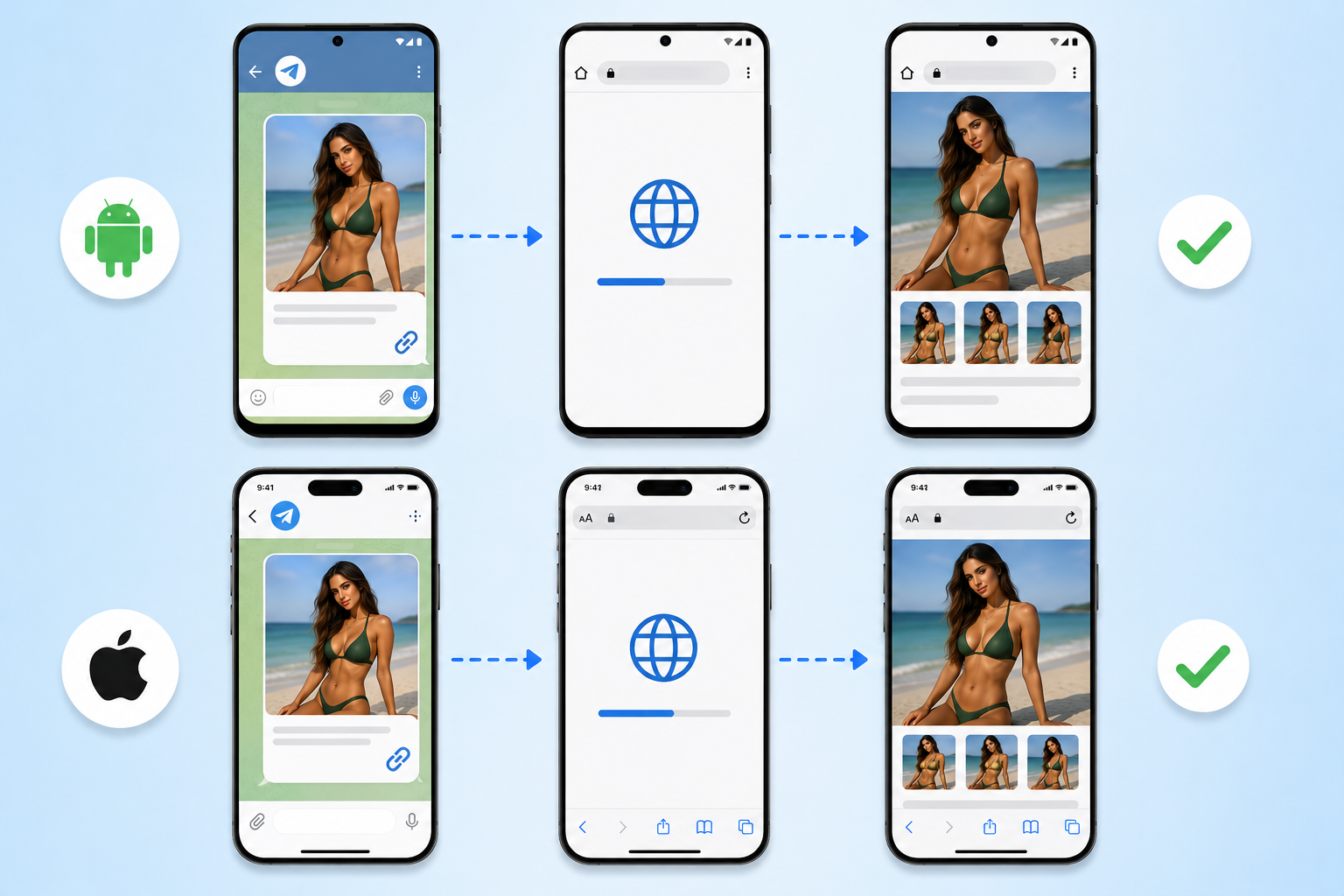
| Device | Behavior | User Action Required? |
|---|---|---|
| Android | Automatic redirect to default browser | None |
| iOS | Automatic redirect to default browser | None |
Telegram is the most deep-link-friendly platform on this list. Both Android and iOS escape automatically.
This is why many marketers use Telegram as a bridge in their funnels: post a Telegram link on restrictive platforms, then have the Telegram channel deliver the actual destination link.
What If Deep Links Are Blocked?
Some platforms (Reddit on iOS, TikTok on iOS) completely block automatic escapes. The deep link can’t force a redirect.
Two fallback methods still work:
Long-press fallback
Users can long-press a link inside the in-app browser to open the system menu.
From there, they can select “Open in Safari” or “Open in Chrome.”
This works universally but requires user education and one extra tap.
Direct link redirect
Instead of trying to escape the in-app browser, you can use a direct link that redirects users straight to the destination URL.
The user technically stays in the in-app browser, but the redirect happens fast enough that the destination loads before the in-app browser environment can interfere with login state.
This isn’t as good as a proper escape, but it’s better than no solution at all on platforms with hard blocks.
Why Native Browsers Convert Better
Beyond the technical details, the conversion improvement comes from four factors.
Saved logins persist
Users land already authenticated on their destination site. No “Log in” prompt. No password recall. No 2FA hurdle.
For platforms like OnlyFans, Fansly, or any subscription service, this alone can double conversions.
Payment methods autofill
Apple Pay, Google Pay, saved cards, and digital wallets only work in the native browser context.
An in-app browser visitor has to manually enter card details, which kills checkout completion.
Trust increases
The native browser feels safer.
Users see the URL bar, recognize the secure padlock, and trust the page they’re on.
In-app browsers strip these visual trust signals, increasing user hesitation.
Browser features work
Password managers, autofill, ad blockers, accessibility tools, and other browser extensions only function in the native browser.
For users who depend on these tools, the difference between escape and no-escape is the difference between converting and bouncing.
How Do You Set This Up?
Implementing deep linking from scratch requires technical work: configuring Universal Links on iOS, App Links on Android, hosting an Apple App Site Association file, and managing fallback URLs.
Most marketers don’t need to build this themselves.
Linko handles all of this automatically.
You paste your destination URL, enable deep linking with one toggle, and Linko generates the correct URI schemes for iOS, iPad, and Android.
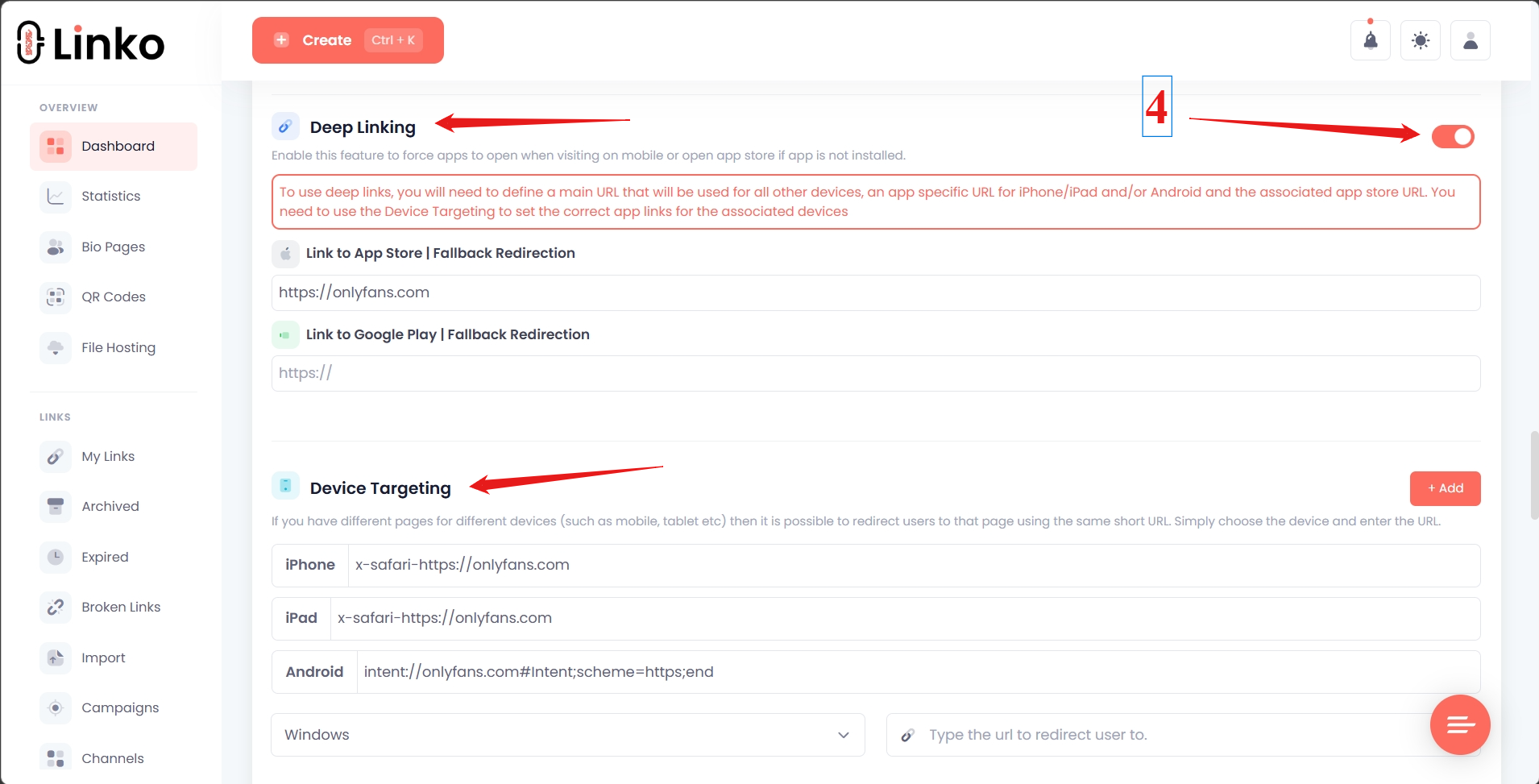
For a step-by-step setup walkthrough, see our guide on how to create an OnlyFans deep link. The same setup process works for any platform; just paste a different destination URL.
What Linko handles automatically
- Detection of which platform and device the user is on
- Generation of the correct URI scheme for each platform
- Fallback to long-press or middle pages when automatic escape isn’t possible
- App store fallback for users without the destination app installed
- Click tracking across all escape methods
For agencies generating high volumes of unique tracked links, Linko’s API can create deep-linked URLs programmatically.
See our guide on automating link creation with the Linko API and Airtable.
Common Use Cases for Escaping In-App Browsers
Different industries see different conversion gains from deep linking. The biggest impact appears in:
Adult creator platforms
OnlyFans, Fansly, and Fanvue have no native apps. Their entire user experience runs through web browsers.
When users land in an in-app browser, they’re not logged in. Their payment methods aren’t saved. They abandon.
For specific tactics in this niche, see our guide on OnlyFans marketing tools for agencies.
E-commerce and direct-to-consumer brands
Mobile cart abandonment already runs at 85% across e-commerce. In-app browsers add another layer of friction on top.
According to Criteo’s mobile commerce research, retail apps see conversion rates over four times higher than mobile web. The in-app browser problem is part of this gap.
SaaS and subscription services
Any service that requires login during signup loses customers in in-app browsers. Saved credentials don’t transfer. The friction kills conversion.
Affiliate marketing
Affiliate links posted to social media often die in in-app browsers because the destination site can’t track the referral cookie properly.
Deep linking preserves the affiliate attribution.
Frequently Asked Questions
What is an in-app browser?
An in-app browser is a stripped-down web view inside a mobile app. When you tap a link in Instagram, Facebook, TikTok, or similar apps, the link opens inside that app’s own browser instead of Safari or Chrome.
Why do social media apps use in-app browsers?
Apps use in-app browsers to keep users inside their app. The longer users stay in the app, the more ads they see and the more data the platform collects.
Some apps also inject tracking JavaScript into the in-app browser to monitor user behavior on external sites.
Are in-app browsers safe?
In-app browsers from major social apps have raised privacy concerns. According to research covered by PCMag in 2022, TikTok’s in-app browser injects JavaScript that can act as a keylogger, capturing taps, form inputs, and passwords on external sites.
If you’re entering sensitive information, always switch to your default browser first.
Can deep links be used to get out of the in-app browser?
Yes, deep linking is the primary technical solution for escaping in-app browsers.
When configured correctly, deep links force the link to open in the user’s default browser (Safari or Chrome) instead of the in-app one.
The success rate depends on the platform and device. Telegram, Instagram, and Facebook on Android escape automatically. Reddit on iOS blocks escapes entirely.
How do I open a link in Safari instead of Instagram?
Three options:
- If the link uses deep linking: It opens automatically in Safari
- Manual long-press: Long-press the link and select “Open in Safari” from the menu
- Three-dots menu: Inside Instagram’s in-app browser, tap the three dots in the corner and select “Open in Safari”
For consistent results, deep linking is the most reliable method.
Does deep linking work on iOS?
Deep linking works on iOS but with platform-specific limitations. Instagram, X, Telegram, and Threads support automatic escape on iOS. TikTok, Reddit, Snapchat, and Facebook block direct escapes and require workarounds.
Does deep linking violate Instagram or TikTok’s terms of service?
No. Deep linking simply opens links in the user’s default browser, which is standard behavior for many types of links. It’s not prohibited by any major social platform’s terms of service.
What’s the difference between deep links and universal links?
Universal Links are Apple’s specific implementation of deep linking on iOS. They use HTTPS URLs and require a verified domain association.
App Links are Google’s equivalent for Android.
“Deep link” is the umbrella term that covers all these methods of opening specific content in apps or escaping in-app browsers.
Stop Losing Conversions to In-App Browsers
In-app browsers are one of the biggest hidden conversion killers in mobile marketing. Most marketers don’t realize how much revenue they lose to this single friction point.
Deep linking solves the problem on most platforms. Where automatic escape isn’t possible, fallback methods like long press and middle pages still help.
The technical setup is complex if you build it yourself. Most marketers use a link management platform that handles deep linking automatically.
Create your free Linko account to set up deep-linked URLs that escape in-app browsers across every major social platform.
For agencies needing high volume and API access, the Business or Agency plan includes everything required to scale deep linking across hundreds of campaigns.
Comments