
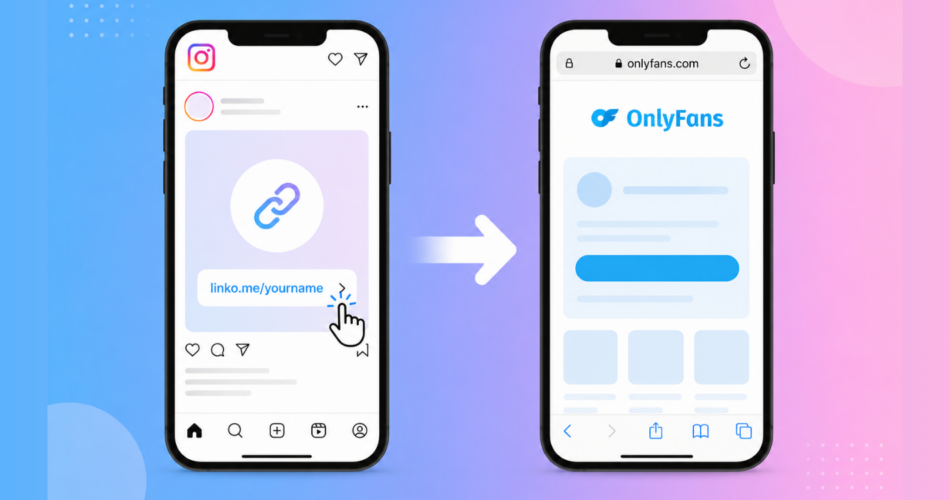
You share your OnlyFans link on Instagram. Someone taps it.
Instead of landing on your profile ready to subscribe, they’re stuck in Instagram’s broken in-app browser.
- They’re not logged in.
- Their saved passwords don’t work.
- Their payment methods are missing.
Most of them leave. You lose the subscriber.
This has been one of the biggest frustrations for OnlyFans creators and agencies to drive traffic and open OnlyFans links in Safari from Instagram
The in-app browser kills conversions, and many creators have tried various workarounds to bypass link restrictions with limited success.
Until now, there wasn’t a reliable fix.
That’s changed.
Linko now automatically bypasses Instagram’s in-app browser on iOS.
When someone clicks your Linko short link from Instagram, it opens directly in Safari where OnlyFans actually works.
- No manual steps.
- No asking users to tap three dots.
- No friction.
This guide shows you exactly how it works and how to set it up in under two minutes.
Key Takeaways
- Instagram’s in-app browser breaks OnlyFans login and payment flows, causing subscribers to abandon.
- Linko now automatically opens OnlyFans links in Safari on iPhone, bypassing Instagram’s browser completely.
- On Android, links open in Chrome automatically with the same seamless experience.
- No configuration needed beyond enabling deep linking when you shorten your link.
- Works with OnlyFans, Fansly, Fanvue, and other creator platforms.
Why Does Instagram’s In-App Browser Destroy Your Conversions?
Instagram’s in-app browser destroys conversions because it isolates users from their saved logins, passwords, and payment methods.
When someone taps a link in your Instagram bio or story, Instagram doesn’t open it in Safari or Chrome. Instead, it opens inside Instagram’s own built-in browser.
This creates serious problems for OnlyFans creators:
Users aren’t logged in
Even if someone has an OnlyFans account and visits regularly, they won’t be logged in when they click your link from Instagram.
The in-app browser is a completely separate environment from Safari. This is why deep linking has become essential for creator marketing.
Saved passwords don’t work
Password managers like iCloud Keychain and 1Password don’t function properly in Instagram’s browser.
Users who wanted to quickly log in with saved credentials now have to manually type everything.
Payment methods are missing
If a user has their card saved on OnlyFans through Safari, that payment method won’t be available in Instagram’s browser.
They’ll need to re-enter their card details from scratch.
The result? Friction.
Every extra step loses potential subscribers.
According to research from Baymard Institute:
Mobile cart abandonment reaches 85.65%.
Instagram’s in-app browser adds even more friction on top of that.
For OnlyFans creators, where the conversion IS the payment, this is devastating.
You worked hard to get that click from Instagram. Having it die in a broken browser wastes all that effort.
What Doesn’t Work (And Why)?
Most common workarounds fail because they still keep users trapped inside Instagram’s browser or add friction that causes abandonment.
Before automatic bypass solutions existed, creators had limited options. None of them worked well.
| Method | Why It Fails |
|---|---|
| Tell users to tap three dots | Most users don’t know the option exists or won’t bother |
| Linktree / Beacons / AllMyLinks | Adds another page but still opens in the in-app browser |
| Instruction pages | Adds friction at the worst moment – users leave instead of reading |
| Manual “copy link” workarounds | Too many steps – kills conversions |
Why doesn’t telling users to tap the three dots work?
It doesn’t work because most users don’t know the option exists, and those who do won’t bother with extra steps.
Instagram’s in-app browser has a menu (the three dots in the top right corner) where users can select “Open in Browser” to escape to Safari.
However, you’re asking potential subscribers to work harder just to give you money. That friction kills conversions.
Why don’t Linktree, Beacons, or AllMyLinks solve this?
These tools don’t solve the problem because they simply add another page inside the same broken browser.
They’re popular link-in-bio tools, but they don’t address the in-app browser issue at all.
When someone clicks your Linktree from Instagram:
- Instagram opens Linktree in its in-app browser
- User taps your OnlyFans link on the Linktree page
- OnlyFans opens… still in Instagram’s in-app browser
Linktree adds an extra click without fixing anything.
As a result, your OnlyFans link still opens in the broken browser environment. The same applies to Beacons, AllMyLinks, and similar tools.
Why don’t instruction pages and manual workarounds work?
Instruction pages fail because they add friction at the worst possible moment.
Some tools show a “middle page” with instructions telling users to manually copy the link or open in their browser.
You’re asking users to read instructions and take extra steps. Most won’t. They’ll just leave.
How Does Linko Automatically Open Links in Safari?
Linko detects when someone is inside Instagram’s browser and automatically redirects them to Safari or Chrome.
No manual steps required from you or your audience.
Here’s what happens when someone clicks your short link from Instagram:
- User taps your link in Instagram bio, story, or DM
- The system detects they’re inside Instagram’s browser
- They’re automatically redirected to Safari (iPhone) or Chrome (Android)
- OnlyFans opens in the real browser where they’re logged in
- Saved passwords and payment methods work normally
- User subscribes with minimal friction
The entire process happens in a split second.
Linko handles everything automatically – your audience doesn’t see any instructions or extra pages.
They just end up on your OnlyFans profile in Safari, ready to subscribe.
What platforms does this work with?
The Instagram browser bypass works with OnlyFans, Fansly, Fanvue, and other creator platforms that don’t have native mobile apps. Here’s the full list:
- OnlyFans – Profile links open directly in Safari/Chrome
- Fansly – Same automatic bypass
- Fanvue – Same automatic bypass
- Other creator platforms – Any link that needs to escape Instagram’s browser
If you’re new to the concept of bypassing platform restrictions, Linko supports all these platforms automatically when you enable deep linking.
Does it work on both iPhone and Android?
Yes, it works on both platforms.
iPhone users get redirected to Safari, and Android users get redirected to Chrome.
iPhone (iOS): Linko opens links directly in Safari.
This is the big update – Instagram on iOS has been the most problematic, and Linko’s automatic bypass now handles it seamlessly.
Android: Linko opens links in Chrome.
This has worked reliably for a while and continues to work seamlessly.
How Do You Set Up Instagram Browser Bypass with Linko?
Setup takes less than two minutes.
You paste your OnlyFans link, enable deep linking, and click shorten.
Here’s the step-by-step process:
Step 1: Go to Linko and paste your OnlyFans link
Head to Linko.me and paste your OnlyFans profile URL in the link field.
Example: https://onlyfans.com/yourusername
If you want to customize your link with a memorable alias, you can create a custom short URL like allmylink.me/yourname.
Step 2: Click the gear icon to expand options
Next to the Shorten button, you’ll see a gear icon (⚙️). Click it to reveal additional settings.
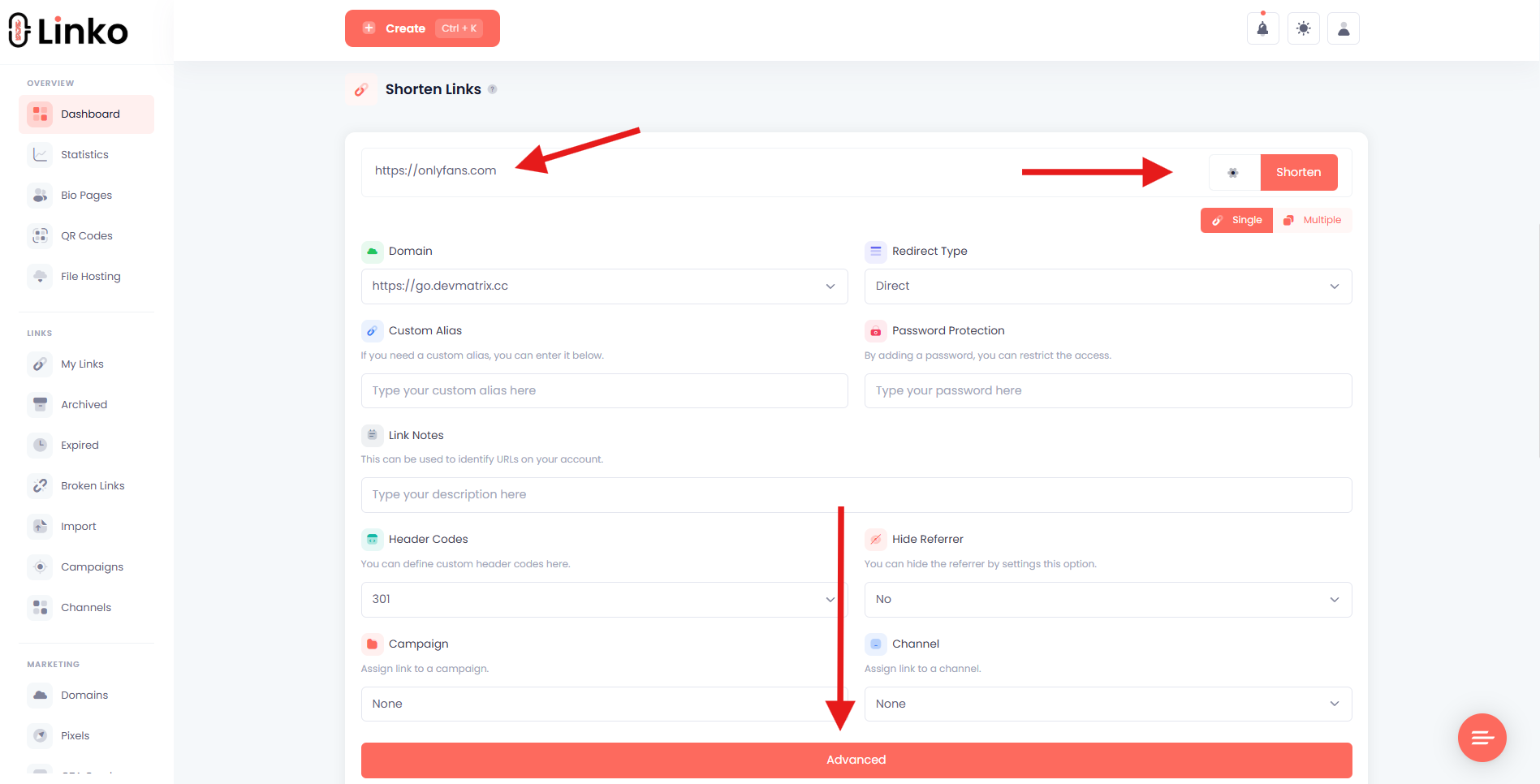
Step 3: Click “Advanced” to access deep linking
At the bottom of the expanded options, click the “Advanced” button. This reveals the deep linking settings.
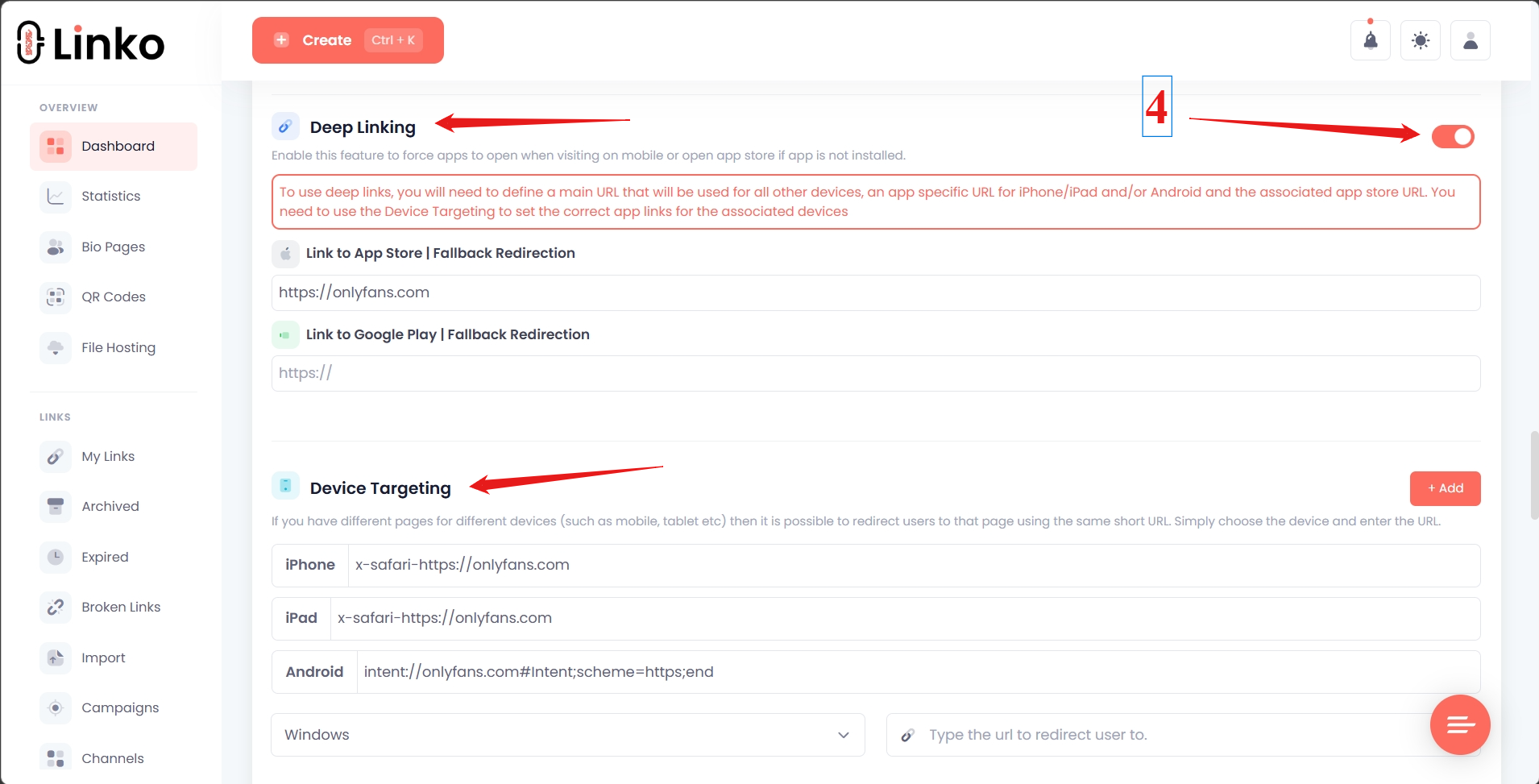
Step 4: Enable “Deep Linking”
Toggle on the “Deep Linking” option.
Linko automatically detects that your link is an OnlyFans URL and generates the correct settings for iPhone, iPad, and Android.
You don’t need to manually enter any fallback links or configure device-specific settings. Linko handles all of that automatically for OnlyFans and other supported platforms.
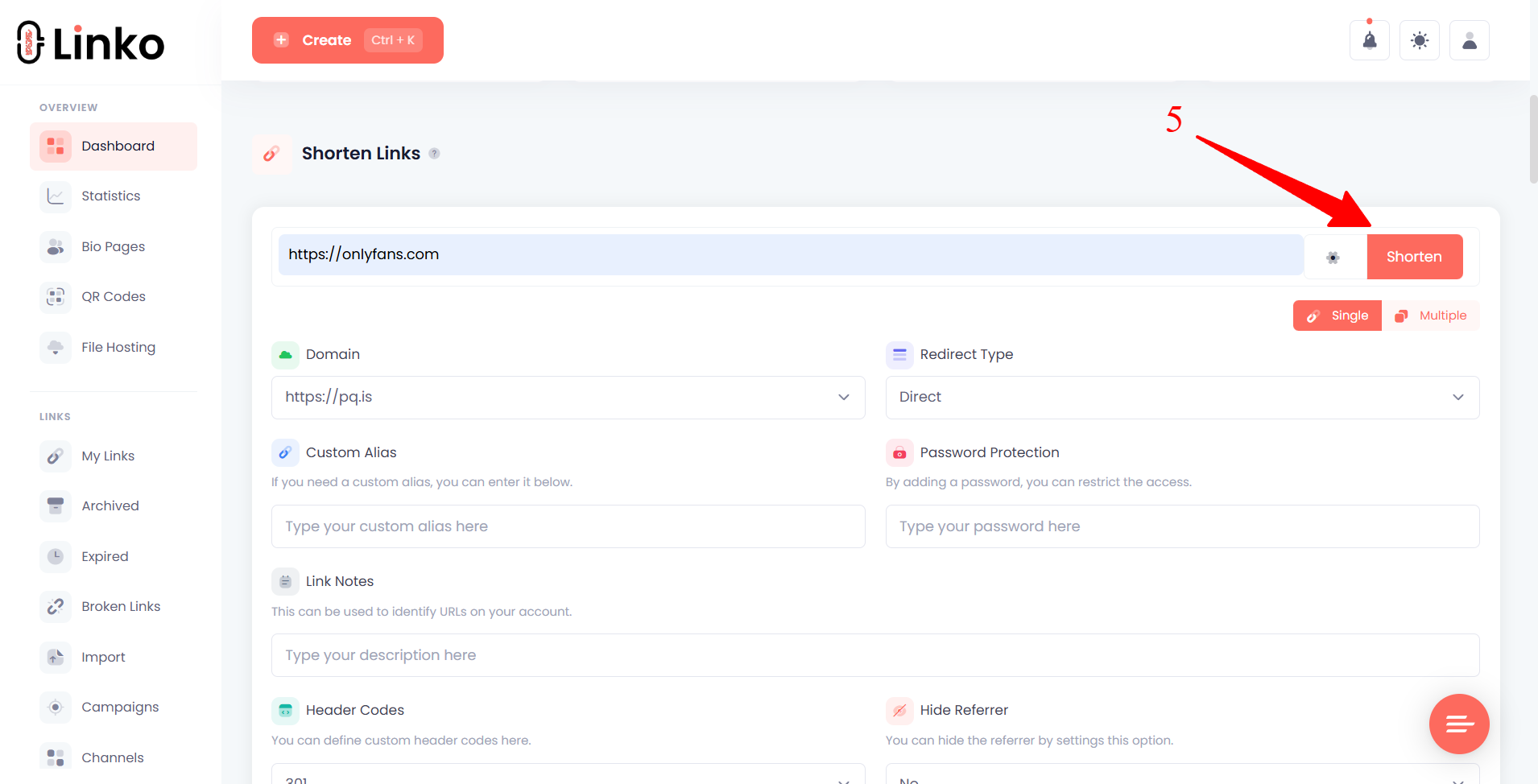
Step 5: Click Shorten
Scroll back up and click the Shorten button. Linko will generate a short link like allmylink.me/abc123 or a custom alias if you set one.
Step 6: Use your new link on Instagram bio
Add your Linko short link to your Instagram bio, stories, or DMs.
When someone taps it, they’ll automatically land in Safari instead of Instagram’s in-app browser.
That’s it. No ongoing maintenance required. Linko will continue to bypass Instagram’s browser automatically.
How Do You Test That It’s Working?
Test by sending your Linko link to yourself in an Instagram DM and tapping it on your iPhone. If Safari opens instead of Instagram’s in-app browser, it’s working correctly.
Here’s the full testing process:
- Create your Linko short link with deep linking enabled (follow the steps above)
- Send the link to yourself in an Instagram DM or add it to your insta bio
- Open Instagram on your iPhone
- Tap the link
- Confirm that Safari opens (not Instagram’s in-app browser)
You’ll know it worked if you see Safari’s address bar at the bottom of the screen and your OnlyFans profile loads with your normal logged-in state.
If you’re still seeing Instagram’s in-app browser (with the Instagram header at the top), double-check that deep linking is enabled on your Linko link.
What About TikTok?
TikTok’s in-app browser creates the same problems, but bypass options are more limited on iPhone.
Android works well, while iOS remains challenging across the industry.
Android: Deep linking works on TikTok for Android. Links open in Chrome automatically.
iPhone: TikTok on iOS continues to block most bypass methods. This is an industry-wide limitation that affects all link shorteners.
TikTok has been more aggressive than Instagram in preventing links from escaping their app.
For TikTok traffic on iPhone, however, many successful OnlyFans agencies use a Telegram funnel strategy.
Instead of linking directly to OnlyFans, they link to a Telegram channel where the OnlyFans link can be shared without in-app browser issues.
This workaround sidesteps the problem entirely.
For a deeper look at this strategy and other approaches, see our guide on OnlyFans deep linking.
Why Does This Matter for OnlyFans Agencies?
For agencies managing multiple creators, the in-app browser problem multiplies across every account.
Fixing it once with Linko improves conversions across your entire portfolio.
When that traffic hits a broken in-app browser, you’re losing a significant percentage of potential conversions across your entire portfolio.
With Linko’s automatic browser bypass:
- Every creator’s Instagram traffic converts better
- No manual configuration per account (just enable deep linking)
- Links work consistently across iPhone and Android
- You can track clicks and conversions through analytics
Agencies managing 50+ creators can also use Linko’s API to generate links at scale, with each creator getting their own campaign for tracking.
Additionally, for privacy-conscious promotion, link cloaking can hide referrers and protect your marketing sources from competitors.
Frequently Asked Questions
Does this work on iPhone?
Yes, Linko works on iPhone. Links open directly in Safari where OnlyFans login and payment flows work normally. This automatic bypass is the key update that solves the iOS problem.
Do I need a paid plan?
Yes, deep linking requires a Business or Agency plan. The free plan includes basic link shortening but not the deep linking feature needed for Instagram browser bypass.
Does it work with Fansly and Fanvue?
Yes, Linko’s Instagram browser bypass works with OnlyFans, Fansly, Fanvue, and other creator platforms that don’t have native mobile apps.
How do I know it’s working?
Send your Linko link to yourself in an Instagram DM and tap it on your iPhone. If Safari opens instead of Instagram’s in-app browser, it’s working correctly.
Will this get my Instagram account banned?
No, this method doesn’t violate Instagram’s terms of service. Linko simply redirects users to their default browser, which is standard behavior for many links. The short link itself looks clean and professional.
What if I’m already using Linktree?
You can keep your Linktree page and use Linko’s deep-linked short URLs for your OnlyFans destination. Add the Linko short link as the OnlyFans button on your Linktree page. When users tap it, they’ll escape to Safari even though they started in Instagram’s browser viewing your Linktree. Or you can shorten your Linktree bio link and add the shortened link in your instagram bio, when someone click on it, it will redirect and open your Linktree bio link in Safari on iOS or Chrome on Android.
Start Converting More Instagram Traffic
Instagram’s in-app browser has been costing OnlyFans creators subscribers for years.
Now there’s a fix that actually works.
Linko automatically opens your OnlyFans links in Safari on iPhone and Chrome on Android. No instructions for users to follow. No extra taps. No friction.
Set it up once, and every click from Instagram lands where it should: on your OnlyFans profile, in a real browser, ready to convert.
Create your free Linko account and start converting more of your Instagram traffic today.
Already have an account? Log in and create a new link with deep linking enabled.
Comments