
If you want people to message you on WhatsApp without hunting for your number, you need a click-to-chat link.
It is a single link that opens a WhatsApp conversation with you the moment someone taps it.
No saving a contact, no copying digits, no searching.
Businesses put it on websites, ads, and Instagram bios to turn interest into a real conversation in one tap.
The good news is that WhatsApp gives you the format for free, and you can build a working link in about a minute.
This guide walks through the exact steps, the pre-filled message trick, every link format, and how to make your link branded, trackable, and reliable once you start sharing it widely.
Key Takeaways
- WhatsApp’s official click-to-chat format is
https://wa.me/<number>, using your number in full international format. - Leave out the plus sign, leading zeros, brackets, dashes, and spaces, or the link breaks.
- Add a pre-filled message by appending
?text=and your URL-encoded text. - The
whatsapp://sendURI opens the app directly and is mainly used inside other apps. - Linko turns the long raw link into a branded short link with click tracking, a QR code, and an automatic Instagram in-app browser escape.
What Is a WhatsApp Deep Link?
A deep link opens a specific spot inside an app rather than a web page.
A WhatsApp deep link opens a chat with one specific number, straight inside the WhatsApp app, with the conversation already open and ready.
For a business, that removes the single biggest reason people never get in touch: friction.
There is nothing to copy and nothing to save.
If you want the wider background on how this works across apps, see our guide on what deep linking is.
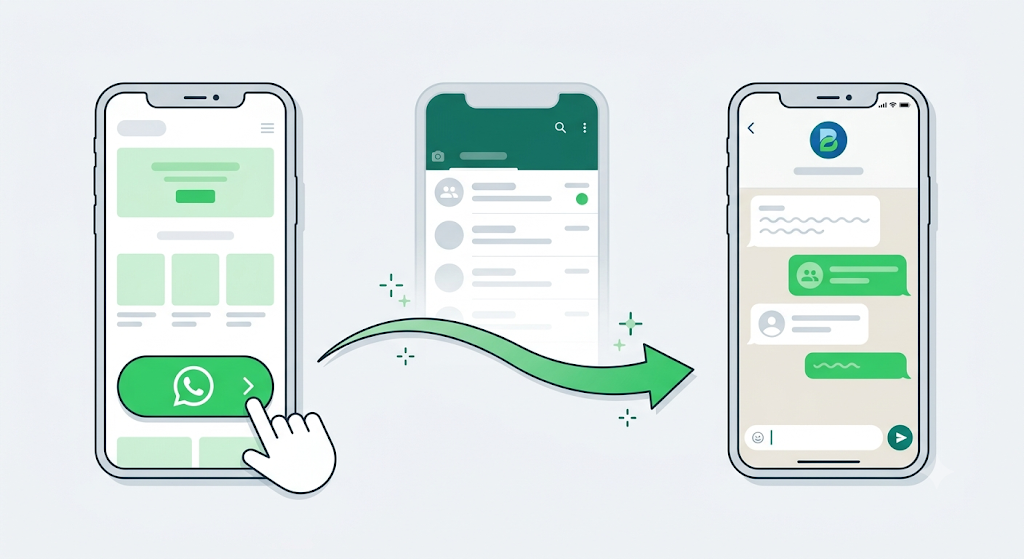
How to Create a WhatsApp Click-to-Chat Link
You do not need any tool for the basic version. WhatsApp publishes the format, and it looks like this:
https://wa.me/<number>Swap <number> for your phone number in full international format.
According to WhatsApp’s own click-to-chat instructions, you must remove the plus sign, any leading zero, brackets, dashes, and spaces.
Keep the country code.
Here is how that looks for a few countries:
| Country | Phone number | Click-to-chat link |
|---|---|---|
| United States | +1 (202) 555-0123 | https://wa.me/12025550123 |
| United Kingdom | +44 7911 123456 | https://wa.me/447911123456 |
| India | +91 98765 43210 | https://wa.me/919876543210 |
Paste your finished link into any browser to test it.
On a phone it opens the WhatsApp app, and on a computer it opens WhatsApp Web, with the chat ready to go.
How to Add a Pre-Filled Message
The real power move is starting the chat with a message already typed in.
It sets the tone and makes replying effortless, which is ideal for support and sales.
Append ?text= to your link, then your message in URL-encoded form, where every space becomes %20:
https://wa.me/12025550123?text=Hi%20I%20saw%20your%20adYou can also skip the number and set only a message, letting the sender choose the recipient.
That is useful for share buttons and referral prompts:
https://wa.me/?text=Check%20this%20outRunning this across campaigns?
Add UTM tags to the page you promote so you can see which source drove each chat.
Every WhatsApp Link Format
There is more than one way to link into WhatsApp.
Here is how the formats compare, so you pick the right one.
| Format | Example | Best for |
|---|---|---|
| Click-to-chat | wa.me/12025550123 | The standard, official link for everyone |
| With message | wa.me/12025550123?text=Hi | Support and sales chats |
| Message only | wa.me/?text=Hi | Share and referral buttons |
| Legacy API | api.whatsapp.com/send?phone=12025550123 | Older links, still supported |
| URI scheme | whatsapp://send?phone=12025550123 | Opening the app from inside another app |
| Group invite | chat.whatsapp.com/<code> | Inviting people to a group |
Stick with wa.me for almost everything.
It is the official, documented format, and it works on every device.
The whatsapp:// URI opens the app instantly but is not a clickable web link, so it fails in a browser or a bio if the app is not installed.
For the technical distinction, see our breakdown of deep links vs Universal Links vs App Links vs URI schemes.
Why Your Link Might Open the Browser Instead of the App
A wa.me link normally opens the WhatsApp app on mobile.
When it does not, one of these is usually why:
- The number is formatted wrong.
- A stray plus sign, space, dash, or leading zero makes WhatsApp show an “invalid number” error. This is the most common mistake, so check it first.
- The app is not installed.
- The link then loads the web version instead of opening the app.
- It was tapped inside an in-app browser.
- Instagram and TikTok open links in their own built-in browser, which can break the hand-off to the WhatsApp app.
The first two you control.
The third is the tricky one, because it happens on your visitor’s phone, not yours.
When your link sits in your Instagram bio or a story, tapping it opens Instagram’s in-app browser instead of Safari or Chrome.
From there the jump to WhatsApp can stall or drop your pre-filled message, and some people simply give up.
If you are paying for that traffic, every lost tap is a lost lead.
Our guide on how to redirect out of in-app browsers explains the problem in full.
Make It Branded, Trackable, and Reliable with Linko
A raw wa.me link works, but once you add a pre-filled message it turns long and ugly, and it tells you nothing about how many people actually tapped it.
Linko solves both and makes the app open reliably.
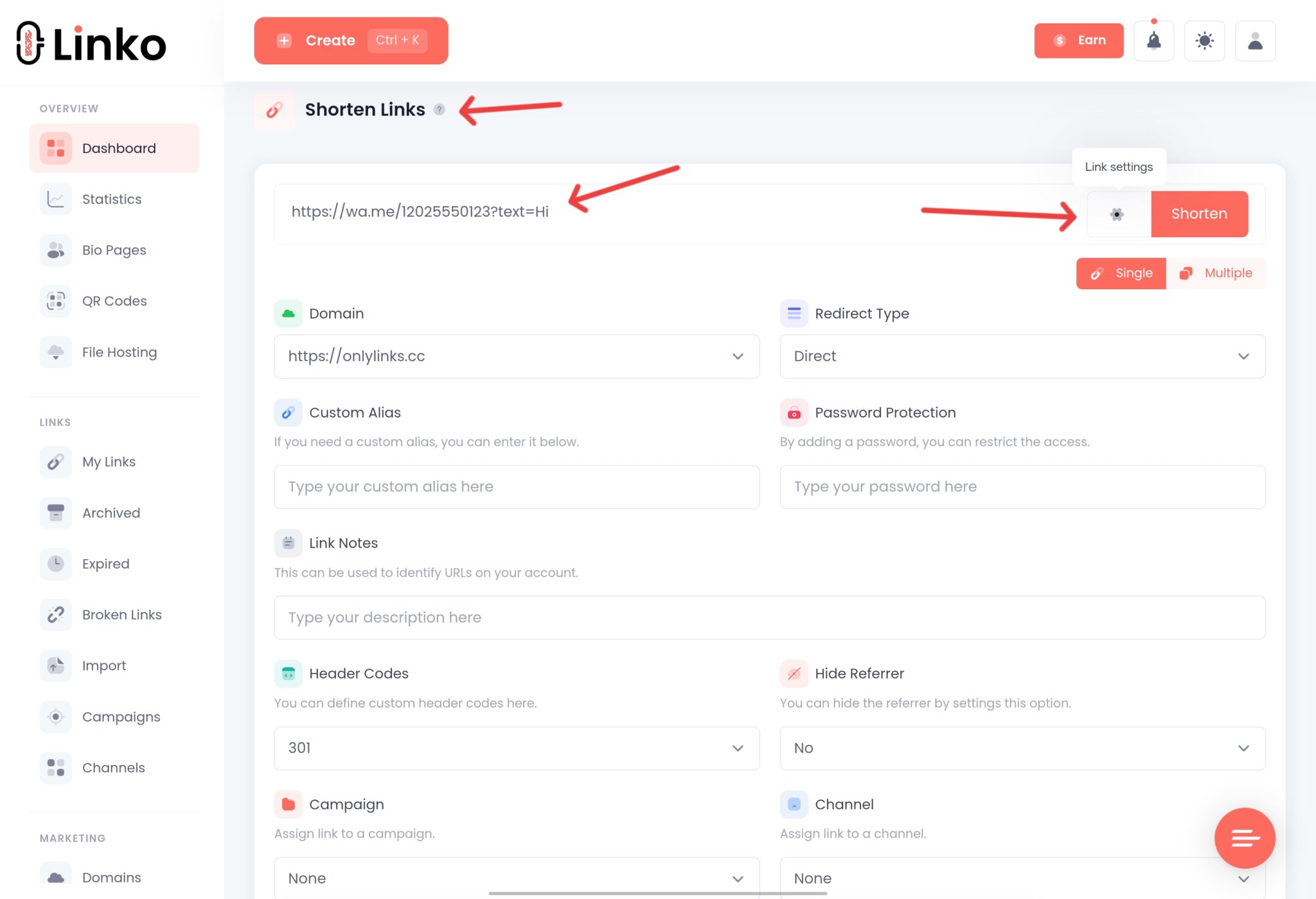
- Build your click-to-chat link first, for example
https://wa.me/12025550123?text=Hi. - Paste it into Linko to create a clean branded short link, such as
yourbrand.link/chat. - Turn on Deep Linking so the link opens the WhatsApp app reliably and escapes Instagram’s in-app browser.
- Share the short link, then track clicks, locations, and devices in your analytics.
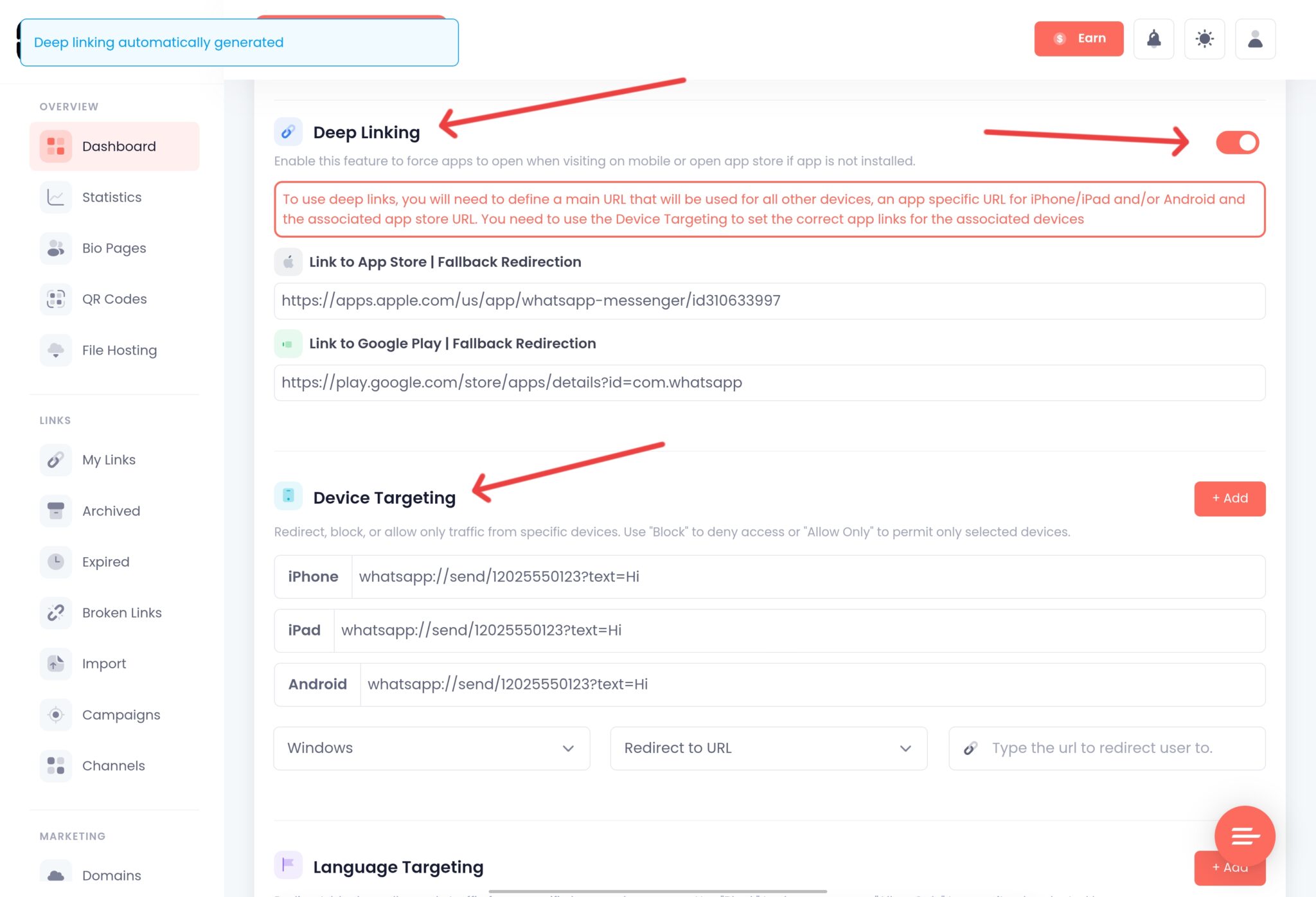
Your chat link is now short, on-brand, measurable, and it opens the app directly instead of getting trapped in Instagram’s browser.
Linko automatically bypasses Instagram’s in-app browser restrictions, with no configuration needed.
The same approach works for other apps, as shown in our Messenger deep link guide.
Turn Your WhatsApp Link into a QR Code
For shop windows, flyers, packaging, table tents, and business cards, a QR code is the offline version of your chat link.
Anyone who scans it opens a conversation with you instantly.
Paste your wa.me link into Linko’s free QR generator, pick a URL QR code, add your logo, and download it.
Which Linko Plan Do You Need?
Shortening, branding, and adding a QR code to your WhatsApp link work on a free or entry Linko plan.
To guarantee the link escapes Instagram’s in-app browser and opens the app, you need Deep Linking, available on the Business and Agency plans.
The full Linko pricing has the details.
To be straight with you: if all you need is one plain wa.me link on your website, no paid tool is required.
The free method above covers it.
Linko earns its place when you want branding, tracking, QR codes, and reliable app opening across your whole marketing setup.
Frequently Asked Questions
How do I create a WhatsApp link to my number?
Use https://wa.me/<number> with your phone number in full international format, leaving out the plus sign, leading zeros, brackets, and spaces. A US number, for example, becomes https://wa.me/12025550123.
How do I add a message to a WhatsApp link?
Append ?text= and your URL-encoded message, so spaces become %20. For example, https://wa.me/12025550123?text=Hi%20there opens the chat with “Hi there” already typed in.
Why does my WhatsApp link say the number is invalid?
It is almost always a formatting issue. Remove the plus sign, spaces, dashes, and the leading zero, and make sure the country code is included. WhatsApp needs a clean international number.
Can I make a WhatsApp link without saving the number?
Yes, that is exactly what click-to-chat is for. Anyone who taps your wa.me link can message you without adding you as a contact, and your number never lands in their address book.
Does a WhatsApp link work on both mobile and desktop?
Yes. On a phone it opens the WhatsApp app, and on a computer it opens WhatsApp Web in the browser, with the chat ready either way.
What is the difference between wa.me and the whatsapp:// link?
The wa.me link is a normal web link that works everywhere and is safe to share publicly. The whatsapp://send URI opens the app directly but is not clickable in most browsers or bios, so it is mainly used by developers linking from inside another app.
Start Your WhatsApp Chats in One Tap
For a single link on your website, the free wa.me method is genuinely all you need.
Once you are running it across an Instagram bio, ads, print, and email, a branded and trackable link that reliably opens the app is worth the small setup.
Linko turns your WhatsApp link into a clean short link with click tracking, a scannable QR code, and an automatic Instagram in-app browser escape.
Create a free Linko account and build your first click-to-chat link today.
You can start with the free link short maker, then upgrade when you need deep linking.
Comments