
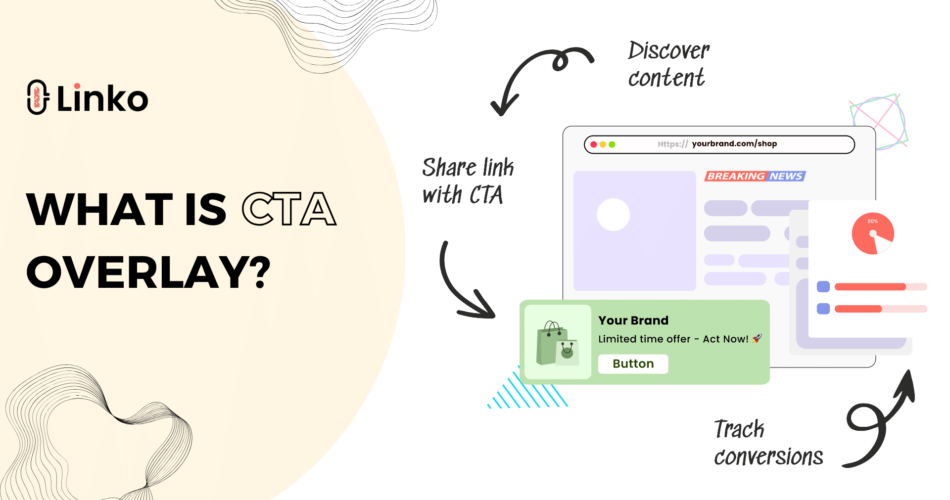
A CTA overlay puts your own message on top of a page you did not create.
You share an article, a review or a news story, and your visitor sees a small panel with your offer, your form or your discount code.
It turns curated content into a way to collect leads, which is why marketers share other people’s articles at all.
This guide covers the six overlay types, how to build one, and how to attach it to a link.
Key Takeaways
- A CTA overlay shows your message over any destination page, without editing that page.
- There are six types: Contact Form, Poll, Message, Coupon, Image and Newsletter.
- Build the overlay once, then attach it to as many short links as you like.
- Overlays are included on every plan, starting at 1 on Free and rising to 500 on Agency.
- You can add or swap an overlay on a link you already shared, without changing the URL.
What is a CTA overlay?
It is a panel that loads over the destination page when someone opens your short link.
The visitor still reads the page they expected, and your message sits alongside it rather than replacing it.
Why use one instead of just sharing the link?
Because a plain shared link sends your audience to someone else’s site and gives you nothing back.
- Collect an email or a lead from traffic you did not have to create content for.
- Keep your brand visible while the visitor reads third-party content.
- Offer a code or a next step at the moment attention is highest.
- Measure which curated links actually produce responses.
How is it different from a promo page?
These two get confused constantly, and the difference is simply where your message sits.
| Tool | What the visitor sees | Best for |
|---|---|---|
| CTA overlay | Your panel on top of someone else’s page | Curated links and lead capture |
| Promo page | A page of your own instead of theirs | Offers, warnings and age checks that need their own space |
Both are redirect modes on a short link, alongside a plain direct redirect and link cloaking.
One naming note, because older guides disagree: a Promo Page is the same feature that used to be called a Custom Splash Page, renamed rather than replaced.
Which of the six types should you use?
Pick by what you want the visitor to do, not by how the panel looks.
| Type | What it does | What you get back | Use it for |
|---|---|---|---|
| Message | Shows text with a button | Clicks to your own page | Announcements, and any plain link CTA |
| Newsletter | Asks for an email address | Subscriber addresses | List building from curated content |
| Contact Form | Collects a longer enquiry | Named leads with details | Services, quotes, B2B enquiries |
| Coupon | Reveals a discount code | Redemptions | Promotions and affiliate offers |
| Poll | Asks a single question | Response counts | Audience research, engagement |
| Image | Displays a banner | Clicks | Visual products, events, sponsors |
Use Message when you just want a link
There is no separate link type, because Message already does that job.
Write your text, point the button at your own URL, and you have a link CTA.
Forms can carry a disclaimer
Contact Form and Newsletter overlays support a disclaimer line, which matters if you are collecting personal data.
Use it to state what you will do with the address, rather than leaving the visitor guessing.
How do you create a CTA overlay?
The process is the same for all six types, and only the middle step changes.
- Open CTA Overlays in your Linko dashboard and choose to create a new one.
- Name it something you will recognise later, such as
newsletter-industry-news. - Pick one of the six types.
- Fill in the content for that type, meaning your text, image, question, code or form fields.
- Set the button label and, where the type uses one, the button destination.
- Adjust colours and position so the panel reads as yours.
- Save it, and it becomes available to attach to any link.
Naming matters more than it sounds
Overlays are reused across many links, so a name like cta-1 becomes useless within a month.
A pattern that survives scale:
newsletter-industry-newsfor an ongoing list builder.coupon-blackfriday-2026for a dated promotion.poll-audience-researchfor a research question.
How do you attach it to a link?
An overlay does nothing until a short link uses it.
On a new link
- Paste the destination URL into the shortener.
- Open Advanced settings.
- Select your saved overlay from the CTA field.
- Shorten, then test the link on a phone before sharing it.
On a link you already shared
You can add or change the overlay later, and the short URL stays the same.
Edit the link, choose a different overlay in the CTA field, and save.
That means a link printed on a flyer can carry a summer offer in June and a different one in September.
Swapping the overlay later
Because the overlay is a separate object, changing it updates every link pointing at it.
That is useful for a seasonal offer and risky if you forget which links are attached.
Why some pages will not display it
Some sites block being framed by other tools, so no overlay product can appear on them.
Before any campaign, check the finished link yourself:
- Open it on a phone, not just a desktop browser.
- Open it from the app you will actually post in, since in-app browsers behave differently.
- If the panel does not appear, choose a different source article rather than fighting the site.
How many overlays do you get?
Overlays are on every plan, including Free, which is unusual in this category.
| Plan | CTA overlays | Promo pages |
|---|---|---|
| Free | 1 | 1 |
| Starter, $12 | 10 | 10 |
| Pro, $29 | 50 | 50 |
| Business, $79 | 200 | 200 |
| Agency, $149 | 500 | 500 |
The count is how many overlays you can keep, not how many links can use them, so one overlay can sit behind hundreds of links.
How do you get the leads and responses?
Form and newsletter submissions
Submissions collect in your dashboard, grouped against the overlay that produced them.
From there you have three options:
- Read and reply from the dashboard.
- Export them for your own records.
- Push them into your CRM or email tool with the Zapier webhook integration.
Poll results
Poll responses are counted per option on the overlay itself.
Judging performance properly
Three numbers are worth watching:
- Human clicks on the link, not total clicks.
- Submissions or responses from the overlay.
- The ratio between them, compared per source rather than in aggregate.
Linko filters bots before a click is counted on every plan, which matters here because a conversion rate calculated on inflated traffic is meaningless, as our guide to bot traffic in link analytics explains.
Tag the links with utm_source and utm_campaign so you can tell which placement produced the leads, using our UTM tag guide.
What makes an overlay actually convert?
Ask for one thing
A panel asking for an email, a follow and a purchase gets none of them.
Match the offer to the article
Someone reading about pricing strategy will take a pricing template, and will ignore a generic newsletter signup.
- Industry news article, then a Newsletter overlay for the weekly roundup.
- Product review, then a Coupon overlay.
- How-to guide, then a Message overlay pointing at your own deeper guide.
Keep the button specific
Replace Submit with what the visitor receives, such as Send the template.
Do not fight the page
The visitor came to read something, so let them read it and keep your panel small.
Reuse rather than rebuild
Keep a small set of good overlays organised by campaign, as covered in organising short links.
What goes wrong most often?
Setup mistakes
- Never testing the link, when some destinations will not display an overlay at all.
- Sharing your own pages, where the offer belongs on the page itself.
- Forgetting the disclaimer on forms that collect personal data.
Judgement mistakes
- Running one generic overlay everywhere, when relevance is what makes these work.
- Judging results on total clicks, which makes the conversion rate look far worse than it is.
- Giving up after one article instead of testing five.
Overlays or retargeting pixels?
They solve the same problem at different speeds and they work well together.
- An overlay asks for the action now, in view of the visitor.
- A pixel is invisible and lets you advertise to that person later.
- Running both means one click can convert immediately or feed an audience.
Our guide on adding a retargeting pixel to a link covers the setup, and if you are comparing dedicated overlay tools, see our Sniply comparison.
Frequently Asked Questions
What is a CTA overlay?
A panel showing your own message over a destination page when someone opens your short link.
It lets you add a call to action to content you did not publish.
Can I add a CTA overlay on a free plan?
Yes, the Free plan includes one saved overlay.
That one overlay can be attached to as many links as you create.
Is there a link type of CTA?
Use the Message type, which shows text with a button pointing anywhere you choose.
That covers the plain link CTA use case without a separate type.
Can I change the overlay after sharing the link?
Yes, and the short URL does not change.
This is what makes overlays useful on printed material and old posts.
Why is my overlay not appearing?
The destination site most likely blocks being displayed inside another tool.
No overlay product can work on those pages, so choose a different source article.
Do overlays work on any link?
They work on short links you create, including ones on your own branded domain.
They are not something you can apply to a link someone else shortened.
Start with one overlay
Build a single Newsletter or Message overlay, attach it to the next five articles you share, and watch what comes back.
That is enough to tell whether curated sharing can earn you leads before you design anything more elaborate.
You can create a free Linko account and set up your first overlay in a few minutes.
Comments