
Every time someone clicks your OnlyFans link from Instagram, TikTok, or Twitter, they land in a stripped-down in-app browser where they’re not logged in, their saved passwords don’t work, and the subscription flow breaks.
This isn’t a minor inconvenience. It’s costing you subscribers.
An OnlyFans deep link attempts to solve this problem by opening your profile directly in the native browser instead of the broken in-app browser.
On Android, deep linking works reliably. Chrome opens automatically, users stay logged in, and payment flows work normally.
But, on iOS, the situation is more complicated.
Recent updates to Instagram, TikTok, and iOS itself have blocked many deep linking methods. This is an industry-wide challenge affecting all link shorteners and bio tools.
This guide explains why in-app browsers hurt OnlyFans creators, the current state of deep linking on iOS and Android, how to set up deep linking with Linko, and the real-world strategies that successful OnlyFans agencies use to drive 500K+ clicks monthly.
Key Takeaways
- In-app browsers on Instagram, TikTok, and Twitter break OnlyFans login and payment flows.
- Mobile cart abandonment reaches 85.65%, with in-app browsers adding extra friction.
- Most link-in-bio tools like Linktree and link.me don’t have deep linking and don’t solve this problem.
- Linko now bypasses Instagram’s in-app browser on iOS – Links open directly in Safari automatically.
- Android deep linking works reliably – Chrome opens automatically, bypassing the in-app browser.
- TikTok iOS remains limited – TikTok continues to block bypass methods on iOS.
- Successful OF agencies use Linko’s API to manage 10K+ links monthly with Telegram funnels and premium domains.
Instagram In-App Browser Bypass (May 2026 Update)
Good news: Linko now automatically bypasses Instagram’s in-app browser on iOS. When someone clicks your Linko short link from Instagram, it opens directly in Safari instead of Instagram’s restricted browser.
What Changed?
Instagram blocked the previous x-safari-https:// method in April 2026. Linko developed a new approach that works automatically – no configuration needed on your end.
What Works Now
Instagram (iOS): Links open directly in Safari. Users stay logged in, saved passwords work, payment flows complete normally.
Instagram (Android): Links open in Chrome. Same seamless experience.
Twitter/X: Deep linking behavior varies but often works.
Desktop: Links open normally in the user’s default browser.
What’s Still Limited
TikTok (iOS): TikTok continues to block bypass methods. Links stay in TikTok’s in-app browser.
TikTok (Android): Deep linking works – Chrome opens automatically.
Why This Matters
Instagram is one of the biggest traffic sources for OnlyFans creators. Having links open in Safari instead of Instagram’s broken browser means:
- Users are already logged into OnlyFans
- Saved passwords and payment methods work
- Subscription flow completes without friction
- Higher conversion rates from your Instagram traffic
How OnlyFans Agencies Actually Use Linko (Real-World Strategy)
While deep linking has iOS limitations, successful OnlyFans marketing agencies have built effective workflows using Linko that don’t depend on bypassing in-app browsers.
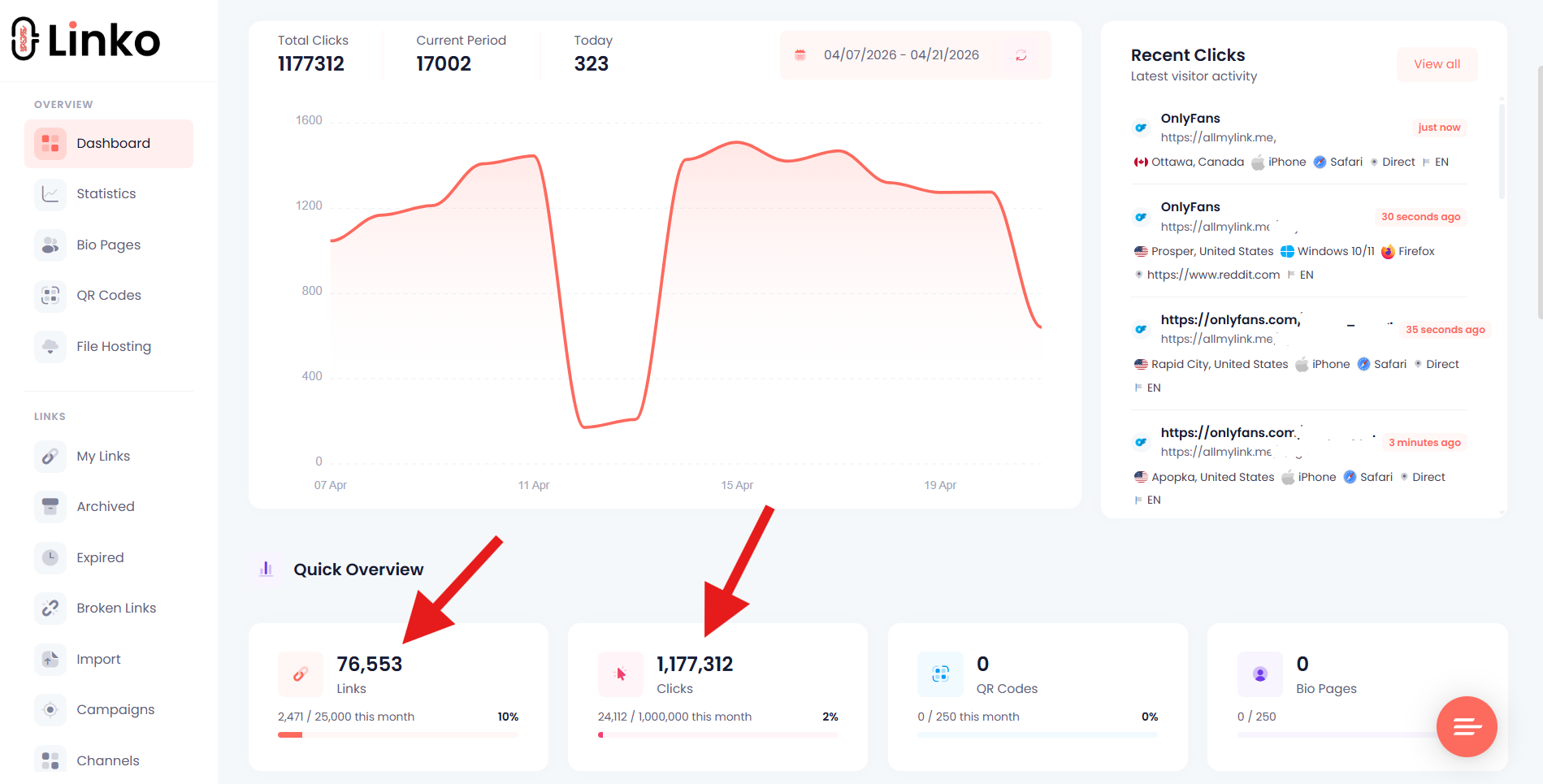
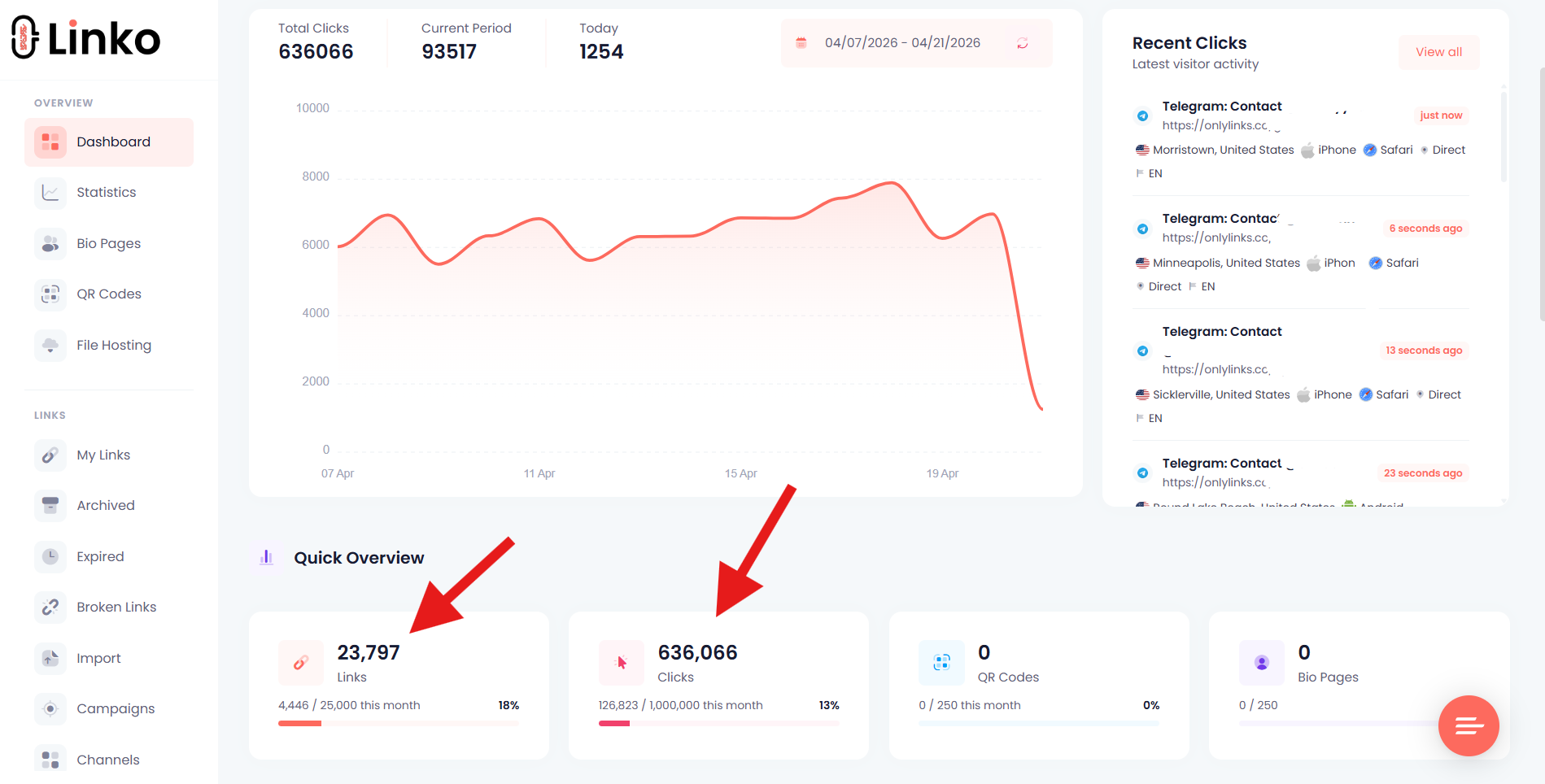
Several agencies managing multiple OnlyFans creators use Linko’s API to shorten 10,000-15,000 links monthly, generating over 500,000 clicks.
Their approach focuses on link management at scale rather than deep linking alone.
The Telegram Funnel Strategy
Instead of linking directly to OnlyFans profiles (which face restrictions on most platforms), these agencies shorten Telegram profile links.
Telegram acts as a bridge:
- Telegram links face fewer restrictions on social platforms
- Creators build a direct communication channel with potential subscribers
- The OnlyFans link is shared within Telegram where there are no in-app browser issues
This approach sidesteps the in-app browser problem entirely by moving the conversion to a platform where links work normally.
Premium Domains Built for Adult Content
Linko offers premium domains specifically suited for OnlyFans marketing:
allmylink.me– Clean, professional-looking domainonlylinks.cc– Niche-specific domain for adult creators
These domains are less likely to trigger spam filters compared to generic shorteners, and they look trustworthy to potential subscribers.
API Automation with Airtable
Agencies managing 50+ creators can’t manually shorten links. They use Linko’s API integrated with Airtable to:
- Generate hundreds of unique short links per creator automatically
- Assign links to campaigns for tracking
- Track which marketing channels drive the most traffic
- Rotate links to avoid platform detection
Each marketing post gets its own unique trackable link, providing granular analytics on what’s working.
We’re publishing a full tutorial on setting up Linko + Airtable automation for OnlyFans agencies. Check back soon or follow our blog for updates.
What is an OnlyFans Deep Link?
An OnlyFans deep link is a URL that opens your OnlyFans page directly in the user’s native browser (Safari on iPhone, Chrome on Android) instead of the in-app browser that social media platforms force on users.
Understanding how deep linking works is essential for any creator promoting content on social media.
When someone clicks a regular OnlyFans link from Instagram:
- Instagram intercepts the click
- Opens the link in Instagram’s built-in browser
- User sees OnlyFans but isn’t logged in
- Saved passwords and payment methods don’t work
- User has to manually log in or create an account
- Most users abandon the process
With a working deep link:
- User clicks your link
- OnlyFans opens directly in Safari or Chrome
- User is already logged in (if they’ve visited before)
- Payment methods are saved
- Subscription is one tap away
The difference is friction. Every extra step loses potential subscribers.
Why Are In-App Browsers Killing Your Conversions?
Instagram, TikTok, Twitter/X, Facebook, Snapchat, and Reddit all use embedded browsers called WebViews. When you share a link on these platforms, they don’t open it in the user’s real browser.
They open it inside their own app.
This creates serious problems for OnlyFans creators who rely on short links for social media marketing.
The Three-Dot Menu Friction
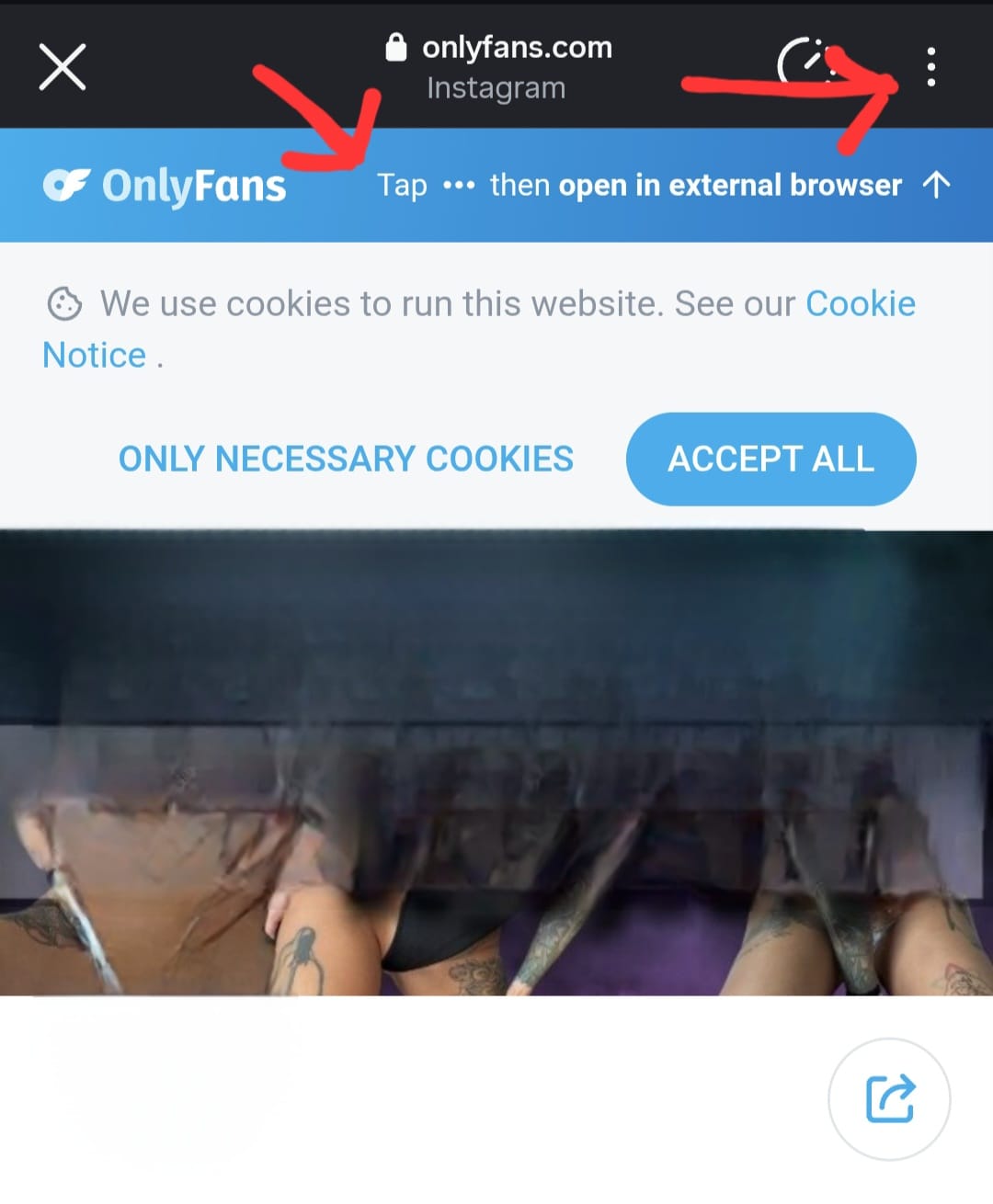
The most obvious problem: users have to manually tap the three dots (…) in the top right corner of the in-app browser navigation, then select “Open in Browser”.
Most users don’t know this option exists. Those who do often won’t bother with the extra steps.
Every tap you add to the conversion path loses potential subscribers.
Users Aren’t Logged In
The in-app browser is a separate environment from Safari or Chrome.
Even if someone is logged into OnlyFans on their phone, they won’t be logged in when they click your link from Instagram.
They’ll see a login screen instead of your profile.
Saved Passwords Don’t Work
Password managers like iCloud Keychain and 1Password don’t work properly in in-app browsers.
Users who wanted to quickly log in with their saved credentials now have to manually type everything.
That friction causes abandonment.
Payment Methods Are Missing
If a user has their card saved on OnlyFans through Safari, that payment method won’t be available in Instagram’s browser. They’ll need to re-enter their card details.
Most won’t bother.
The Numbers Are Brutal
Research shows the impact of in-app browsers on conversions:
- Mobile cart abandonment reaches 85.65% according to Baymard Institute
- Deep linking can boost mobile conversions by 51-52% according to Airbridge
- Mobile converts at just 1.8% vs 3.9% on desktop
For OnlyFans creators, where every subscriber counts, this friction is devastating.
Why Is OnlyFans Hit Harder Than Other Platforms?
OnlyFans has a unique vulnerability to the in-app browser problem.
No Native App
OnlyFans doesn’t have an iOS or Android app. Apple and Google’s app stores prohibit adult content, so OnlyFans is web-only.
This means there’s no app to deep link into. The only solution is opening OnlyFans in a real browser where the full web experience works properly.
Other platforms like YouTube, Spotify, or Amazon have apps that deep links can open directly. OnlyFans doesn’t have that option.
Payment Is the Conversion
On OnlyFans, the conversion isn’t just viewing content. It’s subscribing and paying.
If someone clicks through to a YouTube video in an in-app browser, they can still watch it. The experience is degraded but functional.
On OnlyFans, if the payment flow breaks, there’s no conversion at all. The user can’t subscribe without logging in and entering payment details.
Links Are Already Restricted
OnlyFans links face restrictions on most social platforms. Instagram, TikTok, and others actively limit or shadowban adult content links. Learning how to bypass OnlyFans link bans is critical for creators.
When your link does get through, it needs to convert. Having it open in a broken in-app browser wastes the traffic you worked hard to get.
How Do Different Platforms Handle OnlyFans Links?
Each social platform handles links differently, but they all create problems for OnlyFans creators.
Instagram’s in-app browser is one of the most restrictive. When someone taps a link in your bio or story, Instagram opens it in a WKWebView (on iOS) that:
- Doesn’t share cookies or login sessions with Safari
- Blocks password manager autofill
- Prevents Universal Links from working properly
- Keeps users trapped inside Instagram
The good news: Linko now automatically bypasses Instagram’s in-app browser on both iOS and Android. Your links open directly in Safari or Chrome, where OnlyFans works properly.
TikTok
TikTok’s in-app browser is similarly restrictive and raises additional privacy concerns.
Links in your TikTok bio open in TikTok’s embedded browser, which:
- Sandboxes the browsing session from the rest of the phone
- Doesn’t support saved logins or payment methods
- Can potentially track browsing activity within the WebView
TikTok is one of the biggest traffic sources for OnlyFans creators, but that traffic converts poorly because of the in-app browser.
Twitter/X
Twitter’s in-app browser has been inconsistent, with deep links breaking entirely at times.
According to AppsFlyer research, deep links on Twitter iOS stopped working properly in late 2024, causing an 86% drop in conversions from organic posts.
For OnlyFans links, Twitter’s browser creates the same login and payment friction as other platforms.
Facebook removed the option to open links in an external browser by default. All links now open in Facebook’s in-app browser.
This browser:
- Isolates the session from Safari or Chrome
- Doesn’t support saved credentials
- Tracks user behavior for Facebook’s advertising
Snapchat
Snapchat uses an in-app browser for all external links with no easy way to open in Safari or Chrome.
Links shared in snaps or stories open in Snapchat’s browser where OnlyFans login and payment flows break.
Reddit pushes users toward its app and uses an in-app browser for external links.
Even on mobile web, Reddit tries to redirect users to the app, creating additional friction for OnlyFans links.
Why Don’t Most Link-in-Bio Tools Solve This?
If you’re using Linktree, Beacons, link.me or similar tools, you might think you’re protected from in-app browser issues.
You’re not.
Link.me Focuses on Monetization
Link.me (Linkme) is popular among creators for selling products, courses, and accepting tips directly from a bio page.
However, Link.me doesn’t offer deep linking to bypass in-app browsers.
Their focus is on converting visitors who are already on your page, not on getting those visitors out of the in-app browser in the first place.
If your audience clicks your Link.me page from Instagram, they’re still stuck in the in-app browser when they tap through to OnlyFans.
Linktree Has No Deep Linking
Linktree creates a landing page with your links. That’s useful for organizing multiple destinations, but it doesn’t solve the in-app browser problem.
When someone clicks your Linktree from Instagram:
- Instagram opens Linktree in its in-app browser
- User taps your OnlyFans link on the Linktree page
- OnlyFans opens… still in Instagram’s in-app browser
Linktree adds an extra click without fixing anything. Your OnlyFans link still opens in the broken WebView environment.
Beacons Doesn’t Address It Either
Beacons focuses on monetization features, AI tools, and customization. It doesn’t have deep linking that bypasses in-app browsers.
Same problem as Linktree. Your links still open in the in-app browser.
GetAllMyLinks Uses Instruction Pages
GetAllMyLinks shows a “middle page” with instructions telling the user to manually open the link in their external browser.
This requires the user to:
- Read the instructions
- Tap to copy the link or open in browser
- Complete additional steps manually
That’s not automatic. It’s a workaround that still creates friction and loses users who don’t want to follow instructions.
StealthCreator Focuses on Cloaking
StealthCreator is built for hiding links behind “shield pages” to avoid detection. It’s useful for link cloaking but doesn’t solve the in-app browser problem.
Your OnlyFans link still opens in the WebView after passing through the shield page.
How True Deep Linking Works
True deep linking automatically opens your destination in the correct app or browser without requiring any action from the user.
For OnlyFans, since there’s no app, true deep linking means opening the OnlyFans website directly in the native browser (Chrome on Android, Safari on iOS) instead of the in-app browser.
The technical implementation involves:
- Detecting the user’s device (iOS vs Android)
- Detecting the source app (Instagram, TikTok, etc.)
- Using platform-specific methods to break out of the in-app browser
- Opening the destination in the native browser
Current reality:
- On Android, this process works as intended. The
intent://URI scheme successfully opens Chrome. - On iOS, Instagram and TikTok have blocked these methods, so the link typically stays in the in-app browser despite the deep linking configuration.
How to Create an OnlyFans Deep Link with Linko
Linko supports deep linking for OnlyFans that bypasses in-app browsers. Instagram works on both iOS and Android. TikTok works on Android (iOS remains limited).
Here’s how to set it up:
Step 1: Log In to Linko
Go to linko.me and sign in to your account.
If you don’t have an account, you can create one from the homepage. Deep linking is available on Business and Agency plans.
Step 2: Paste Your OnlyFans URL
Enter your OnlyFans profile URL in the destination field:
https://onlyfans.com/yourusernameReplace yourusername with your actual OnlyFans username.
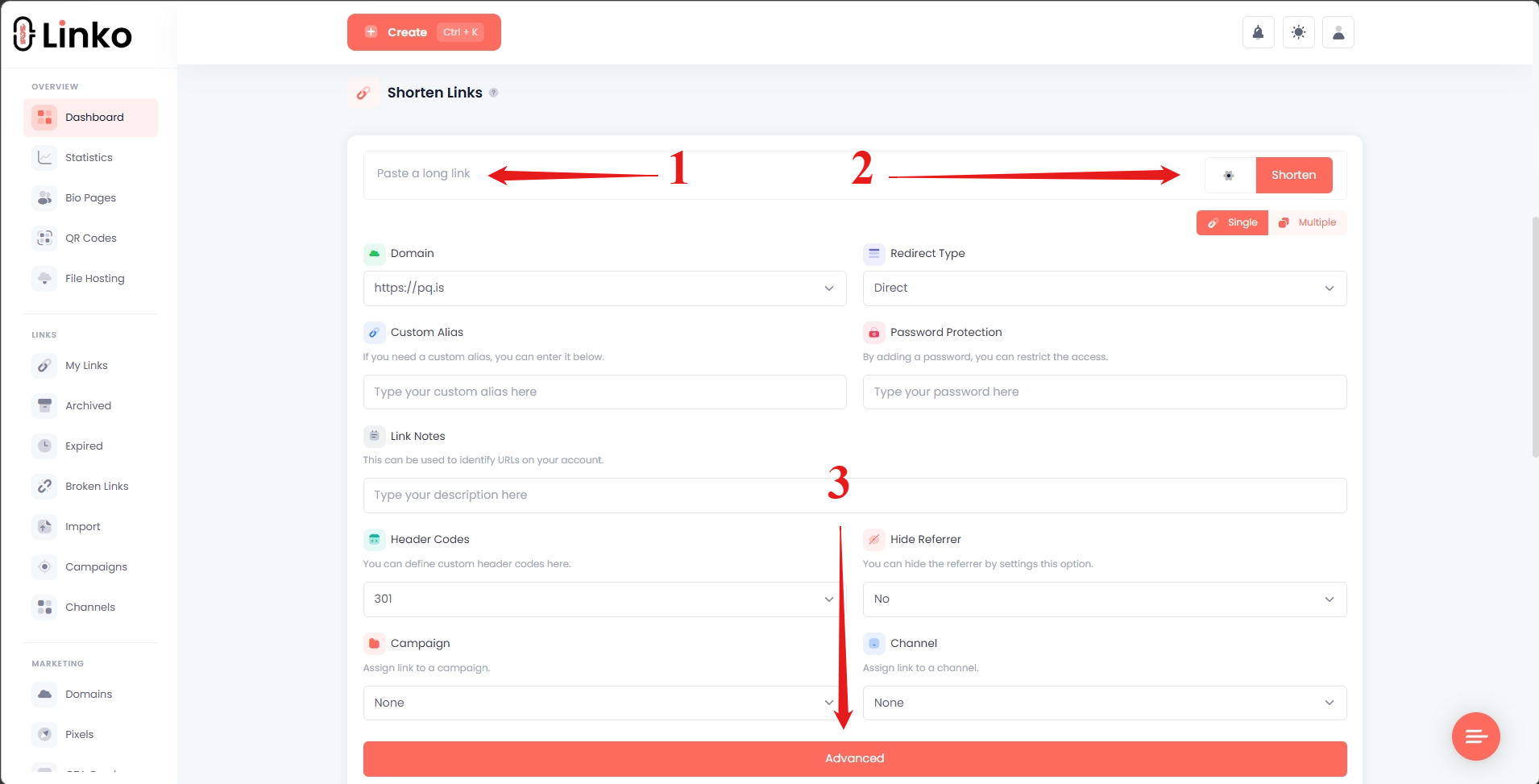
Step 3: Open Advanced Settings
Click the gear icon (⚙️) beside the Shorten button to expand options, then click the Advanced button at the bottom to reveal more settings.
Step 4: Enable Deep Linking
Scroll down to the Deep Linking section and toggle it on.
Linko automatically generates the deep link URIs for iPhone, iPad, and Android. You don’t need to manually configure anything for supported platforms like OnlyFans.
Linko also auto-fills the fallback URLs for failed redirection, ensuring users who aren’t on mobile or don’t have the deep link working still reach your profile.
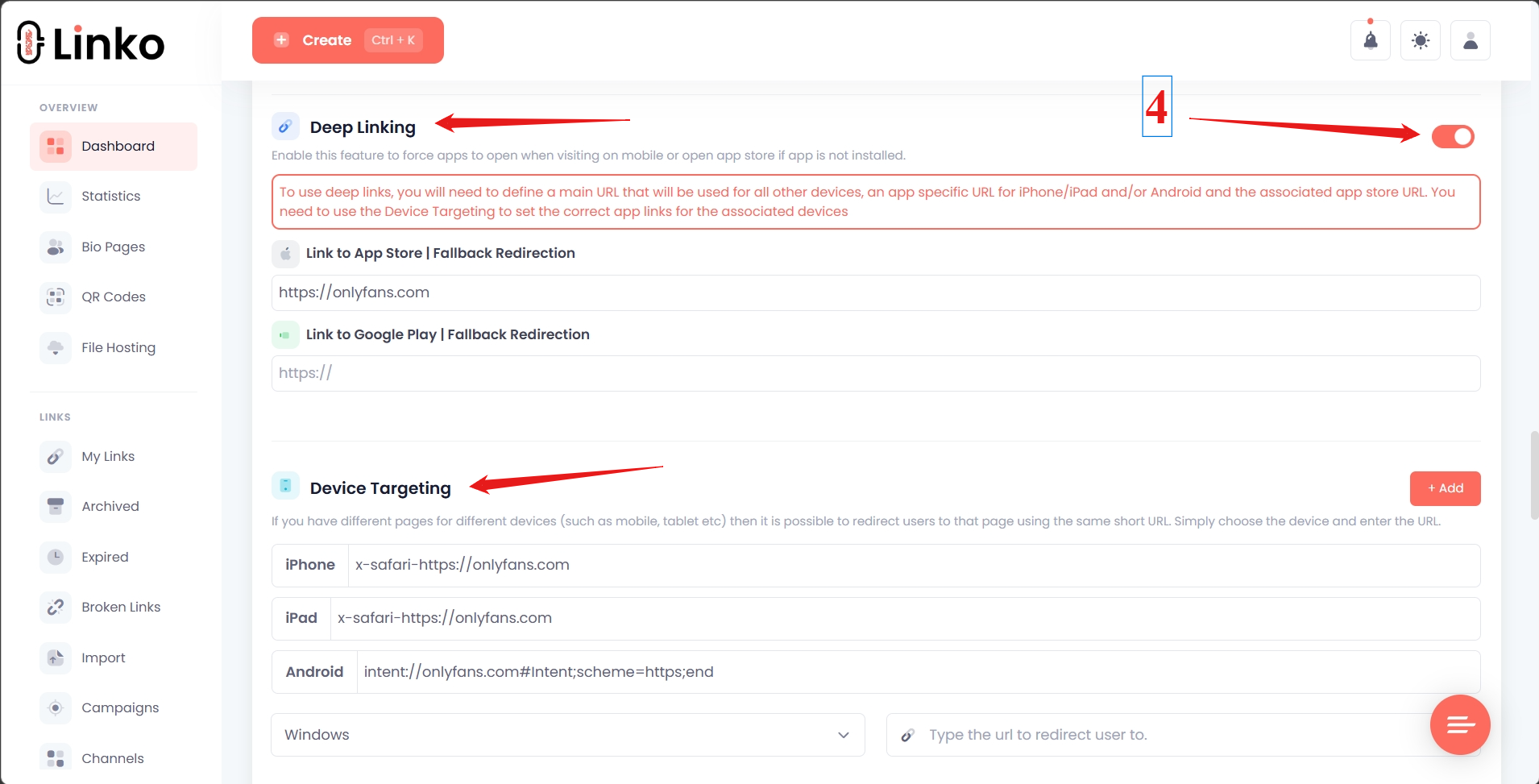
Once enabled, you’ll see the auto-filled URIs:
- In-app Browser Fallback:
https://onlyfans.com/yourusername - iPhone/iPad: Linko automatically handles the bypass (no manual configuration needed)
- Android:
intent://onlyfans.com/yourusername#Intent;scheme=https;end
Note: Linko automatically bypasses Instagram’s in-app browser on iOS. TikTok iOS remains limited due to platform restrictions.
Step 5: Click Shorten
Scroll back up and click the Shorten button to create your deep link.
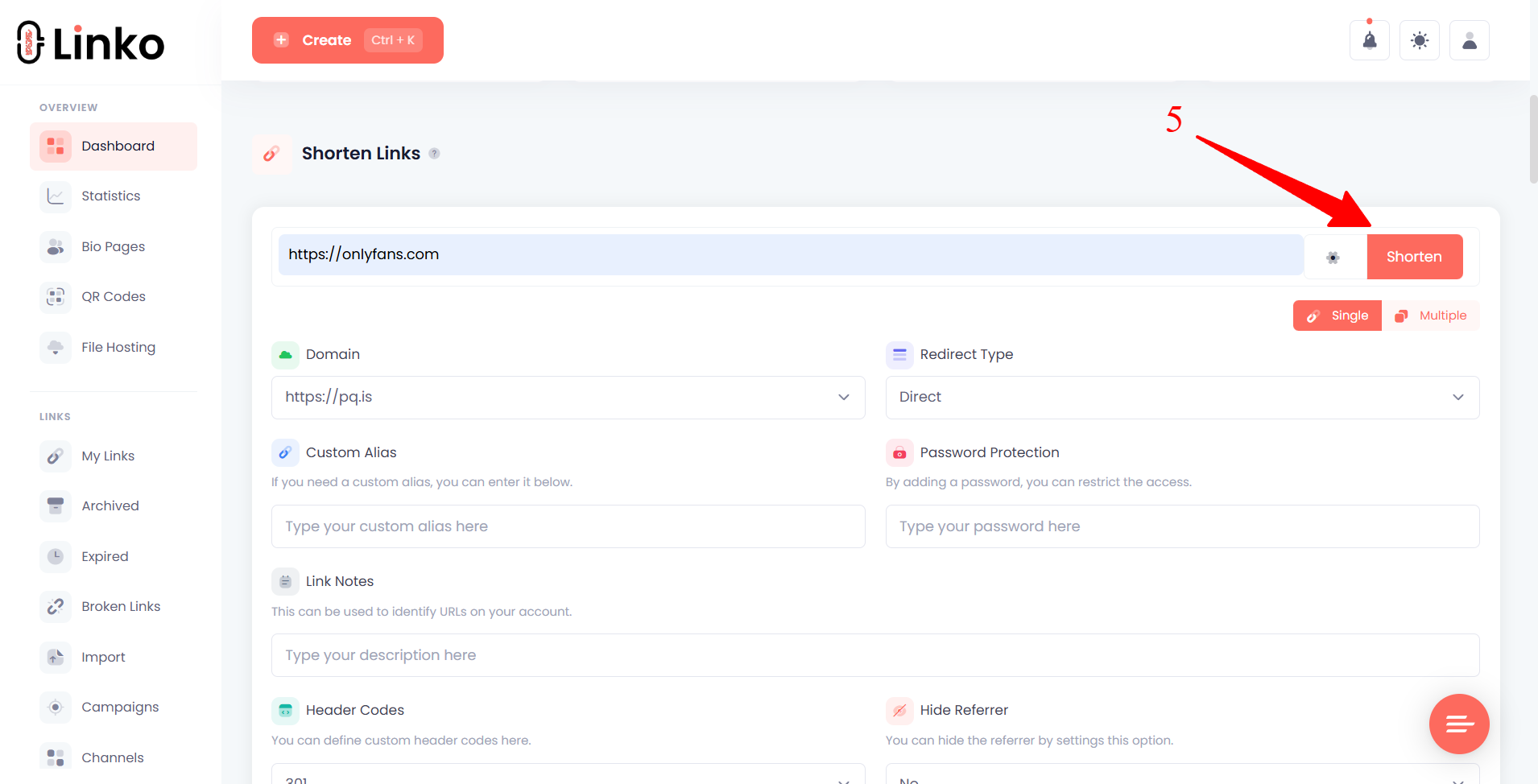
Copy the short URL and use it in your Instagram bio, TikTok bio, Twitter profile, or anywhere else you share links.
What Happens When Someone Clicks Your Deep Link?
Here’s the current user experience with Linko’s deep linking enabled:
| Source | What Happens |
|---|---|
| Instagram (iOS) | Safari opens → OnlyFans loads with saved credentials → Subscription flow works normally |
| Instagram (Android) | Chrome opens → OnlyFans loads with saved credentials → Subscription flow works normally |
| TikTok (iOS) | Currently stays in in-app browser (TikTok blocks bypass methods) |
| TikTok (Android) | Chrome opens → OnlyFans loads with saved credentials → Subscription flow works normally |
| Twitter/X | Behavior varies – may open in native browser on some devices |
| Desktop | Default browser opens → Normal web experience |
On Instagram and Android, the deep link handles everything automatically. TikTok iOS remains a challenge industry-wide.
Combining Deep Links with Other Linko Features
Deep linking works alongside Linko’s other features to maximize your OnlyFans promotion.
| Feature | What It Does |
|---|---|
| Link Cloaking | Hide your referrer so platforms can’t see traffic going to OnlyFans |
| Custom Domains | Use a branded domain for professional-looking links |
| Click Analytics | Track clicks, locations, devices, and traffic sources with detailed analytics |
| Bio Pages | Create a free bio page with multiple deep-linked destinations |
| A/B Testing | Test different destinations to optimize conversions |
What Are the Best Practices for OnlyFans Deep Links?
Test Your Links Before Sharing
Click your deep link from Instagram, TikTok, and Twitter on both iPhone and Android.
On Instagram (iOS and Android), confirm Safari or Chrome opens instead of staying in the in-app browser.
On TikTok Android, confirm Chrome opens. On TikTok iOS, the link will stay in the in-app browser due to platform restrictions.
Use a Custom Alias
Instead of a random string, create a memorable custom short URL like:
allmylink.me/subscribeonlylinks.cc/vipyourdomain.com/join
Custom aliases look more professional and are easier to remember.
Update Your Bio Links Everywhere
Replace your direct OnlyFans links with deep links on:
- Instagram bio
- TikTok bio
- Twitter/X bio
- Snapchat
- Reddit profile
- Dating app profiles
- Anywhere else you share links
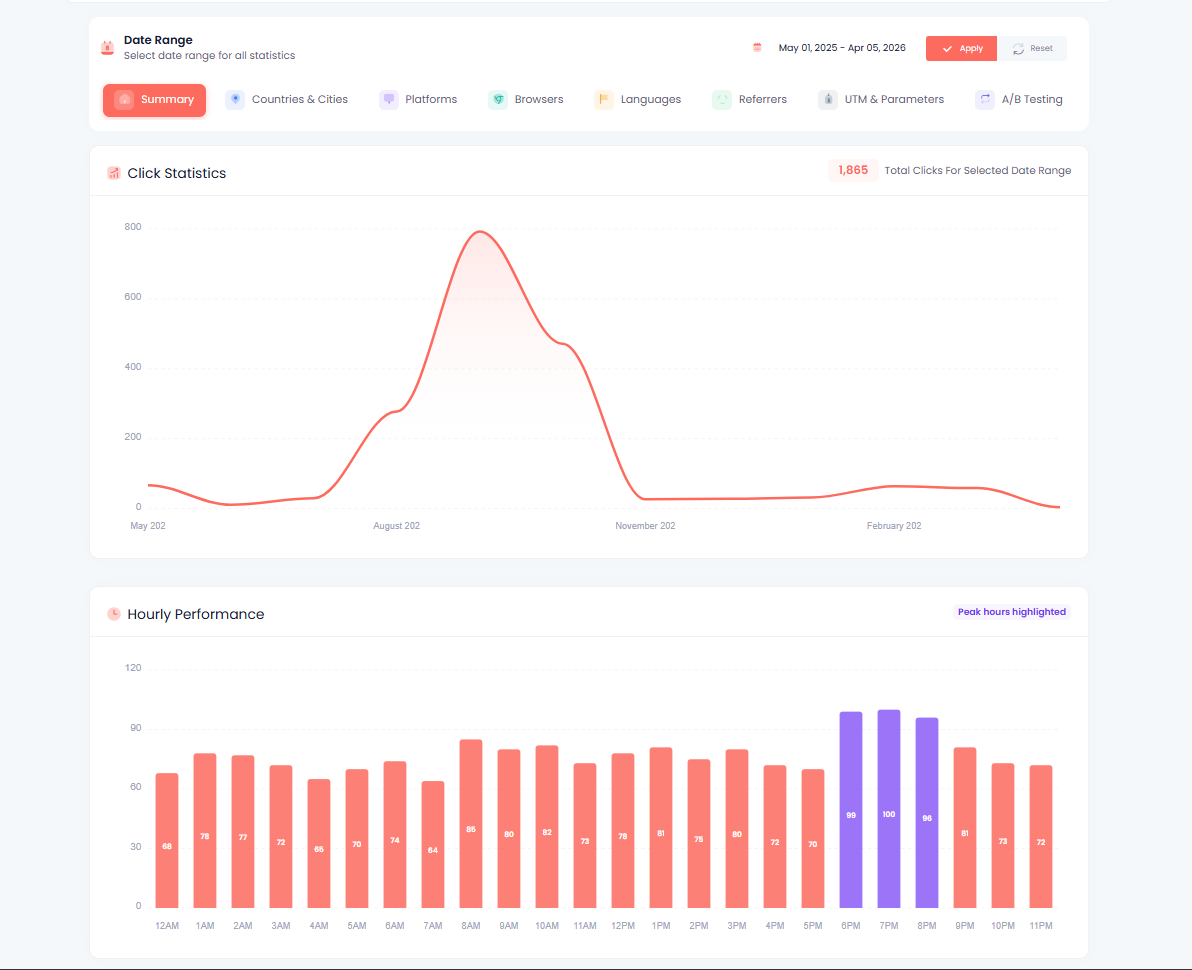
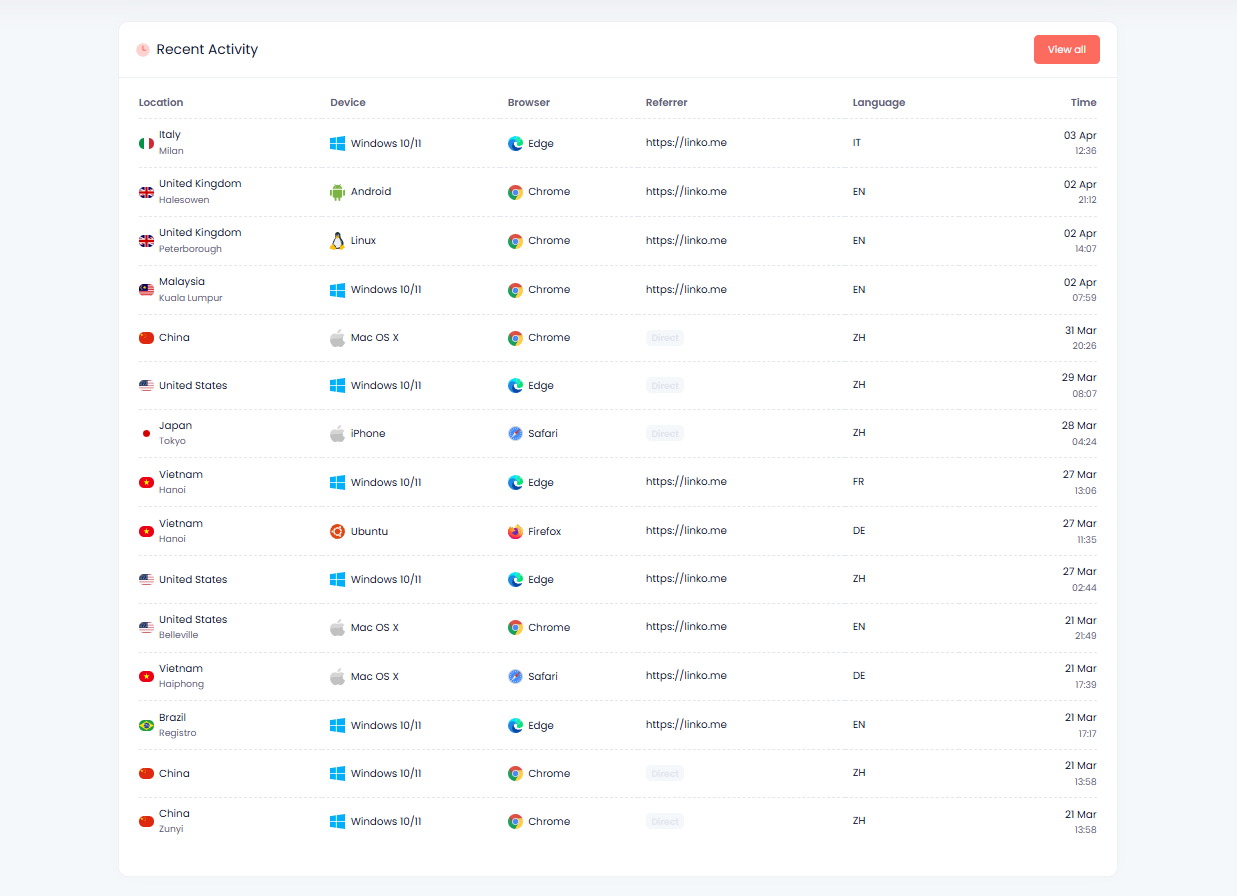
Monitor Your Analytics
Check your Linko dashboard regularly to see:
- Which platforms send the most traffic
- What times your audience is most active
- Geographic breakdown of your fans
- Device split between iOS and Android
Use this data to optimize your promotion strategy.
Combine with Link Cloaking
Enable referrer hiding alongside deep linking. This prevents platforms from seeing that clicks are going to OnlyFans, reducing the chance of shadowbans.
How Does Linko Compare to Other Tools for OnlyFans Deep Linking?
Here’s how Linko compares to other link-in-bio tools for OnlyFans creators:
| Feature | Linko | Linktree | GetAllMyLinks | Beacons |
|---|---|---|---|---|
| Deep Linking (Android) | Yes (automatic) | No | Partial (instruction page) | No |
| Deep Linking (iOS Instagram) | Yes (automatic) | No | Partial (instruction page) | No |
| Deep Linking (iOS TikTok) | Limited (blocked by TikTok) | No | Limited (instruction page) | No |
| Bypasses In-App Browser | Instagram: Yes / TikTok iOS: Limited | No | Requires user action | No |
| OnlyFans Friendly | Yes | Yes | Yes | May restrict |
| Link Cloaking | Yes | No | Yes | No |
| Hide Referrer | Yes | No | No | No |
| Custom Domains | Yes | Paid only | Yes | Paid only |
| Bio Pages | Yes | Yes | Yes | Yes |
| Click Analytics | Yes | Yes | Yes | Yes |
| A/B Testing | Yes | Paid only | No | No |
| Bot Hit/Crawling Protection | Yes | Yes | No | Yes |
Key difference: Linko automatically bypasses Instagram’s in-app browser on iOS – no instruction pages, no manual steps. GetAllMyLinks and other tools still rely on showing users instructions to manually open links in Safari.
Frequently Asked Questions
Does OnlyFans have its own deep link URL scheme?
No. OnlyFans doesn’t have a native iOS or Android app, so there’s no app-specific URL scheme like onlyfans://. The solution is opening the OnlyFans website in the native browser (Safari/Chrome) instead of the in-app browser.
Will deep linking get my account banned?
No. Deep linking is a standard technology used by major companies. It simply opens links in the correct browser. There’s nothing against any platform’s terms of service about where a link opens.
Do I need a paid Linko plan for deep linking?
Yes. Deep linking is available on Linko’s Business and Agency plans. If you just need basic link shortening without deep linking, you can use our free OnlyFans URL shortener to get started.
Does deep linking work for Fansly too?
Yes. The same deep linking setup works for Fansly, Fanvue, or any other web-based platform. Just replace the OnlyFans URL with your Fansly URL. The same iOS limitations apply.
Why doesn’t deep linking work on iOS anymore?
Instagram and TikTok have updated their in-app browsers to detect and block common deep linking bypass methods. The x-safari-https:// URI scheme that previously forced links to open in Safari no longer works reliably on iOS 26.x and later. This is an industry-wide issue affecting all link shorteners and bio tools, not just Linko.
What if the user doesn’t have Safari or Chrome?
The deep link opens in whatever the user’s default browser is. On iOS, that’s usually Safari. On Android, it could be Chrome, Firefox, Samsung Internet, or another browser. The important thing is it opens in a real browser, not the in-app WebView. If it doesn’t open on any browser, then it falls back and open in the in-app browser.
Can I use deep links in my Linktree?
You can add a Linko deep link to your Linktree page, but it partially defeats the purpose. The user would click your Linktree (opening in the in-app browser), then click your Linko deep link (which would then open Safari). It works but adds an extra step. Better to use Linko’s bio page feature instead, which supports deep linking on all your links.
How do I know if my deep link is working?
Test it yourself. Open Instagram on your phone, go to a profile with your link, and tap it.
On Android: If Chrome or your default browser opens instead of staying in Instagram, the deep link is working.
On iOS: Due to current platform restrictions, the link will likely stay in the in-app browser. This is an industry-wide limitation, not specific to Linko.
You can also check your Linko analytics to see device and browser data for your clicks. This helps you understand what percentage of your audience is on iOS vs Android.
Stop Losing Subscribers to In-App Browsers
The in-app browser problem is costing OnlyFans creators real money. Every subscriber who gets stuck in Instagram’s broken browser is revenue lost.
Most link-in-bio tools don’t address this at all. They organize your links but still open them in the same broken WebView.
The current reality:
- Instagram (iOS and Android): Linko automatically bypasses the in-app browser. Safari or Chrome opens directly.
- TikTok (Android): Deep linking works. Chrome opens automatically.
- TikTok (iOS): Platform restrictions currently block deep linking methods.
Combined with link cloaking and referrer hiding, Linko gives you a more robust link strategy than creators using basic bio tools that don’t address the in-app browser problem at all.
Create your OnlyFans deep link and start converting more of your Instagram and Android traffic into paying subscribers.
Comments