
To shorten links in bulk, paste your list of URLs into the shortener, put one address on each line, then press Shorten once.
Every link comes back shortened and tracked, and the free plan covers your first 50.
That paste method is free and needs no file, no spreadsheet, and no setup.
A CSV import exists as well, and it adds an alias and preview text for each row, though it starts on a paid plan.
Key Takeaways
- Pasting a list is the free method, and it handles one URL per line.
- CSV import needs Starter or above, and it carries an alias, title, and description per row.
- Your plan allowance is the real limit, not the size of a single paste.
- You can shorten 14 kinds of address, including phone, SMS, and WhatsApp links.
What Bulk Shortening Actually Does
Bulk shortening turns a list of long addresses into short trackable ones in a single operation.
Each result is a normal short link, so it counts clicks and lets you change its destination later.
The lists that turn up most often look like this.
- An outreach sheet where every creator or partner needs their own trackable link.
- A product or affiliate catalogue exported from a store, one row per item.
- An email sequence where each send needs its own link to be measured separately.
- A print run of flyers, packaging, or business cards that must stay editable after printing.
- A contact list of phone numbers or chat handles rather than web pages.
There is more than one way to submit the list, and they are not equivalent.
| Method | What you submit | Batch size | Lowest plan |
|---|---|---|---|
| Paste a list | One URL per line | No fixed cap | Free |
| Import a CSV | A file with one row per URL | No fixed cap | Starter |
| Chrome extension or Telegram bot | URLs typed into the tool | 10 at a time | Free |
| Developer API | One request per link from your own script | Whatever you script | Free |
Only the CSV route lets you decide the alias, title, and description of each link as it is created.
There is also a Full-Page Script in the Tools section, which shortens the links already published on one of your web pages.
You paste that snippet before the closing </body> tag and stop maintaining a list at all.
If you have never made a single short link before, start with our guide on how to make a short link.
Shorten a List for Free
This is the method that works on a free account.
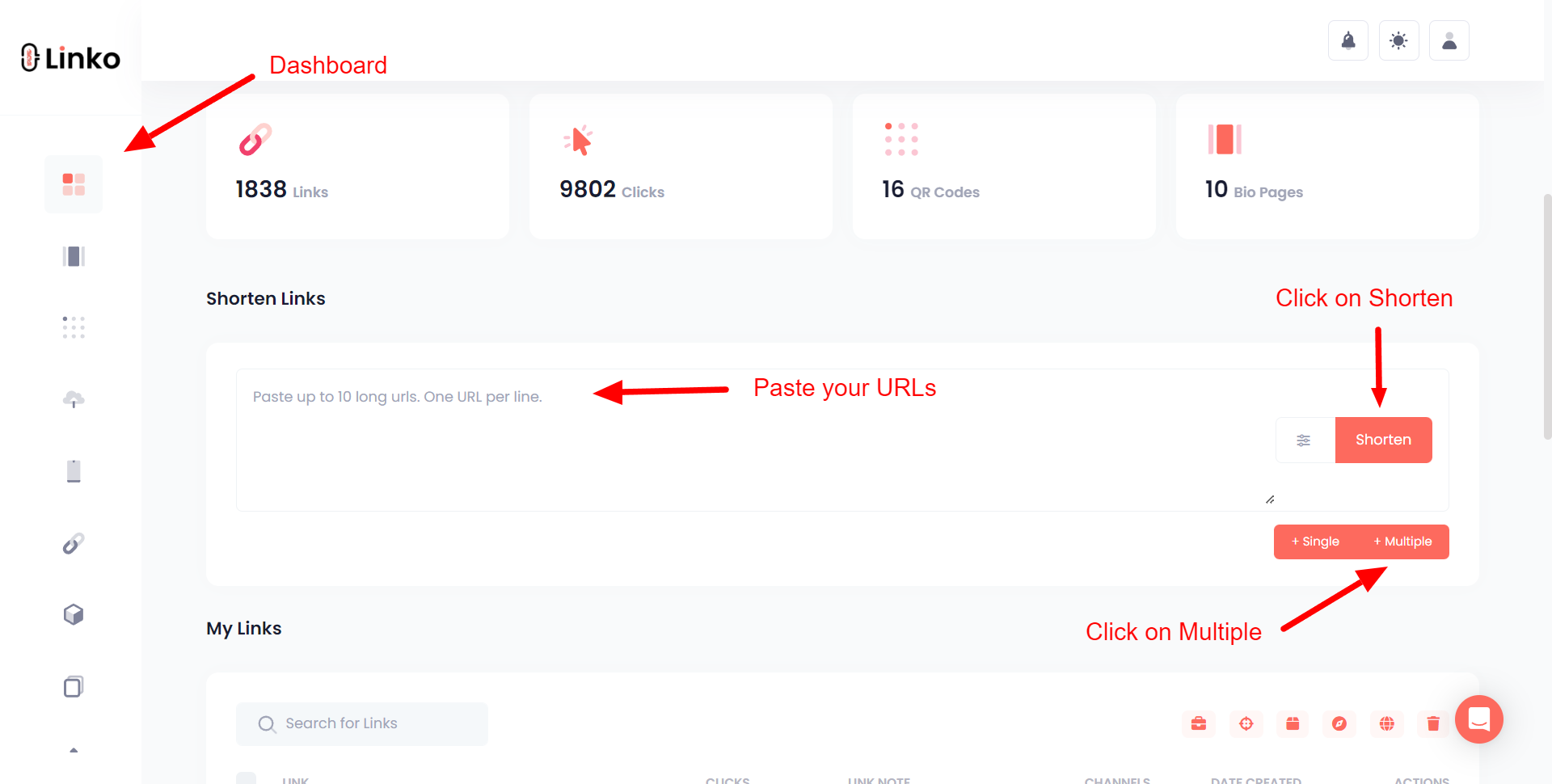
- Open the shortener in your dashboard and select Multiple.
- Paste your URLs into the field, keeping one address per line.
- Choose the domain the links should use, which on a free account means a Linko or premium domain.
- Press Shorten and wait for the results table.
Include the https:// prefix on every line, because a bare domain can be rejected or treated as text.
Aliases are generated automatically in this mode, and you can edit any of them afterwards.
A handful of row types cause almost every failed paste.
- Bare domains such as
example.comwith no scheme in front of them. - Wrapped lines, where one long URL has been broken across two lines by a document.
- Curly quotes and trailing commas carried over from a spreadsheet or a Word file.
- Stray text, such as a person’s name sitting on its own line between the URLs.
Running the list through a plain text editor first removes all four problems at once.
Import a CSV Instead
A CSV is worth it when you want to name each link rather than accept generated aliases.
This route uses Import Links rather than the shortener field, and it begins on the Starter plan.
Four situations genuinely justify the file and the plan it needs.
- The endings will be read aloud or typed by hand, so
/spring-salebeats a random string. - The links will be shared socially and need their own preview title and description.
- You are moving links off another shortener and want to keep the existing endings.
- The batch is large enough that renaming aliases one at a time would take longer than building the file.
The file needs a header row and four columns in a fixed order.
longurl, alias, title, description
https://example.com/spring-sale, spring, Spring Sale, Our April promotionlongurlis the destination, and it is the only required column.aliassets the ending, and a taken alias is replaced with a generated one.titleanddescriptioncontrol the preview card when the link is shared.
You can rename the column headers, but the order has to stay the same.
The full walkthrough, including choosing a branded domain and redirect type during import, is in the bulk import guide.
To set your own endings on a free account instead, create the links individually using custom short URLs.
How Many Links Can You Do at Once?
There is no fixed cap on how many URLs one paste can contain.
Customers have pasted lists running into the thousands from the browser, and it generally completes.
What actually stops you is your plan’s short-link allowance.
| Plan | Price | Short links included |
|---|---|---|
| Free | $0 | 50 in total |
| Starter | $12 | 250 a month |
| Pro | $29 | 1,000 a month |
| Business | $79 | 5,000 a month |
| Agency | $149 | 25,000 a month |
A very large paste depends on your browser holding the request open, so split it into a few batches if it stalls.
For a scheduled or repeating job, the API is the more reliable route and it is available on every plan including Free.
These are the cases where a script beats the dashboard.
- The same batch has to be produced every week or every campaign.
- The URLs are generated by another system, such as a store feed or a CRM.
- The job needs to run unattended, without a tab open for the duration.
- You need the resulting short URLs written back into the system that supplied the list.
What the Free Plan Actually Covers
Since the free route is the one most readers came for, here is its full shape.
- 50 short links as a lifetime total rather than a monthly refill.
- 1,000 clicks of analytics, with the full country, city, device, and referrer breakdown.
- One month of click history, which becomes six months on Starter and a year on Pro.
- One channel for grouping, and no campaigns, which begin on Pro.
- No CSV import and no branded domain, both of which begin on Starter.
- Full API access and custom aliases, on the same terms as every paid plan.
Fifty links is a real batch, so the free tier is enough to run a first campaign rather than only a demo.
Not Just Web Pages
Bulk lists do not have to be web addresses, because 14 kinds of address can be shortened.
This matters for contact campaigns, where a list might be phone numbers or chat links rather than pages.
| Type | Example | What tapping it does |
|---|---|---|
| Web page | https://example.com/page | Opens the page |
mailto:you@example.com | Starts a new email | |
| Phone | tel:+123456789 | Opens the dialler |
| SMS | sms:+123456789?body=Hello | Opens a prefilled text |
https://wa.me/1234567890 | Opens a WhatsApp chat | |
| Telegram | https://t.me/username | Opens a Telegram chat |
| Messenger | https://m.me/username | Opens a Messenger chat |
| Viber | viber://chat?number= | Opens a Viber chat or call |
| LINE | https://line.me/R/ti/p/@name | Opens a LINE chat |
weixin://dl/chat?username= | Opens a WeChat chat | |
| FaceTime | facetime://+123456789 | Starts a FaceTime call |
| App store | market://details?id= | Opens the app listing |
| FTP | ftp://ftp.example.com/path | Opens the file path |
| Bitcoin | bitcoin:address?amount= | Opens a wallet payment |
The trap in a phone-number batch is that the number is not written the same way in every format.
tel:,facetime://andviber://take the country code with the+kept.https://wa.me/takes the same number with the+removed.- Spaces inside a prefilled message must be written as
%20, in bothsms:andwa.melinks. - LINE separates people from groups, using
/R/ti/p/for a user and/R/ti/g/for a group.
A wrong prefix still produces a working short link, so the mistake only appears when someone taps it.
The specialised link guide gives the exact pattern for all fourteen, including WeChat mini programs and Telegram groups.
Check the Batch Before You Use It
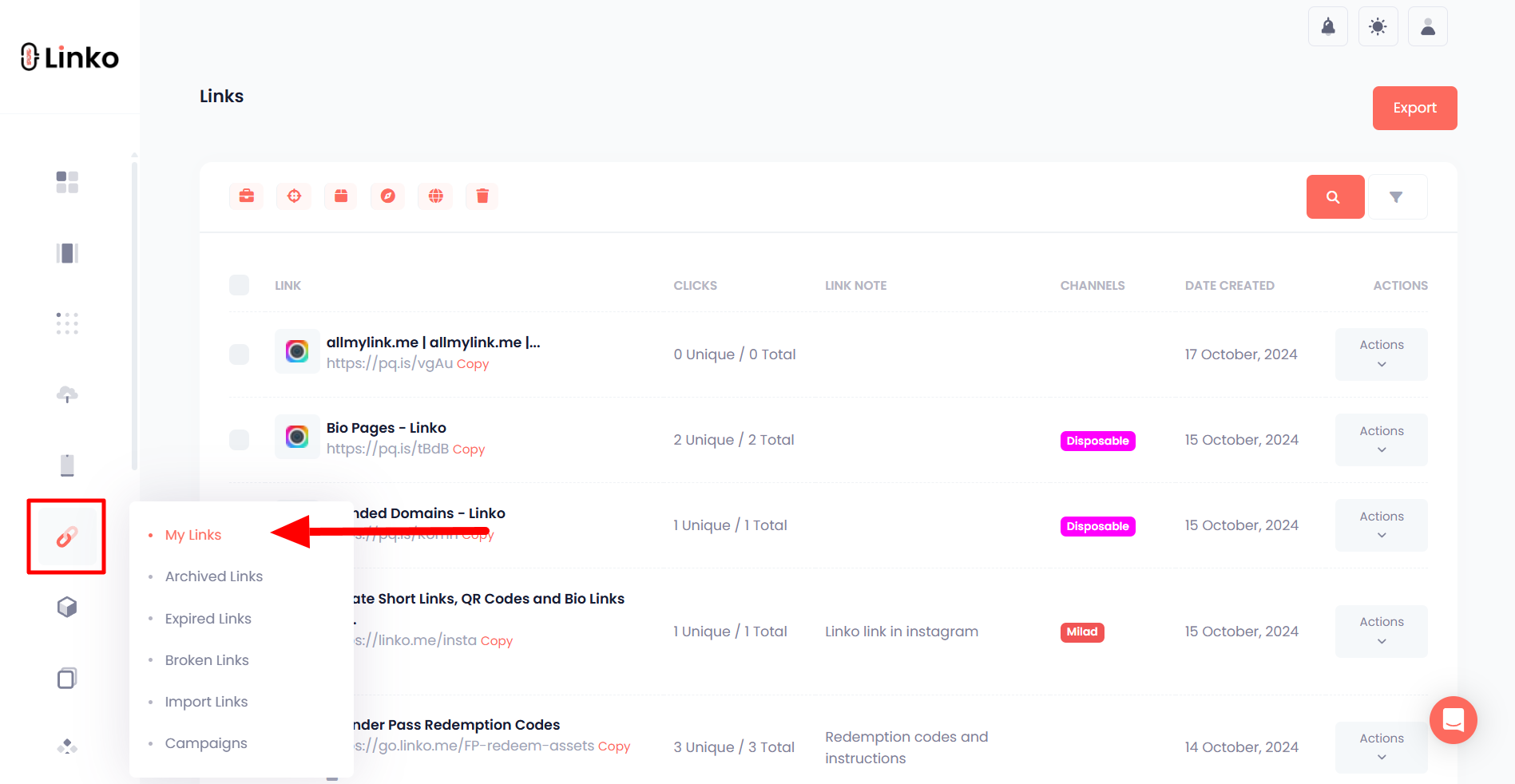
A results table appears under the shortener, and everything also lands in My Links.
Open two or three of them yourself before the batch goes anywhere near a campaign.
One mistyped row in a list of two hundred is invisible until someone reports a dead link.
Nothing about a batch link is second class, and each one keeps the same controls as a link you made by hand.
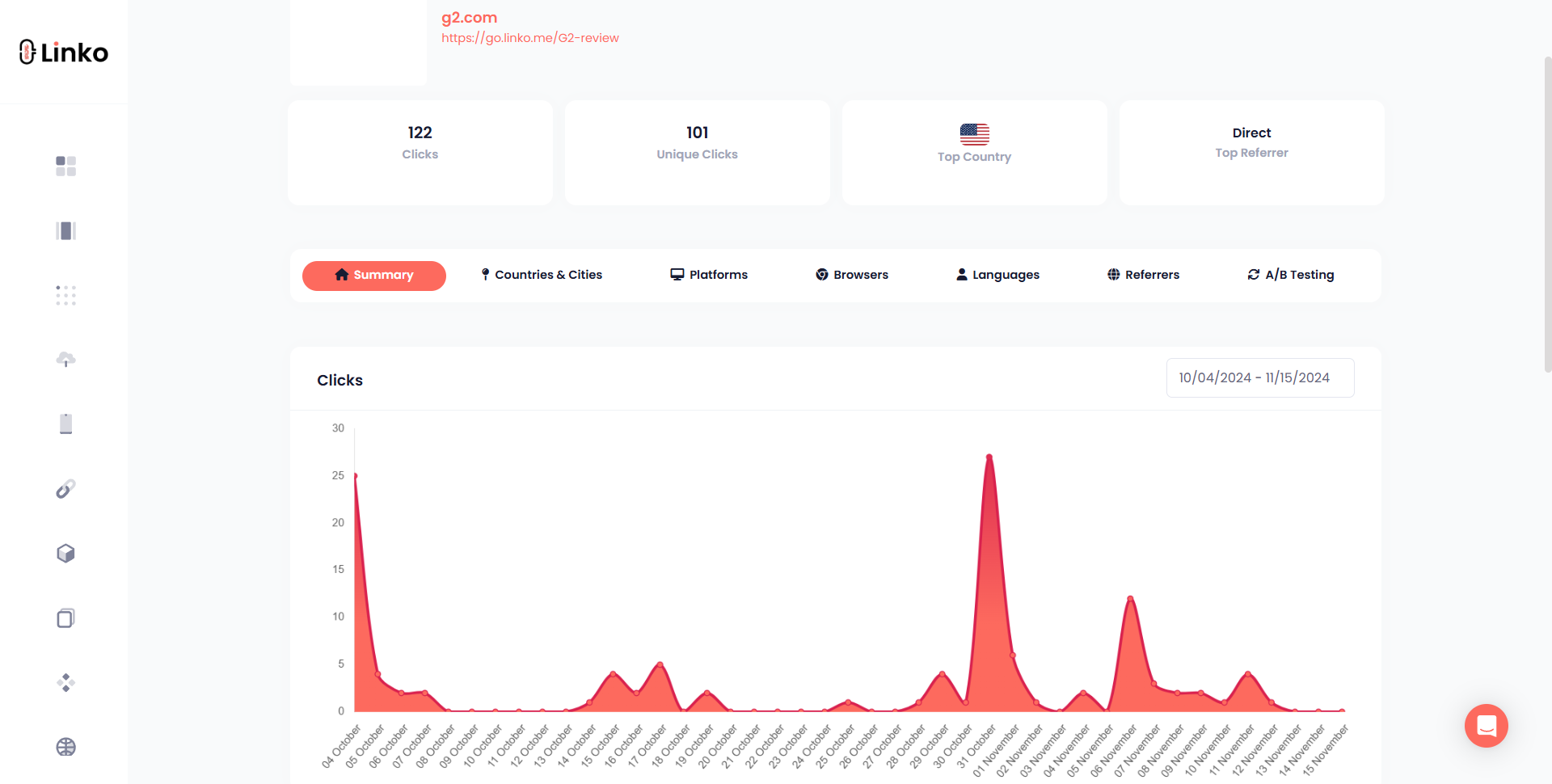
- Its own click report, split by country, city, device, browser, language, and referrer.
- An editable destination, so the printed or posted short URL never has to change.
- Password protection and link notes, both of which are on the free plan.
- A renameable alias, which is how you fix a generated ending you dislike.
Automated crawler traffic is filtered out before a click is counted, on every plan including Free.
Once a batch grows past a few dozen links, organising them beats one flat list, using channels on any plan or campaigns from Pro upwards.
Which Free Plans Allow Bulk Shortening
Most shorteners keep batch creation for paying customers, so the free tiers differ more than the marketing suggests.
Every figure below was read from each company’s own pricing page on 25 September 2026.
| Tool | Batch creation on the free plan | Free link allowance | Free analytics |
|---|---|---|---|
| Linko | Yes, by pasting a list. CSV import from Starter | 50 in total | Yes, first 1,000 clicks, bot filtered |
| Short.io | Yes | 1,000 in total, not monthly | Yes, up to 50,000 tracked clicks |
| Bitly | No, bulk creation starts on Growth | 5 a month | No click history on Free |
| Rebrandly | No, bulk import starts on Professional | 10 a month | Country only, 100 clicks a month |
Short.io has the most generous free batch allowance of these four, and that is worth knowing before you choose.
Its 1,000 links are a one-time lifetime allowance rather than a monthly refill, which its pricing page states plainly.
It also gives free accounts five custom domains, where Linko’s free tier gives none, so a branded batch is genuinely cheaper there.
What Linko’s free tier adds instead is everything around the links, including a bio page, QR codes, file links, and the same API the paid plans use.
TinyURL is deliberately absent from the table, because its own free-plan page does not list analytics and its pricing page does not publish figures we can verify.
Whichever tool you land on, four questions decide whether its free tier can carry a batch.
- Is the link allowance monthly or one-time, because the two sound identical in marketing copy.
- Is batch creation itself on the free tier, or only single links.
- Does the free tier include click history, rather than only a running total.
- How long that history is kept before it is deleted.
A wider feature comparison sits in our roundup of the best link shortener tools.
Mistakes That Ruin a Batch
| Mistake | What goes wrong | Do this instead |
|---|---|---|
Leaving off https:// | Rows are rejected or treated as plain text | Add the prefix to every line before pasting |
| Pasting from a formatted document | Smart quotes and line wrapping corrupt the URLs | Paste through a plain text editor first |
| Tagging the links afterwards | Campaign data is missing for clicks already collected | Add UTM tags to the destinations before shortening |
| Not opening any of the results | A whole campaign can launch pointing at a typo | Test a sample from the batch immediately |
| Reusing one link everywhere | You cannot tell which channel produced the clicks | Create one link per placement |
The tagging mistake is the expensive one, because clicks collected before the tags existed cannot be recovered.
Build the tagged destinations first with our guide to UTM tags, or the free UTM builder, then shorten the finished list.
Frequently Asked Questions
Do links created in a batch count against my plan allowance?
A batch of two hundred links consumes two hundred of your allowance, because every result is an ordinary short link.
Check what is left on your plan before a large paste, because the allowance decides how much of the list gets through.
Can I change where a bulk link points after it is created?
Yes, any link from a batch can be repointed later from My Links without the short URL itself changing.
That is the practical reason to run a printed or posted list through a shortener rather than publishing the raw destinations.
Do I lose the original long URLs after shortening a list?
No, each short link stores its destination and shows it in the dashboard, so the original list stays recoverable.
You can also search your links by destination URL, which helps when the spreadsheet you pasted from has moved on.
How long is click data kept for a batch?
Retention runs one month on Free, six months on Starter, a year on Pro, and two years on Business and Agency.
Exporting the numbers starts on Pro, so on the lower plans read the data inside the dashboard before the window closes.
Should I use the API instead of the dashboard?
Use the API when the job repeats or has to run unattended, because it does not depend on a browser tab staying open.
It is included on every plan including Free, so it is a convenience choice rather than a reason to upgrade.
Can I use my own domain for a bulk batch?
Yes, you choose the domain before the batch runs, and the CSV import offers the same choice during the import step.
Branded domains begin on Starter with two included, which is the same plan that unlocks CSV import.
Can I edit a whole batch at once afterwards?
Not yet, links are edited one at a time, and bulk editing of domain, channel, and UTM settings is currently an open feature request.
So settle the domain and the tracking parameters before you shorten, because fixing them later means touching every link.
Start With the List You Already Have
Take the spreadsheet or document where your URLs already live and copy the column into the shortener.
Fifty links cost nothing, which is enough to find out whether batch shortening fits how you work.
Add the tags before you paste, check a sample afterwards, and the rest is just reading the click data.
You can do all of it on the free plan without entering a card.
Comments