
A short link is a compact web address that forwards anyone who clicks it to a longer one.
Making one takes about a minute, and the whole process is four steps.
You open a link shortener, paste your long URL, choose the ending you want, then copy the short version it gives you back.
That short version is what goes in your bio, your caption, your email signature or a printed QR code.
This guide shows you how to make a short link step by step, then covers the parts beginners usually get wrong.
- The four steps, with screenshots of each one.
- Every setting you can change on a link, and the plan each one needs.
- What the main shorteners actually cost, checked against their own pricing pages.
- The mistakes that quietly cost you clicks.
What Is A Short Link?
A link shortener takes a long web address and issues a much shorter one that points to the same place.
Here is the kind of address that causes the problem.
https://www.example.com/blog/best-social-media-marketing-tips-for-beginners?utm_source=instagram&utm_campaign=springAnd here is the same destination as a short link.
https://linko.me/socialtipsBoth open the same page, because the short one performs a redirect the moment it is clicked.
The visitor never has to read the long address, and on most platforms they never even see it.
Because every click passes through the shortener first, that redirect is also where the useful extras live.
- Click tracking, so you know how many people opened it and from where.
- An editable destination, so you can repoint a link you have already shared.
- A QR code, generated from the same link for print and packaging.
- Your own domain, so the link carries your brand instead of someone else’s.
How To Make A Short Link In Four Steps
The steps below use Linko, though the shape of the process is the same in most tools.
You need two things before you start.
- The long URL you want to share, copied to your clipboard.
- An idea of the ending you want, such as
/spring-sale.
Step 1: Create Your Account
Tracking clicks means the tool has to store the link against an account, so this step comes first.
- Open the sign-up page.
- Enter an email, a username and a password, or continue with Google.
- Confirm your email address if you are asked to.
- Log in, which lands you on the dashboard.
The free plan is enough to learn the entire workflow on, and it includes things other tools charge for.
- 50 short links and 1,000 tracked clicks.
- Custom endings on every link you create.
- Password protection, which several competitors hold back for paid tiers.
- One promo page and one CTA overlay.
- API access, which is how the Chrome extension and Telegram bot work on a free account.
Click history is held for one month on that plan, so export anything you need to keep for longer.
If you only need a quick redirect and no statistics at all, a no-account tool like TinyURL will do the job instead.
Step 2: Paste The Long URL And Shorten It
- Go to the Shorten Link area of the dashboard.
- Paste your long URL into the input field.
- Press Shorten.
- Copy the link that appears, which works immediately.
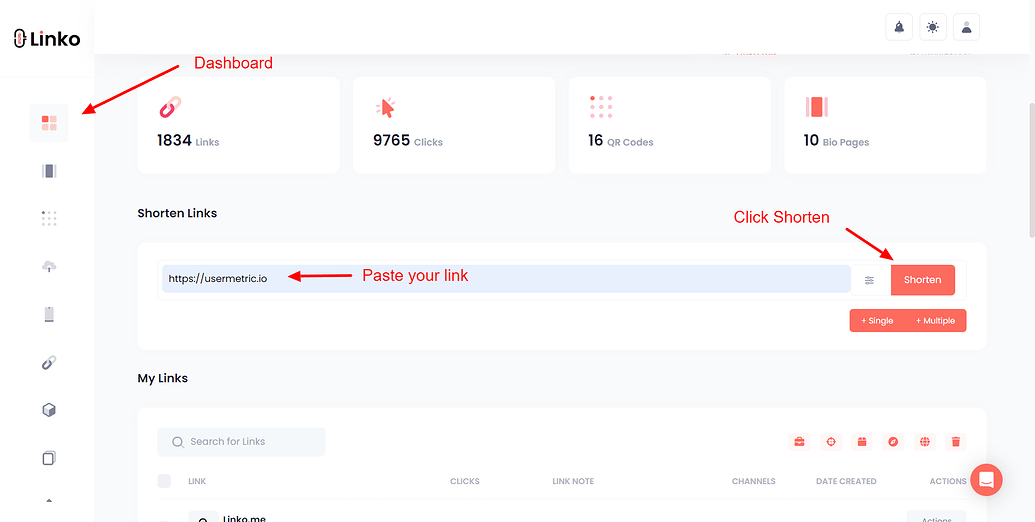
At this point you have a working short link, and for many people that is the whole job.
The next step is what separates a link you can measure from one you cannot.
Step 3: Customize The Link
Open Advanced Options before you press Shorten, and you can set the ending yourself instead of accepting random characters.
A readable ending such as linko.me/spring-sale tells people where they are going, which matters more than it sounds.
Three habits keep an alias useful.
- Keep it short enough to read at a glance.
- Stick to lowercase letters and hyphens, because mixed case invites typos.
- Describe the destination rather than an internal campaign code.
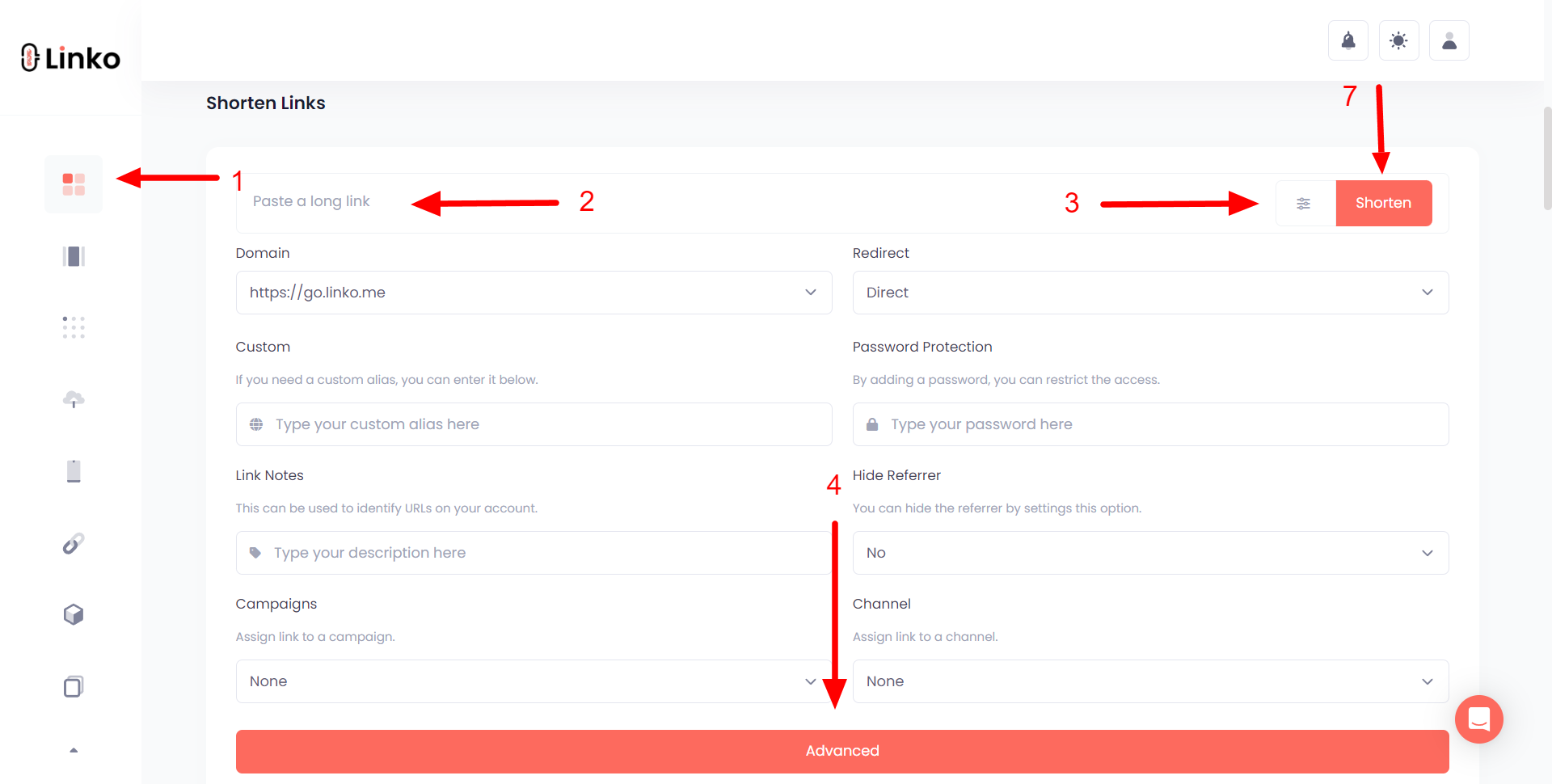
The table below lists what you can change and the lowest plan that includes it.
| Setting | What it does | Lowest plan |
|---|---|---|
| Custom alias | Sets the ending of the link yourself | Free |
| Password protection | Asks for a password before redirecting | Free |
| Promo page | Shows a branded page before the destination | Free |
| CTA overlay | Puts your own call to action over the destination | Free |
| Link cloaking | Keeps the short address in the address bar | Free |
| Branded domain | Serves the link on a domain you own | Starter |
| Hide referrer | Conceals which site sent the traffic | Starter |
| Meta tags | Controls the preview card when shared | Starter |
| Retargeting pixel | Fires an ad pixel as the click passes through | Starter |
| UTM parameters | Adds campaign tags for your analytics | Starter |
| Redirect code | Chooses a 301, 302 or 307 response | Starter |
| Link expiration | Switches the link off on a chosen date | Pro |
| Geo, device and language targeting | Sends different visitors to different pages | Pro |
| A/B testing | Splits traffic between two destinations | Business |
| Deep linking | Opens the destination inside its app | Business |
| Click limit | Disables the link after a set number of clicks | Business |
The first five rows matter most for beginners, and none of them cost anything.
Step 4: Check The Click Analytics
A short link you never look at again is just a redirect, so this is the step that pays you back.
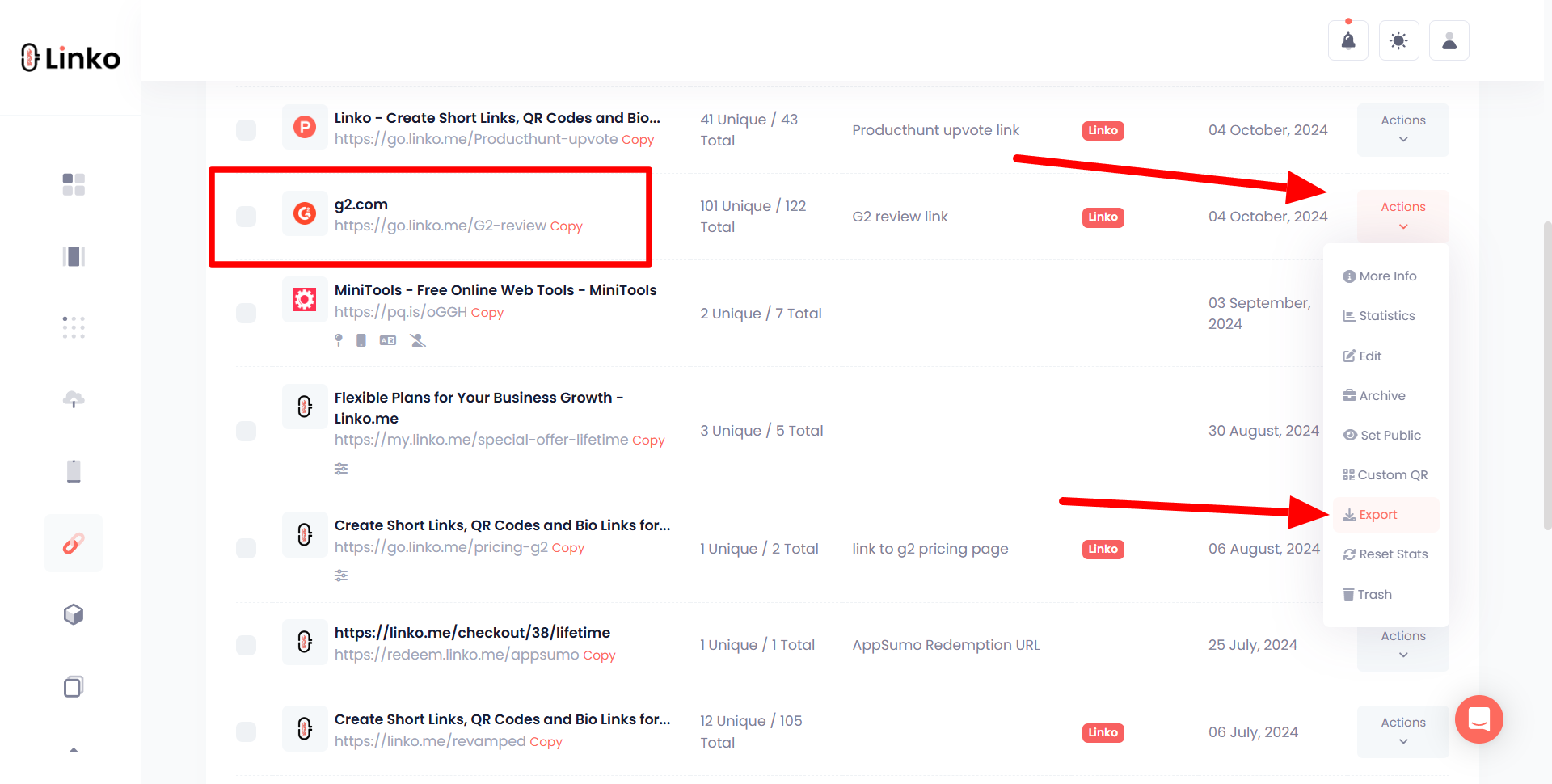
- Open My Links in the dashboard.
- Find your link and press Action.
- Choose Statistics.
The statistics screen breaks each click down several ways.
- Total clicks, and how they build up hour by hour.
- Country and city.
- Device, operating system and browser.
- The referring site or app.
- Language, and any UTM tags you attached.
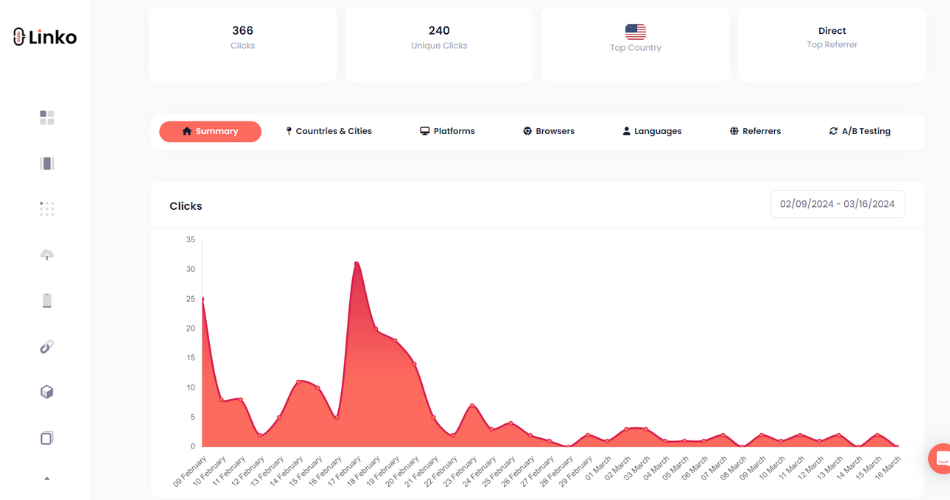
Automated traffic is filtered out before a click is counted, on every plan including the free one, so these numbers reflect people rather than crawlers.
If the difference between raw hits and real visitors matters to you, we cover bot traffic in link analytics separately.
Where To Put Your Short Link
A short link earns its keep anywhere the full address would be ugly, cut off or impossible to type.
- Social posts and bios, where short links in social media marketing save characters and stay readable.
- Email and SMS, where a wrapped long URL often breaks across lines.
- Print and packaging, paired with a QR code so nobody has to type at all.
- Buttons, where the visible text carries the message and the link stays hidden.
- Spoken places, like a podcast or a video, where the link has to be short enough to say out loud.
For anything you will reuse, add a UTM tag so the visit shows its source in your own analytics later.
Once you are running more than a handful, it helps to organize your short links into campaigns rather than one long list.
What You Gain Beyond A Shorter Address
Length is the obvious benefit and the least interesting one.
- You can fix a mistake. Repoint the destination and every copy of the link already in the wild starts working correctly.
- You learn what works. Two links in two places tell you which placement actually drove the clicks.
- You keep your brand attached. A branded link rather than a generic one shows who is sending the traffic.
- You can retarget. A pixel on the redirect builds an audience from people who clicked.
The first point is the one most people underrate, because a printed QR code pointing at a dead page is otherwise unfixable.
We collected the numbers behind all of this in our URL shortener statistics roundup, and the wider case in the benefits of a URL shortener.
Choosing A Link Shortener
Almost every shortener does the basic job, so the decision comes down to what you need on top of the redirect.
Three questions settle it faster than a feature list.
- Do you need your own domain on the link, or is a shared one fine?
- Do you need to change a destination after sharing it?
- Do you want custom short URLs and QR codes from the same place, or separate tools?
What The Entry Paid Plans Cost
Prices below were read from each company’s own pricing page on 24 September 2026.
| Tool | Free plan | First paid plan | Billed monthly | Billed yearly |
|---|---|---|---|---|
| Linko | Yes | Starter | $12 | $9 a month |
| Short.io | Yes | Hobby | $5 | 17% less |
| Rebrandly | Yes | Essentials | $11 | $8 a month |
| Bitly | Yes | Core | Not published | $10 a month |
Short.io is genuinely the cheapest way in, and if all you want is branded links with analytics it is hard to argue with $5.
What the numbers hide is that the plans are not the same size.
Short.io holds password protection and link expiration back until its $18 Pro tier, while both are on Linko’s free plan.
Rebrandly’s $11 Essentials plan caps you at 250 links a month and 10 destination edits, and keeps deep linking for its $99 tier.
Linko’s $12 covers 250 links a month plus bio pages, 14 QR code types, file sharing and an API that is open on every plan.
Compare the plan you would actually buy rather than the first number on the page, and check our pricing page against theirs.
Two Tools Worth A Note
TinyURL remains the fastest option when you want a redirect and nothing else, since it needs no account at all.
Its paid tiers are not clearly published on its pricing page, so we are not going to quote a figure we cannot verify.
Bl.ink used to belong on a list like this, and a lot of articles still price it at $48 a month.
It was acquired by Loftware in April 2025 and now sits inside a supply-chain product identification suite.
Its pricing page no longer offers self-serve plans, so treat any small-business price you read for it as out of date.
Hosted Or Self-Hosted
Everything above is hosted, meaning someone else runs the redirect and you just use it.
The alternative is to run the shortener yourself on your own server.
- YOURLS is the long-standing PHP option, with a large plugin ecosystem.
- Polr is deliberately minimal, and fine if you want little more than redirects.
Self-hosting removes the monthly fee and gives you the database, which is the honest appeal.
It also hands you the uptime, the SSL certificates and the spam problem, and a shortener that goes down takes every link you have shared with it.
If you have never administered a server, start hosted and move later if you outgrow it.
For a wider view we keep a running list of the best link shortener tools, plus head-to-head write-ups against Bitly, Rebrandly and TinyURL.
Mistakes To Avoid
These are the errors that show up again and again in support conversations.
| Mistake | What goes wrong | Do this instead |
|---|---|---|
| Using an unknown free shortener | Ad interstitials, harvested data, or a domain that gets blacklisted and kills every link on it | Pick a service that publishes who runs it and how it handles abuse |
| Leaving the random ending | People cannot tell where the link goes, so fewer of them click | Set a readable alias, which is free on every plan |
| Never checking the stats | You keep posting in places that send nobody | Look once a week and move your effort to what worked |
| Forgetting a campaign link exists | An expired offer keeps taking orders you cannot honour | Set an expiry date when you create it |
| Using a shared domain in ads | Ad platforms and some email filters distrust shared shortener domains | Use your own branded domain for anything paid |
The first row deserves expanding, because it is the one that does lasting damage.
Shortener domains get blacklisted when spammers abuse them, and the links of every honest user on that domain stop resolving at the same moment.
On our side that means scanning destination URLs for phishing and malware, applying the same spam rules to free accounts as paid ones, and keeping the linko.me domain in good standing.
Whichever tool you choose, check that it treats its free tier as something worth protecting.
Frequently Asked Questions
Do I need an account to make a short link?
Not always, because some tools will shorten anonymously and hand you the link straight away.
The trade is that an anonymous link belongs to nobody, so you cannot edit it, measure it or delete it afterwards.
Can I change where a short link points after I share it?
Yes, and this is the single most useful habit to build early.
Editing the destination leaves the short address untouched, so posters, business cards and old posts all keep working.
Are short links bad for SEO?
Not when they use a 301 response, which tells search engines the move is permanent and passes ranking signals to the destination.
A 302 is the right choice for a temporary campaign, and Linko lets you pick the code from the Starter plan upward.
Why do some apps block my short link?
Shared shortener domains attract spam, so platforms sometimes distrust every link on them regardless of who made it.
Moving to a branded domain you control is the reliable fix, since its reputation is yours alone.
Can I make a lot of short links at once?
Yes, and there are three routes depending on how many you mean.
- Paste several URLs at once, which works on the free plan.
- Import a CSV file, from the Starter plan upward.
- Call the API, which is open on every plan including free.
How long does a short link last?
Indefinitely, unless you set an expiry or the service itself shuts down.
That second risk is real rather than theoretical, and the history of link shorteners is full of services that took their links with them.
Can I get a QR code from the same link?
Yes, and generating it from the short link rather than the long URL keeps the code simpler and easier to scan.
It also stays correct if you repoint the link later, which is why a bulk QR code generator is worth knowing about before you print anything.
Make Your First Short Link
Everything in this guide starts with one link, so make that one and see what it tells you.
Shorten the URL you were about to paste somewhere, give it a readable ending, then check the statistics tomorrow.
You can do all of that on the free plan without entering a card, or try the free link shortener tool first if you would rather not sign up yet.
If you want to see how other people rate the experience, our reviews on G2 are public.
Comments